Below, you can find all miscellaneous updates to the site, Speeder's driver, Launcher, etc.
October 3, 2026
Launcher has been updated to version 171.
Speeder's driver has been updated to version 67.
I had a good idea the other day to use Microsoft's PDB files to find the necessary address for kernel input. I've been doing this for other stuff, so I'm not sure why it never occurred to me, but here we go.
When loading your driver, Launcher will locate the address needed for kernel input and send this to the driver. This has the significant benefit of avoiding conflicts from software like Razer Synapse or Interception. Kernel input should just simply work regardless of what you have installed on your computer.
Both Launcher & your driver need to be updated to take advantage of this change.
September 30, 2026
Launcher has been updated to version 170.
By default, only scripts/macros from active Speeder users will be displayed in the Marketplace. This eliminates script bloat and ensures the listed scripts are created by users actually playing the game and/or using Speeder. It is possible to see all scripts—those from inactive users as well—by clicking the appropriate checkbox. This change also affects scripts displayed on the site.
You can now filter scripts/macros with the new "Filter" edit box. For example, if I want to find Ranger macros for Aion 2, I can write "ranger" into the edit box and click Show All Scripts. Only script descriptions containing the word "ranger" (case insensitive) will show. This change also affects scripts displayed on the site. You will notice a new "filter" field on Marketplace pages (example) that will filter scripts in the same way as Launcher.
September 21, 2026
Speeder's driver has been updated to version 66.
Added support for some new window hiding methods.
September 18, 2026
Launcher has been updated to version 168.
A backup domain name has been added for people having connection issues. You can activate it via the Use Backup Server checkbox.
Backend work for some new window hiding features.
Speed improvement for Method Four, where it will no longer download the symbol file if it has done so previously and your system .dll has not changed.
September 12, 2026
Launcher has been updated to version 167.
Added support for the Aion 2 Global client (i.e., the option to choose it in the region window).
Added support for the new Wardogs game.
August 29, 2026
Launcher has been updated to version 166.
Changed the 'console' window for the loader from the traditional Windows console to the one I normally use for Speeders. This allows me to protect strings a little more easily. The loader will also zero all free pages in your RAM as an extra security precaution.
August 11, 2026
Launcher has been updated to version 163.
Lots of nice security updates that you will not be able to notice if everything is working correctly. Along with the previous update, I've been working on reducing/eliminating the footprint of Launcher vs. particularly invasive anticheats. I'm now happy with where it's at and can't think of anything else that needs to be done.
August 3, 2026
Speeder's driver has been updated to version 65.
This is a very small update that allows the driver to retrieve module base addresses for Speeder Scanner's new module commands. It is not required if you do not use the Scanner.
July 30, 2026
The reseller page for licenses has been significantly improved. You can now click on the Active column header to see all unused licenses. You can also click on individual licenses to add individual notes (e.g., buyer's email address) to each license.
July 29, 2026
Launcher has been updated to version 162.
Launcher will now clear standby RAM when exiting. I don't think any anticheat actually checks this, but better safe than sorry.
Optimized file erasure.
Implemented additional randomization to the binary.
July 21, 2026
Launcher has been updated to version 161.
Launcher can now load Speeder's driver completely on its own. This gives me greater control over the loading process and allows me to add additional safety features. If you are having issues with the new loading procedure, click the "Debug" checkbox and use provider 13. This will revert to the old method.
July 8, 2026
Launcher has been updated to version 160.
A "Use Chinese Server" checkbox has been added. This will proxy all downloads through a server much closer to China, which will hopefully work better for Chinese users.
On the download page of this site, I have also included mirror links that route through this new server.
June 29, 2026
Launcher has been updated to version 158.
A possible crash related to loading your driver with an incorrect email/license has been fixed, and Launcher will explain how to fix the problem.
A download progress report will now appear in the console whenever downloading files.
Switched over to using static libraries, so all .dll dependencies are now gone.
June 17, 2026
Launcher has been updated to version 157.
Support for Arc Raiders has been added. I will make a separate post when the Speeder is ready (24-48 hours).
May 17, 2026
Launcher has been updated to version 152.
Added automatic trace cleaning when Launcher first runs. This disables unnecessary Microsoft telemetry that keeps track of programs you run on your computer.
May 16, 2026
Speeder's driver has been updated to version 64.
Implemented memory allocation methods for Speeder Scanner's new .dll injection feature.
This update is optional and unnecessary if you are not using the Scanner. To update, click the Update Driver button in Launcher.
April 26, 2026
Launcher has been updated to version 147.
You can now add expiration dates to script licenses. This is a timestamp that is added to the encrypted script upon download. Once the expiration date is reached, Speeder will refuse to read the script and notify the user that the script is expired. Check out the guide for more details.
April 25, 2026
Expired Speeder licenses can now be extended as long as you extend them within 3 months of their expiration date. Previously, once a license expired, you could not extend it, and you would lose access to any Marketplace scripts you purchased. Although I was happy to transfer everything over to the new license, this is no longer necessary. Simply head here, and extend your old license the same way you would if it weren't expired. Your license will be reactivated, and you will regain access to everything within 5 minutes or so.
April 23, 2026
Launcher has been updated to version 146.
Support for the Russian version of Throne and Liberty has been added.
April 8, 2026
A new method for reading/writing to memory has been added to Launcher & Speeders: Method Five.
This method is completely optional and is only meant for people who are comfortable tinkering with the BIOS. It has the advantages of working under HVCI/VBS and not requiring a kernel driver. It has the disadvantage of not working with kernel input. Thus, it's best used in games where you are only interested in hacks and not keyboard/mouse input (unless the game works without kernel input).
I have tested it extensively in Apex Legends with ESP active.
April 7, 2026
Launcher has been updated to version 144.
Translation will now work on the listview column headers for the Marketplace (e.g., Description, Price, etc.).
If driver certificates fail to install, you will be provided instructions on how to install them manually. This can occur if you don't have PowerShell or have an old version of it.
Added an easy way to upload the Log window text if there is an error.
April 4, 2026
Launcher has been updated to version 143.
Fix for UTF-16 translation text not working for buttons/message box.
April 1, 2026
Launcher has been updated to version 142.
It is now possible to translate almost all the text in Launcher, including Log text, buttons, message box text, and more. This is mainly for resellers who are selling to a non-English customer base, though you can use it for your own benefit as well. See the translation guide here for more info.
April 1, 2026
Speeder's driver has been updated to version 63. To update, simply click the Update Driver button in Launcher and wait ~5 minutes.
This is an optional update and purely for performance. When reading physical memory, the driver will now automatically cache virtual addresses so it doesn't have to walk the page tables every time. This is a pretty massive speed boost and should resolve vis check issues in some games.
Overall communication speed boosts.
March 29, 2026
Launcher has been updated to version 139.
An "Enable VBS" button has been added to the main interface. Some people asked for this so you can easily toggle it ON/OFF.
A "Test Driver" button has been added. It communicates with your driver to retrieve its version and will let you know if your driver is not loaded properly.
"Initialize Kernel Input" is now a button instead of a checkbox. Simply click it after loading your driver.
"Method Three" is a new driver loading method that allows your driver to work under VBS/HVCI. This is for advanced users only as it does require tinkering with your BIOS. But if you are comfortable doing so, you can have Speeder's driver load under any condition, including under Vanguard and FaceIt. I will be writing up a full guide for this method soon. Edit: You can find the guide here.
Changed endpoint URLs to avoid having to clear the DNS cache. This should prevent weird VPN issues.
Improved download speeds. If this is still a problem, let me know.
To update your Launcher, go to Download Files → Update Launcher. Launchers are currently still being compiled and should be ready within a couple of hours of this post.
March 25, 2026
Launcher has been updated to version 138.
The driver signing process is now completely automated. You are still encouraged to sign your own driver, but it is not required. Launcher will now automatically install your driver's certificates whenever you try to load it (if they are not already installed).
Script files downloaded from the Marketplace can now be added to your config file automatically by Launcher. Launcher will ask you if you want it to do this.
Script files will have the .ini extension added automatically if you don't do it yourself.
A bug where you could not delete your email address has been fixed.
Support for a new memory reading/writing method has been added. I will write a separate post about how this works once I've done a little more testing.
Launcher updates take many hours to complete. I will post on Discord when all Launcher have been sent out.
If you are reseller and want the new Launcher, send me a message.
March 7, 2026
One of Windows security features I've been concerned about for a while is VBS/HVCI. Although most people disable it anyway due to the performance costs (especially gamers), if it ever were enforced by an anticheat, it would prevent Speeder's driver from loading. Thus, as I mentioned on Discord, I've been working on alternative memory reading/writing methods that 'do' work under HVCI. I have come up with two methods that work pretty much as well as Speeder's current driver, although the setup is a bit more challenging.
Both methods utilize EFI drivers or bootkits, which usually means Secure Boot needs to be disabled. However, I was able to sign the drivers and manually add their signatures to my Secure Boot keys, effectively allowing me to read/write memory with both HVCI and Secure Boot on. This was a relatively huge accomplishment because it basically meant there were no longer any security impediments to Speeder's functionality for the foreseeable future.
I will release the new methods one at a time and will be testing them in games with the best anticheats to ensure their safety matches Speeder's current driver. I will provide the Secure Boot certificate and all that good stuff. Although the initial install is more annoying than Speeder's current driver, once it's done, the driver will automatically load, and you won't have to do anything after restarting your PC. Just click the Run Speeder button, and you're good to go.
Of course, I will continue to support Speeder's current driver, which will remain the default option.
February 14, 2026
Launcher has been updated to version 137.
Lots of quality-of-life additions!
I've drastically improved the driver re-signing process. Once you sign your driver, you can now click the re-sign button on ANY computer, and it will re-sign your driver with your previous certificates (and install them if needed). Unfortunately, this only works on drivers signed with v137+ of the Launcher, but you can still re-use your scripts from the previous signing, and it will work fine. It's just a few extra clicks. Ideally, this will allow me to auto-re-sign drivers for people during driver updates, but I haven't implemented that yet.
Barring emergencies or necessary updates, driver updates are now OPTIONAL. Launcher will let you know if your driver is out of date, and you can choose to update it by clicking the "Update Driver" button. This allows me to update the driver more frequently without disrupting people's gameplay.
A new .dll loading method has been implemented for certain games, and I've implemented a way for me to control the method via the server, so I can change it at will if there is a problem (or add it to new games).
The cmd-line error message has been fixed.
January 14, 2026
Launcher has been updated to version 136.
Hardened driver loading so people cannot accidentally load unsigned drivers.
A lot of reseller QoL adjustments were made. If you are a reseller, I recommend reaching out to me so I can send you the new Launcher. Among the changes, I eliminated the "email" field since it was causing a lot of confusion for people who have license keys (presumably, if you are a reseller, you are purchasing license keys and do not need the email field). If you still need the email field for some reason, I can send you a version with this. I also eliminated the need for the license file.
Initialize Kernel Input will now tell you exactly which driver is interfering with kernel input (if there is a problem).
Log display fixes.
November 15, 2025
Launcher has been updated to version 129.
A new signing method has been added via the new Sign Driver (.ps1) button. Check out this page here for more information.
Fixed some errors related to the Windows folder not being in the default C:\ drive.
November 12, 2025
Launcher has been updated to version 127.
Numerous backend security features have been added with regard to driver loading.
The driver signing process has been significantly expanded. You can now include many different fields in the certificate and even use multiple certificates to sign your driver. Check out this page here for more information.
Fixed various error messages.
November 4, 2025
Launcher has been updated to version 123.
When loading your driver for the first time, if it is unsigned, you will now be asked to sign it. This is equivalent to pressing the "Sign Driver" button and ensures everybody has a unique signature. Fill in a reasonable/legitimate company name, and the rest of the fields are pretty self-explanatory. The default settings are fine.
Driver has been updated to version 58.
Additional techniques for individualizing the driver for each user have been implemented.
October 27, 2025
Launcher has been updated to version 122.
Method Four has been added for loading your driver. This is an improved version of Method Two (old) that works on all Windows versions, even ones not yet released. If you cannot use Method Two (new), use Method Four instead. Method Two (old) is now considered deprecated.
Additional debug output has been added for diagnosing issues.
October 2, 2025
Launcher has been updated to version 120.
Support for spaces in the certificate name when signing your own driver has been added.
The Marketplace has been retained for the reseller version of Launcher. It was originally removed so that people could rebrand without having "Speeder" show up. Now, users can access the Marketplace, but they will only see scripts for which they have licenses. Thus, when you are reselling Launcher/Speeder, you can provide buyers with script licenses and retain all the convenience of the Marketplace (as opposed to having to send scripts out to every buyer individually).
The "Initialize Kernel Input" checkbox will now output the exact class name of the device you unplugged and plugged back in. In order for kernel input to work, the class name must be mouclass or kbdclass. This is the standard class for all USB mice and keyboards. However, some devices, such as Razer mice, have separate drivers that can interfere with kernel input. Previously, this would cause a crash. Now, you will not crash, and Launcher will tell you what the problem is so you can fix it (e.g., uninstalling or disabling the mouse/keyboard software).
September 29, 2025
Launcher has been updated to version 119. Speeder's driver has been updated to version 53.
You can now sign your own driver with the Sign Driver button in Launcher. Instructions are here. This is not necessary but a recommend security move.
The Initialize Kernel Input checkbox in Launcher will now output the device class of the mouse and keyboard you are using. This is a great debugging tool as it can show you if Razer or similar software is interfering with kernel input. You should normally see "kbdclass" and "mouclass" for the device classes if everything is working.
The driver will now automatically refuse to initialize kernel input if the device classes are incorrect. This prevents crashing due to Razer or similar software, and because you can now see the device classes in Launcher, you will now know exactly which software is interfering.
September 20, 2025
Speeder's driver has been updated to version 48.
I've discovered a very efficient method (minimal CPU cycles) for encrypting communication between Speeder and the driver. Already, for each user, the communication codes are unique, so there can be no fingerprinting or detections related to this, but it is theoretically possible to intercept the data being sent/received. Most of the time, this doesn't matter because the data/addresses are random and cannot be reliably predicted, but if they 'could' be predicted, this new update will prevent that from ever being a problem.
This update requires an update to both Speeder and the driver. I will update Speeder first and then the driver to prevent possible crashes. At the time of this posting, most of the games are already finished, and I have been posting about it on Discord. I will continue posting when each game is completed.
September 11, 2025
The Apex Legends Speeder has been released.
September 10, 2025
Launcher has been updated to version 116.
Added support for Apex Legends (coming soon).
September 6, 2025
Speeder's driver has been updated to version 47.
Implemented workaround for mouse input in Fortnite to circumvent new EAC check. Will work with other games as well if needed.
September 2, 2025
Launcher has been updated to version 115.
I've made a lot of improvements to the "Initialize Kernel Input" checkbox. Rather than automatically restarting all mouse devices on your computer, you will need to unplug the mouse you want Speeder to use. Although slightly more annoying, this 1) guarantees the correct mouse is chosen and 2) prevents crashing by guaranteeing a valid device. Wireless mice DO work fine (tested this myself). Simply unplug the USB dongle or restart Bluetooth.
A "Test Mouse/Keyboard" button has been added. This will test input from the mouse and keyboard chosen via "Initialize Kernel Input." It will only work if you use Initialize Kernel Input first.
Due to these changes, I've updated the kernel input guide.
I've placed a function that runs at the start into its own thread to hopefully fix Launcher's slow start-up.
I've implemented a backend solution for adding comments to config files so I will be able to label all the lines in the future. I have implemented this in BDO and will likely add it to other games as well.
As always, Launcher updates take many hours to complete. You should expect to receive v115 within 24 hours of this post.
August 13, 2025
Launcher has been updated to version 114.
Implemented config file encryption unique to each user. This protects against more invasive anticheats (e.g., Xigncode) that scan and open files on your computer. Right now, this implementation is only for BDO but will be potentially rolled out to other games as well. One benefit of this encryption is it allows me to add comments to the config file so you can see exactly which lines affect which settings.
August 8, 2025
Launcher has been updated to version 113.
Removed a lot of old buttons and settings that are no longer needed.
Implemented framework for randomizing config files.
Implemented random settings file names unique to each user.
Launcher should warn you if you choose a driver loading method incompatible with your Windows version.
August 5, 2025
Speeder's driver has been updated to version 46.
When physical memory addresses are enabled, I have fixed a crash when writing to read-only memory.
I have added additional checks to kernel input for the mouse and keyboard to prevent crashing.
July 31, 2025
All posts on the site have been converted to "changelog" entries for each game. You will see a "Changelog" option in the main menu for each game. This significantly reduces website bloat and makes it easier to see all the Speeder updates in one place. I've tried to redirect all deleted posts to the appropriate changelog page.
July 22, 2025
Launcher has been updated to version 112.
A new way to perform DNS resolution has been added called DNS over HTTPS (or DoH). This method will often bypass firewall/ISP blocks for those living in restrictive regions (e.g., China) while still precluding potentially suspicious URLs from appearing in the DNS cache. If the normal DNS resolution method fails, Launcher will automatically use this new method.
Launcher will no longer replace your driver every time you attempt to load it. This is a small security update I've been wanting to do for a while.
July 19, 2025
A few people have asked for licenses for these games. They are now available here:
Marvel Rivals
New World
As always, if you need a reseller version of Launcher (to sell on your own site), let me know.
If there are any additional games you would like licenses for, let me know.
July 3, 2025
Launcher has been updated to version 108.
All network connections are now handled natively by Launcher rather than through Curl, including logging in, checking versions, downloading files, etc. This improves security by allowing Launcher to resolve DNS queries on its own, preventing potentially suspicious URLs from appearing in the DNS cache. Launcher will also automatically flush the DNS if needed. As a result, all that's leftover are some non-suspicious Cloudflare IP addresses.
I've added three different DNS resolvers: Cloudflare, Google, and a Chinese one for Chinese users (in case Cloudflare/Google don't work). If you experience an error with the DNS, let me know one that works for you, and I can add it.
I strongly recommend keeping a backup of Launcher v107 until you know the new version is working for you. As I said, I tested it with everything, and it seems to work fine, but everybody's PC is different, and it's hard to account for everything.
It can take up to 24 hours for everyone to receive the new Launcher version, so don't panic if it won't download.
June 15, 2025
Launcher has been updated to version 107.
An issue with the most recent Windows update (KB5063060) when using Method Two to load your driver has been resolved.
You will now see two radio buttons: Method Two (new) & Method Two (old). Method Two (new) is the . . . well, new version of the method and now the default option. However, if you are still on Windows 10 (or possibly older versions of Windows 11), the new version of the method may not work. In this case, just use the old version instead.
Basically, try the new method; if it doesn't work, you have an old version of Windows and can just use the old method instead.
May 28, 2025
Launcher has been updated to version 105.
I've implemented a new method for initializing kernel input. This method works within Launcher itself. You will find a new checkbox "Initialize Kernel Input." If you check this, kernel input will be initialized during the driver loading process. This only needs to be done once (per reboot) regardless of which Speeder you are using. Unlike the previous method, which seemed to fail occasionally for people, this new method should work 100% of the time.
Important: The checkbox will NOT WORK until you receive your new driver. I will post a message when the new drivers are ready. Until that time, do not use the checkbox.
I will post more information in the guide about how to use this new method once the driver update is done. You can still use the current method if it's working fine for you.
May 21, 2025
Launcher has been updated to version 103.
Speeder's driver has been updated to version 38.
Launcher can now initialize kernel input when loading your driver.
These updates go hand-in-hand, so you need to update the Launcher in order for the driver update to work correctly. As always, you can update the Launcher by clicking Download Files -> Update Launcher.
Update Launcher first, and then load your driver normally.
April 19, 2025
Mainly for resellers, the new licensing system has been implemented. For most Speeder users, you can ignore this post, but if you are interested in making some extra money by reselling Speeder, you can now do so much more easily than before.
Check out this page to purchase licenses: https://speedercheats.vip/reselling/. I am adding Speeders one by one, so they are not all available yet.
If you are interested in becoming an official reseller, please send me an email at [email protected]. I prefer emails over Discord for this. Please be sure to read the requirements before applying.
If you want to resell Speeder on your own website, feel free to contact me for a Launcher with the Speeder Cheats branding removed.
April 13, 2025
Launcher has been updated to version 102.
Launcher has been updated to support the new licensing system. Nothing changes for current users.
To use a license key, simply input it into the field where you would normally input your password.
April 12, 2025
As I stated on Discord, I'm implementing a new licensing system tailored to resellers. Rather than signing up for memberships, you will be able to purchase licenses. These licenses can then be resold to other people. To use a license, all you have to do is input the license into Launcher/Speeder, and it will work immediately. It is HWID-locked the same way as the current system, but you don't need to reset or retrieve a separate password.
The current system (email/pass) is NOT changing. You will still be able to use the same email/password you've always used. This is simply a new way to purchase Speeder.
Licenses can be registered to email addresses, so if you resell through this site, your customer will be able to create a Speeder Cheats account easily—as if they had purchased the membership normally.
Licenses can be merged/extended (e.g., a customer wants to extend their current license before it expires).
This new licensing system will allow me to list resellers on the site who can accept various payment methods like PayPal and make it easier for customers to use the payment method they prefer. Other payment methods like Alipay and WeChat would be appreciated as well.
Most of the code is done, and I am in testing mode. I anticipate release within 1 to 2 days.
April 3, 2025
Launcher has been updated to version 100.
- Manual mapping speed has been significantly improved.
- Add some additional randomization when manual mapping.
February 26, 2025
A free speed hack script has been released for Blade & Soul NEO for use with the Speeder Scanner. Simply load the script, and press F2 to activate it. You can adjust the speed to whatever you want. There do not seem to be any strict checks.
I have posted the script on Discord and in the Marketplace, where you can download it for free.
I have located avatar position and will design some teleport hacks soon.
I will also look into grabbing hotbar data as well.
Speeder Scanner can be purchased here.
February 22, 2025
This is a program I've been wanting to release for a long time. It's basically a Cheat-Engine-Lite memory scanner that will work on pretty much any game regardless of its anticheat status. It's made to be as covert as possible but actually excels at certain tasks, even with obfuscation, when compared to Cheat Engine. The pointer scanner in particular is something I've worked on over the years and is faster than anything else I've tried.
Along with the usual read/write/scanning functions, you can create scripts to automate the reading and writing of memory, as well as press keys, move the mouse, etc. This opens up the opportunity for anyone to create a script for any game and share or sell it on the Marketplace. I will be uploading some free scripts for the less popular Speeder games soon.
Here is the list of features:
- Memory scanning for all the usual data types: UCHAR, USHORT, UINT, UINT64, UTF-8 strings, UTF-16 strings, array of byte.
- Memory scanning by unknown value, changed value, unchanged value, decreased value, increased value.
- Pointer scanning with numerous options, such as min/max base pointer address, max number of offsets, max offset value, max number of different routes per pointer, min/max offset value per offset, and more.
- Pointer re-scanning by address or value (i.e., once you have scanned for pointers, you can rescan them for a specific value).
- Save addresses or pointers with offsets and export them to a file.
- View the memory around a specific address (similar to Cheat Engine's memory viewer) with data organized into whatever data type you wish.
- Write to memory a single time or freeze an address at a specific value.
- Write to read-only memory without changing the page protection.
- Create scripts that automatically read from and write to the game's memory, perform key presses, mouse movements, and much more.
- Scripts can be sold on Speeder's Marketplace if you find a nice hack and would like to make some extra money.

You can purchase the memory scanner here.
February 16, 2025
As I mentioned on Discord, I've been working on an undetected memory scanner you can use on pretty much any game, regardless of its anticheat/protection (except Vanguard/FaceIt). It's modeled after Cheat Engine and has most of the same basic features, such as memory scanning, the ability to save addresses (with offsets), the ability to write to memory (both writable and read-only memory), and even pointer scanning. I will also be adding scripting functionality to the program, and you will be able to sell/buy scripts for use on any game from the Marketplace. You can sell/buy saved addresses/offsets as well.
Pretty much all the code is done. I am now testing everything and shoring up security.
Initial price will be ~$10.
January 27, 2025
Launcher has been updated to version 94.
It is now possible to buy and sell macros, waymarks, and other files directly within Launcher The full guide is here. There are numerous benefits to using the Marketplace (relative to using Encrypter):
- Script encryption is handled entirely on the server. Therefore, as a seller, all you have to do is upload your unencrypted script. When a buyer with a valid license key clicks the download button, the server will encrypt your script and send it to them. Literally the only extra work you have to do is creating the license key.
- Organization of available scripts is far superior. Rather than posting them on Discord, where they can get easily lost, all buyers have to do is click the Show All Scripts button.
- Public display (WIP): It will be possible for me to display the description of available scripts & price to the public so that even people who do not have an active Speeder membership can see the available scripts.
- Buyers can receive script updates much more easily. Whenever they click the download button, they will receive the latest version of the script.
- Similarly, sellers can update their scripts much more easily. Rather than having to resend the script out to each buyer, all they have to do is upload the updated script to the server.
- Better integrity for script reviews: Only people with valid licenses to a script can review it, so the trustworthiness of reviews is higher than before.
- Along with this, buyers can see the number of positive reviews a script has received and sort scripts accordingly. They can also see all the reviews a seller has received.
Let me know if there are any issues. I will be adding a search function & support for ESO/FFXIV.
September 16, 2024
Launcher has been updated to version 72.
Here are the changes:
- Launcher will now download your driver every time you load it. This means that you never have update your driver.
- Your driver name can now be any valid file name. It does not need to be eight characters.
- Launcher will create a driver name for you if you leave it blank on the GUI.
- Launcher will check and automatically install your driver certificate if it isn't already installed.
- When updating Launcher, the old Launcher will be deleted when the new one runs.
July 21, 2024
Everyone's driver and Speeder have been updated to the newest version. If you update your driver, please make sure you also update Speeder; otherwise Speeder will not work.
July 20, 2024
As I mentioned on Discord, I will soon be releasing version 17 of the driver, which has some cool new security features. This is a public post, so I can't discuss them here, but check Discord if you want to see what they entail.
More importantly, once version 17 is released, you will not be able to use your driver with your current version of Speeder. As such, there will be a small period of time where, if you update your driver, you will be unable to use Speeder. Therefore, do not update your driver until you see that Speeder is also updated. I will post when each game is updated, so you will know when it is safe to update your driver.
The update schedule will be as follows: Driver updated to version 17 -> Speeder update for each game -> done.
July 16, 2024
Launcher has been updated to version 51.
Launcher can now detect if you have VBS enabled, which prevents the loading of your driver, and will offer to disable it for you. This is mainly useful for new members, but sometimes Windows will turn it back on again after an update.
June 27, 2024
Speeder's driver has been updated to version 16.
This is an "old" update, but I never made a post about the version 16 update, so here it is.
All issues related to kernel mouse/keyboard input have been resolved. Method 1 should now work for everyone. I will continue adding kernel input to all Speeders in the days to come.
June 10, 2024
Speeder's driver has been updated to version 15.
Compatibility with hardware-based input has been improved for both method 1 and 2. If everything is working fine for you, you do not need to update. If you have experienced crashes while using macros/waymarks, I recommend updating to version 15.
This only affects games with hardware/kernel input.
May 3, 2024
Speeder's driver has been updated to version 12.
Some users were having issues with the new keyboard/mouse input from the driver. I believe this should now be resolved.
February 25, 2024
Launcher has been updated to version 31.
The executables used to load Speeder's driver will now be streamed to your hard drive during the loading process. There are a few significant benefits to doing this:
- These programs no longer need to be on your hard drive, which protects you from scans. Launcher itself is packed and will not raise flags without opening it.
- Launcher can now rename these programs before opening them so there are no suspicious string names in the .exe.
- I can keep these programs updated without anyone having to do any extra work.
I am not aware of these programs ever causing any issues, but I thought this would be a nice/useful to change to make.
To update Launcher, click the Download Files button and then Update Launcher.
February 3, 2024
Launcher has been updated to version 29.
An issue where Server 2 or 3 could cause a crash has been fixed. You can update Launcher by clicking Download Files -> Update Launcher.
February 1, 2024
It is now possible to update Speeder, Launcher, and your driver directly from Launcher. You no longer need to access MEGA at all or do anything other than press a single button. You have the option of updating only Speeder, only Launcher, only your driver, downloading all Launcher files (including macro files & config.txt), or downloading everything. This should make the update process much smoother. As always, the files you download are unique to you and are not shared with anyone else.
FFXIV and ESO Speeders have also been updated to support this new update system.
These changes require updating Launcher to 27, FFXIV Speeder to 20411, and ESO Speeder to 66.
January 18, 2024
Launcher has been updated to version 26.
An issue where special characters could cause the login server to fail has been fixed. You can find the latest version by clicking the update button in Launcher or redownloading the Speeder .zip.
January 14, 2024
It is now possible to check the latest version of both Launcher and Speeder (i.e., the selected game) by clicking the "Check for Update" button. If Launcher is out of date, Speeder will provide you with a link to download the latest version. This allows you to update Launcher without having to redownload the entire .zip file. Because Speeders are individualized for each user, you will still need to download Speeder manually from your MEGA folder.
Launcher will now always copy the .exe version of Speeder into the config.txt directory regardless of whether it exists there already or not. This simplifies the update process because all you have to do is download the updated Speeder(s) into the same folder as Launcher.
Essentially, with this update, anytime you have to download something (e.g., Speeder, Driver, Launcher itself), you can always place it in the same folder as Launcher, and it will always work.
For this particular update, however, you will still need to download the full .zip to update Launcher: Downloads - Speeder Cheats.
January 11, 2024
As I've been posting about for the past week and a half, the Speeder database has been migrated to Cloudflare, which is extremely fast and also allows for much easier distribution of addresses. This means that you need to use the latest version of Speeder and Launcher if you have not updated within the past week. If you have updated within the past week, you should be all set.
The latest version of Launcher can always be found here: Downloads - Speeder Cheats
The latest version of Speeder (both .exe and .dll) can be found in your MEGA folder. Your MEGA folder can be accessed by clicking the "MEGA Folder" button in Launcher. Download and replace the old Speeder with the new, and you will be all set. You do not need to replace anything else.
January 9, 2024
Quick reminder than the old database will be sunsetted tomorrow (Wednesday). If you haven't already, please update Speeder/Launcher to the most recent version. The most recent version of Speeder is always in your MEGA folder. Thank you!
December 31, 2023
All Speeders except ESO and FFXIV (they will be updated shortly) have been updated to use a new database and login server. Both of these are hosted by Cloudflare, which has servers all over the world. If you use the latest version of Speeder or Launcher, you'll notice that logging in is almost instantaneous.
Another perk is that Chinese users should no longer have issues logging in.
Although the FFXIV Speeder is not ready yet, it will also utilize the new database/server, and I have updated it so that it receives the addresses from the login server like every other Speeder. This means that, for most small game updates, you will no longer need to update Speeder. NA/EU/JP/OCE, Chinese, and Korean Speeders will also be consolidated into a single program.
Finally, I am aiming to switch everything over to the new database/server by next Sunday, a week from today. As such, please switch to the latest version of Speeder/Launcher by then. In the meantime, everything will work as normal.
As always, you can find the latest version of Speeder in your MEGA Folder, and the latest version of Launcher is in the game's .zip: https://speedercheats.vip/downloads/
November 15, 2023
New Speeder Launcher Coming Soon!
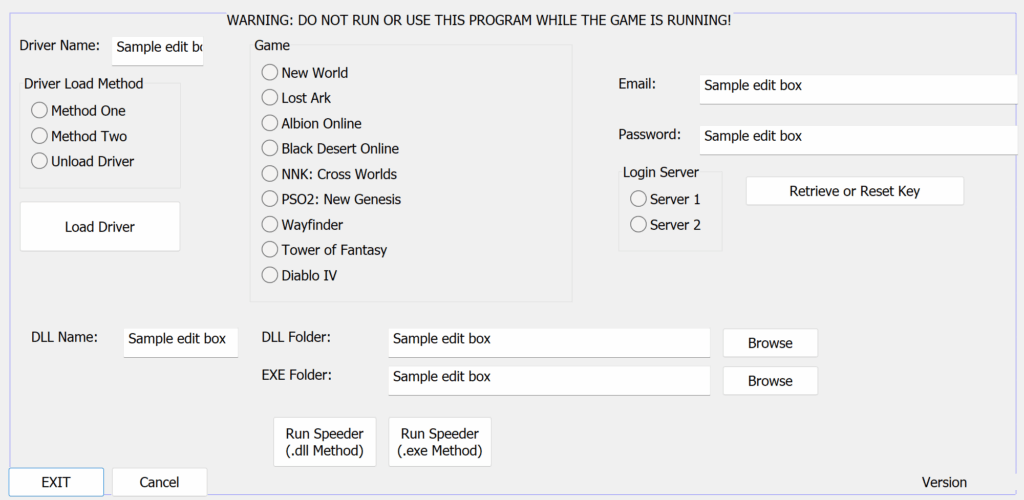
Oh my goodness: it's a GUI!
The procedure for loading Speeder—especially via .dll—should be much less complicated than before. You can now choose the process-to-inject-into from a list, and it will only display elevated processes, as well as only processes run by the current Windows user. Basically, most of the processes that won't work will be removed from the list.
This new launcher also allows me to check that you have your driver name in the correct location, and the Launcher will even add it to your config file if you are missing it.
You no longer need to change your .dll name as Speeder will do this automatically before injecting. Once you have your account set up, it should take no more than three clicks to start Speeder (choose process & click OK).
I will also be able to add some QoL changes, such as being able to adjust the config file through the GUI. Keep in mind, however, that you will not be able to use this Launcher while the game is running for security/safety reasons.
For Speeders without a .dll version, this new Launcher won't be as useful, but it will still be a more efficient way of loading your driver, and Loader.exe will be deprecated (though you can still use it if you want).
The new launcher should be ready for release in 1-2 days. I will need to rewrite a lot of the installation guide, so that will be the main bottleneck.
September 23, 2022
I have set up (hopefully) a much easier method to obtain your role. Simply go to Account - Speeder Cheats and click Connect with Discord. You will be invited to the new server & given your role. Make sure you are on the Discord account you want to use.
September 23, 2022
Just a heads up that Discord decided to ban my main account due to "copyright infringement," despite the fact that I am, of course, selling my own software. It's the usual BS that game companies like to claim to force idiots to take action. I will have things back up and running as soon as possible. Thank you for understanding. As always, you can reach me at [email protected] if needed.
August 28, 2022
You can now add your Discord username to your account on https://speedercheats.vip. To do this, click on Account (top of the page), and you will see a field for Discord. Simply type in your Discord username (including the numbers at the end!) and click save. The bot will automatically give you a role within 20 minutes. This will work on any membership you sign up for, so you will no longer need to use the -discord command for each membership (or ever again).
August 3, 2021
This is the new home base for my various video game hacks and cheats. For now, please see my Patreon and Buy Me a Coffee pages for more information on each hack.