Introduction
If enabled, Speeder's kernel input allows your mouse and keyboard input to come from a physical mouse and keyboard installed on your computer. This is relatively significant because there will be no difference between a key you physically press and a key simulated by Speeder, preventing the anticheat from seeing the input as simulated.
Speeder, however, does not know exactly which mouse and keyboard you want it to use, so please read on for setup instructions.
Setup
The easiest method to set up kernel input for your specific mouse and keyboard is to click the "Initialize Kernel Input" box in Launcher. This only works 'after' your driver has been loaded, so make sure your driver is already running. Simply click the button and then move the mouse and press a key on the keyboard. Launcher will receive the input and update your config file with your keyboard and mouse devices.
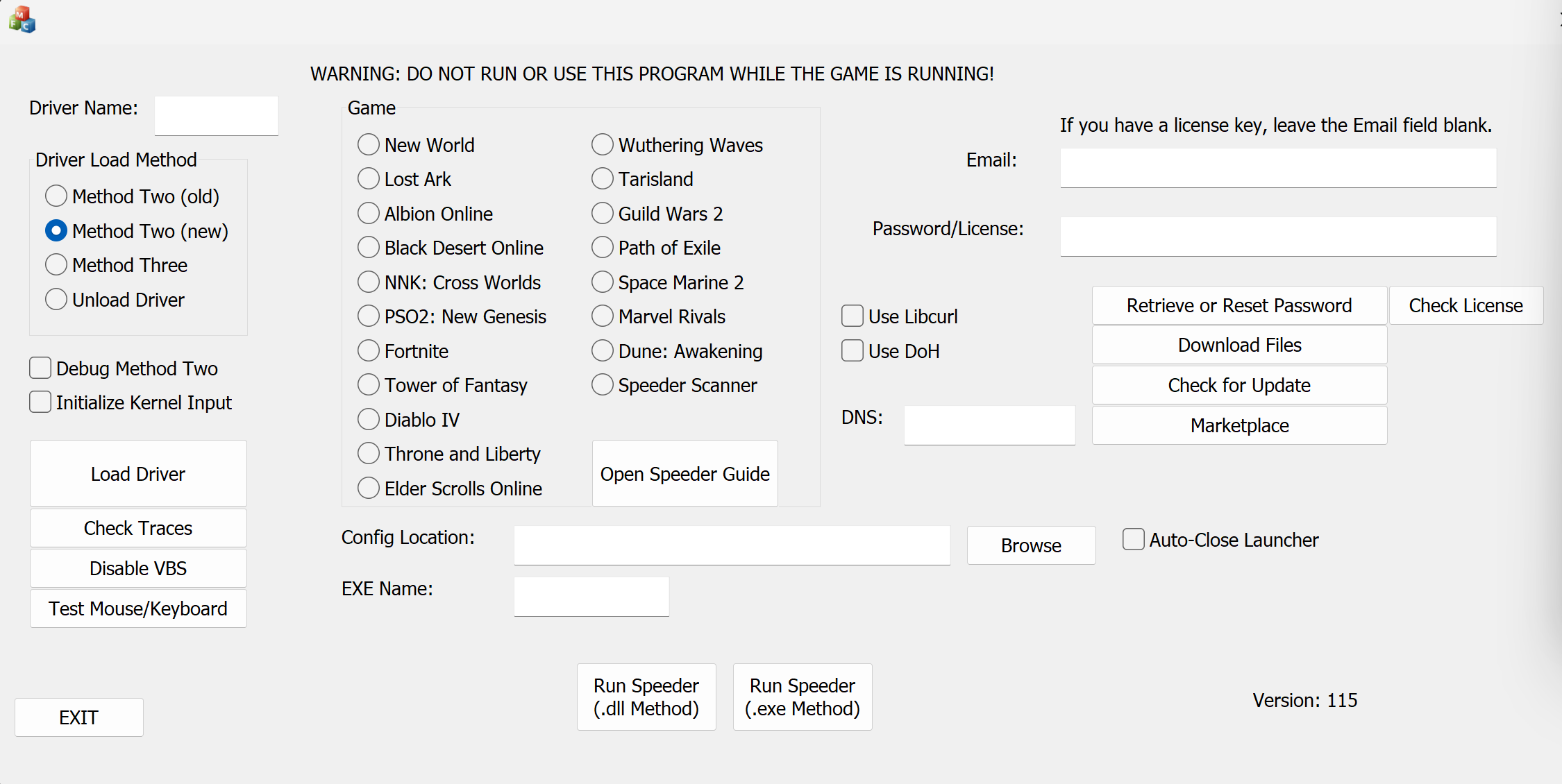
If this does not work for some reason, click the Debug Kernel Input button instead. This button requires you to unplug the keyboard and mouse you wish to use. Launcher will receive the connect data for both devices, and it will be able to determine which driver(s) is conflicting with Launcher's ability to receive input data. Common conflicts are "RzDev," which is Razer Synapse, and "mouse/keyboard," which is Interception. Disabling or uninstalling the conflicting software will usually fix the issue.
If kernel input is still not working, head to this page and download the RawInput Detector. This will list all keyboard and mouse devices installed on your system. You can manually set Speeder's input devices with the following syntax:
1|[keyboard]|[mouse]
such as
1|\\?\hid#vid_3620&pid_1445&mi_10#8&46ae13c&3&0404#{184c9ec3-16e0-21e1-bd8c-10a1c61415ea}|\\?\hid#vid_2531&pid_01b8&mi_10#9&3f42b8c&1&0300#{178ef41d-58ef-21d3-cc9c-10a1c81315fd}
What Do I Do if It Isn't Working?
Speeder relies on HID devices to send mouse and keyboard input. If you do not have an HID device installed for either your mouse or keyboard, the initialization will fail, and you will not be able to use kernel input. Fortunately, HID devices are extremely common. Most (all?) USB mice and keyboards are HID devices and will work fine with Speeder.
To see the HID devices you have installed on your computer, go to Device Manager and look under "Keyboards" and "Mice and other pointing devices." If you see "HID Keyboard Device" and "HID-compliant mouse," you should be all set.
If you do not have an HID device for either your keyboard or mouse, try to find a USB keyboard or mouse lying around (depending on which you are missing) and plug it in. Chances are it is an HID device and will work fine. Really cheap USB mice and keyboards are almost always HID devices, so, worst case, if you don't have one, you can spend $5 to get one. You do NOT need to actually use the mouse/keyboard. It just needs to be plugged in so Speeder can use it.
If you are unable to use an HID device for some reason, you can set the kernel input setting to 0, and Speeder will use the Windows API to send input. For some games, this is fine and won't raise any red flags, but for others, it can be dangerous. For FPS games or games with an aimbot, I do not allow kernel input to be disabled for safety reasons. Always check the [Safety] section for each game.
Other Problems
Having Interception installed may cause kernel input to fail. Either uninstall or disable it.
Having reWASD installed will may kernel input to crash your computer. Either uninstall or disable it.
Avast antivirus (and maybe others?) can cause kernel input to fail. If you are having issues, I recommend temporarily disabling your antivirus so you can narrow down the problem. Windows Defender works fine.
Razer Synapse (and maybe other mouse software) can prevent kernel input from working correctly. Simply disable or uninstall Razer Synapse, and you should be all set. Please note that Razer Synapse will often run in the background without you knowing, so be sure to check services.msc, scroll down to Razer, and make sure none of the Razer services are "Running."