
Below, you can find all the updates to our Lost Ark cheats.
August 28, 2026
The Lost Ark Speeder has been updated to version 189.
Improved logic for finding hotbar addresses for use with the 'ch' script command.
January 30, 2026
The Lost Ark Speeder has been updated to version 185.
The -displayani command should now display IDs for any animation, not just attack animations.
The -recordani command has been completely revamped, along with lines 84-86 in config.txt. Instead of recording animations/speeds & copying them to the clipboard, Speeder will now output them to a text file. This allows you to add comments/notes to each animation so you know which animation refers to which ability. As well, you can create different text files for different characters.
- -recordani [speed/timer] [file name] [line] — Any attack animations you perform will be recorded by Speeder and outputted to "file name." The file name must not contain spaces and must have the .txt extension, such as speeds.txt. If the file already exists, recorded animations & speeds will be appended to the end of the file. Speeder will 'not' record animations already added to the file. If the file does 'not' exist, a new file will be created, and the file name will be added to your config file automatically at the supplied "line." Valid line numbers are 84 (timer hack), 85 (speed hack), and 86 (max timer hack). Simply use the command, activate the skills you would like to hack in the game, and then use -recordani again. Examples:
- -recordani 1.5 speeds.txt 85
- Will record and set your attack animations to +50% speed. The file name will be written to line 85 in config.txt.
- -recordani 0.5 timers.txt 84
- Will record and set your attack animation timers to +0.5 seconds. The file name will be written to line 84 in config.txt.
- -recordani 2.0 maxtimers.txt 86
- Will record and set your attack animation max timers to 2.0 seconds. The file name will be written to line 86 in config.txt.
- -recordani 1.5 speeds.txt 85
This should make speed hacking much easier.
Previous lines 84-86 settings 'will' still work, so you do not need to change anything if you are satisfied with your current settings.
Locking on to mobs with tcm should correctly unlock when the mob dies.
The -esp console command has been fixed.
The ESP display has been upgraded to the model I use for other Speeders, which is faster and uses the GPU instead of the CPU.
A small random delay has been added to the auto-potion keypress.
The "gt" command can now contain an asterisk, such as gt*, which will jump to the final macro line. This precludes you from having to renumber "gt" every time you add a new keys line.
September 14, 2025
The Lost Ark Speeder has been updated to version 178.
Line 11 crash fix for Korean/Chinese clients.
September 10, 2025
The Lost Ark Speeder has been updated to version 177.
An issue where -danger was causing a crash on Korean/Chinese clients has been resolved.
August 28, 2025
The Lost Ark Speeder has been updated to version 176.
An issue where macros were being deleted when switching config files has been resolved.
August 17, 2025
The Lost Ark Speeder has been updated to version 175.
The "smt" script command has been added to allow you to dynamically the adjust the max timer of any animation:
- "smt[max timer]" — Your current animation's max timer will be set to "max timer." An animation's max timer is timer value an animation must reach before the animation is considered "finished" (and the next animation can start). For example, with no attack speed increase, a max timer of 1 would equal 1 second (i.e., the animation would take 1 second to complete). You can, thus, use this command to cut an animation off early or extend it. Example:
- keys=smt1.5|dbg % current animation's max timer set to 1.5 seconds
August 1, 2025
The Lost Ark Speeder has been updated to version 174.
The -fov console command will now correctly scan to find the address if the current pointer is not working. In other words, you should not need to wait for me to update the addresses.
July 23, 2025
The Lost Ark Speeder has been updated to version 173.
Fixed the -scan console command for the Korean client.
June 27, 2025
The Lost Ark Speeder has been updated to version 171.
The Lost Ark Speeder can now hack animation speeds on the fly, including non-combat animations, with the new "sas*" script command:
- "sas*[speed]" — This command sets the speed of your current animation—and only your current animation (unlike "sas" above)—to "speed." In most situations, I recommend using line 85 to set animation speeds instead of relying on macros, but there may be situations where you want to adjust the speed that line 85 cannot account for. Also, this command will work with all animations in the game, including non-attack animations, so you may find some use for it outside of combat. Two examples:
- keys=sas*3|dbg % current animation speed increased by 2x
- keys=sas*1|dbg % resetting current animation speed back to normal
Do note that you can use this command to reset your animation speeds back to normal (1), which you may find useful.
The -cf console command for switching config files has been fixed.
May 5, 2025
Speeder's driver has been updated to support mouse scrolling. The script command to scroll up is "256d," and the script command to scroll down is "257d." I realize the "d" is somewhat counter-intuitive for the scroll up command, but it makes sense relative to how every other keypress works. Just think of it as if you are "pressing" scroll up.
Scroll up/down keypresses do not need to be released like other keys. For example, if you want F2 to scroll down, you would write
[113]
keys=257d
repeat=0
To scroll more than one "tick," simply repeat the command:
keys=257d|257d|257d
You can set repeat=1 if you want to scroll continuously as well.
March 30, 2025
Instead of relying on device numbers for kernel input, which can change after every restart, you can now use the name of the device(s) you want Speeder to use for kernel input. You will want Speeder to use the same devices as the ones you are physically using. Fortunately, we have an updated utility to do this for you. The RawInput Detector will detect the keyboard and mouse you are using and copy all the data you need to the clipboard. Please see the setup guide here.
The significant benefit of this method is that it is a set-it-once-and-forget-it kind of method. Device names do not change and will work indefinitely. If you change the keyboard & mouse you are physically using, you should update the device names in your config file.
March 24, 2025
The Lost Ark Speeder has been updated to version 165.
The ability to rotate the camera has been fixed. This does require the use of the -danger command, so be aware of that.
March 18, 2025
The Lost Ark Speeder has been updated to version 163.
Line 78 in config.txt (autoloading macros) has been fixed.
The command to call functions (call %) has been fixed.
March 9, 2025
The Lost Ark Speeder has been updated to version 161.
The console can now be resized, and the number of lines displayed will be automatically adjusted.
The "lnf" (load new file) command will now attempt to disable any running macros before loading the new file.
February 23, 2025
The Lost Ark Speeder has been updated to version 159.
An ESP has been added to Speeder, which can display mob HP, ability ID, and name. The main reason I added the ESP, though, is to improve the targeting system. Now, Speeder can precisely target mobs without having to use -calibrate and lock onto targets with ease. Targeting and the ESP are intertwined because the same function to translate 3D coordinates to 2D is used for both. This means that configuring the ESP properly is necessary for targeting to work, even if you don't want to use the ESP. However, the only setting you actually need to adjust (for targeting) is line 91. Line 91 should be "30" without any FoV hacks active. If you do hack your FoV, you will need to adjust the number until the ESP text aligns with entities properly. Just keep adjusting the number, and you will see the ESP update in real time. It shouldn't take long.
Basically, the cursor will move to the left side of the ESP text, so you can use that to determine whether you are using the right number on line 91.
Here are the new settings:
- 90) Settings for the ESP. Each setting is separated by the "|" character. The ESP can be closed (and reopened) by using the -esp console command. The settings should be ordered as follows:
- Total number of entities to display.
- Font size.
- Mob color.
- RESERVED.
- RESERVED.
- Show mobs: 1 to enable, 0 to disable.
- RESERVED.
- RESERVED.
- Refresh rate: How often (in milliseconds) Speeder should update the ESP.
- (Optional:) Font can be the name of any font currently installed on your system, such as Arial or Garamond.
- Example: 100|20|255|120000|0|1|1|1|50
- 91) ESP and targeting field of view, X offset (optional), and Y offset (optional). These settings are used to translate 3D coordinates into 2D screen coordinates and are necessary for targeting and the ESP to work correctly. "30" should work fine if you have not hacked your field of view. Otherwise, you will need to adjust this line. The easiest way to adjust it is to turn on the ESP and make sure the text aligns with the entities in the game. X & Y offsets are optional and allow you to adjust the cursor and ESP text along the X or Y axis. If the cursor/text is too low or high, try adjusting the Y offset. If the cursor/text is too far left or right, try adjusting the X offset. The order of the settings is as follows:
Field of view|X|Y - 92) The ESP text you would like displayed for mobs. The following dynamic variables are possible: %name% (mob name), %hp% (HP percent), and %abl% (current ability ID). For example, if you want to display the mob's name and HP, you would write: %name% %hp%. If this line is blank, Speeder will default to displaying the mob's name.
Here are the new targeting commands:
- "tcm*[mob distance],0,[lock target]" — Speeder will target the closest mob within "mob distance" of your character. The second parameter should always be 0 since it is not used. "Lock target" can be 0 or 1 and, if 1, will lock the cursor to the mob until the "lt-" command is called or the mob dies. This prevents Speeder from changing your target should another mob move closer. This setting requires line 91 in config.txt to be set correctly. Example:
- [113]
keys=cnm1,1000|tcm*1000,0,1|2d|rs100,300|2u
endkeys=lt-
repeat=2 - Press F2 to have Speeder automatically target and right click the closest mob within 1000 distance until all are dead.
- [113]
- "tcm[mob distance],[cursor distance]" — Similar to "tcm*" but moves the cursor toward the mob rather than directly targeting. The distance the cursor is moved is controlled by "cursor distance." This setting requires line 91 in config.txt to be set correctly. Example:
- keys=cnm1,1000|tcm1000,200|dbg % moving cursor 200 distance toward closest mob within 1000 distance
- "tcmC[mob distance],0,[lock target]" — Speeder will target the mob closest to your cursor as long as it is no farther than "mob distance." If "lock target" is 1, the cursor will remain locked on the mob until the "lt-" command is called or the mob dies. This setting requires line 91 in config.txt to be set correctly. Example:
- [113]
keys=tcmC1000,0,1|s100
repeat=1
endkeys=lt- - While holding F2, my cursor will be locked to the closest mob within 1000 distance of my cursor.
- [113]
- "lt-" — Releases target lock when using the "lock target" parameter of the "tcm" command. It is a good idea to call this in your endkeys.
The guide has been updated with a targeting macro. You can also use this one for testing:
[117]
keys=tcm*10000,0,1
endkeys=lt-
repeat=0
pass=0
It is now possible to use the [variables] section in your macro/waymark file to set a variable to text with the "|" character included, such as
[variables]
test=this|now|works
February 16, 2025
The Lost Ark Speeder has been updated to version 158.
The autoloading of macros and the "lnf %" (load new file) script command have been fixed.
February 13, 2025
The Lost Ark Speeder has been updated to version 156.
The -hp command has been fixed for the Chinese client.
A lot of nice QoL features have been added to the console, such as the ability to move through the text with the arrow keys and edit mid-line instead of at the end only. The performance has also been significantly improved.
February 5, 2025
The Lost Ark Speeder has been updated to version 154.
The script command "cmd" for sending system command has been fixed to work with the new console. I've also updated the guide text because some of the syntax was incorrect. The correct syntax is:
keys=cmd % "C:\Program Files\VideoLAN\VLC\vlc" --qt-start-minimized --play-and-exit C:\soundfile.mp3
You can now use the left/right arrows to move the cursor back and forth within the console's input text. This allows you to edit anywhere in the input text rather than having to delete everything up to the point you want to edit. You can also right-click to copy individual words or numbers.
January 23, 2025
The Lost Ark Speeder has been updated to version 152.
The -fov console command has been fixed to work with 21:9 resolutions or 16:9 resolutions with the "Force 21:9" in-game option enabled.
Per request, the -danger console command will revert the movement speed hack (line 3) back to its original functionality, which requires modifying the game's code.
January 19, 2025
The Lost Ark Speeder has been updated to version 151.
It is now possible for Speeder to reset line 85 attack speeds and line 86 max timers when Speeder is disabled or closed. However, because addresses change whenever you zone, it is only possible for Speeder to reset the speeds if the animation occurs at least once after zoning. In most situations, this should allow you to disable the hack mid-fight without issue.
The line 85 speed hack should now work properly on the Taiwan client.
January 18, 2025
The Lost Ark Speeder has been updated to version 150.
The attack speed hack on line 85 in config.txt now affects all animations/attacks and works much better than before. Here is the updated guide text:
- 85) A series of animation IDs and speeds. When your current animation ID matches one of the IDs listed here, that animation's speed will be set to the value specified. Most animation speeds are 1.0 by default. Therefore, anything above 1.0 will increase the speed of the animation, where 1.1 equals a 10% increase, 1.2 equals a 20% increase, and so on. The syntax is as follows (do not include brackets):
[animation ID]:[speed]|[animation ID 2]:[speed 2]|etc.
such as
25000:3|25001:3|25002:3|25003:3|25170:3|25171:3
The console command -recordani can record animation IDs and speeds for you.
Animation IDs and speeds can also be discerned with the -displayani console command. Please note that speed adjustments will remain even after Speeder is closed.
January 17, 2025
The Lost Ark Speeder has been updated to version 149.
The max zoom and field of view hack will now work with the -danger command if you wish to use it. I recommend using -fov instead if possible.
The text display for -displayani has been fixed so that each animation appears on a single line.
January 16, 2025
The Lost Ark Speeder has been updated to version 148.
The attack speed hack on lines 2/33/34 has been fixed and reverted to its previous state. However, please note that you must use the following console command to enable full functionality:
- -danger — Enables the attack speed hack on lines 2, 33, & 34 in config.txt. This hack requires modifying the game's code and is considered unsafe, especially on the Korean client.
I have tested all 3 lines, and everything seems to be working.
January 15, 2025
The Lost Ark Speeder has been updated to version 147.
I've removed some old, unnecessary functions to improve Speeder's security. If you are using the old attack speed hack, it will now work without needing to modify the game's code. If possible, I recommend using line 84 instead.
I've added an additional check to ensure the timer/speed for lines 84-86 is being written to the correct address. If this causes issues for some reason, you can disable it via line 89 in config.txt:
- 89) If 1, Speeder will run an additional check to ensure that animation timers & speeds are written correctly. This affects lines 84-86. I recommend always setting this line to 1 unless there is a problem.
January 12, 2025
The Lost Ark Speeder has been updated to version 142.
Scanning for the HP address via the -hp command should now work properly on the Korean client.
A potential crash when closing the game before Speeder has been fixed.
January 3, 2025
The Lost Ark Speeder has been updated to version 141.
The console window has been updated to reflect recent changes in other Speeders that allow me to protect/encrypt all text outputted to the console. Everything should basically work the same as before as I've modeled the new console after the Windows one as much as I could. The main difference is you can only copy text from a single line. If you notice any display issues, feel free to let me know.
Settings for the new console are located on line 87 in config.txt.
November 19, 2024
The Lost Ark Speeder has been updated to version 140.
The -hp console command has been fixed for the Chinese and Taiwanese clients.
November 12, 2024
The Lost Ark Speeder has been updated to version 139.
As requested, the animations recorded from -recordani will appear in the order they are recorded rather than numerical order.
The "ia" (is attacking) command has been improved to ensure it will not return true while zoning.
The following script command has been added:
- "ani[animation ID]" — If your current animation matches "animation ID," the rest of the keys line will process. The inverse is possible with "!ani." Animation IDs can be discerned with the -displayani console command.
November 5, 2024
The Lost Ark Speeder has been updated to version 138.
You can now record animations for use with the speed hacks on lines 84-86 in config.txt. This makes the setup process much easier.
- -recordani [speed/timer] — Any attack animations you perform will be recorded by Speeder and formatted for easy copy-paste into lines 84-86. Simply use the command, activate the skills you would like to hack in the game, and then use -recordani again. Open config.txt and paste into lines 84, 85, or 86, depending on what you want to do. "Speed/timer" is optional and allows you to set a default speed/timer for all the recorded animations.
October 28, 2024
The Lost Ark Speeder has been updated to version 137.
I've deprecated lines 81 & 82 in config.txt because the new attack speed hacks are already safe to use, so there is no need for this safety precaution. You can still use line 2 if you want as well.
October 19, 2024
The Lost Ark Speeder has been updated to version 136.
I've added scanning for the -fov command in case it is not working for you. You'll need to input the width and height of the game window, and Speeder should be able to find the address for you.
October 15, 2024
The Lost Ark Speeder has been updated to version 134.
The following attack speed hacks have been added to config.txt:
- 84) A series of animation IDs and minimum timers you'd like Speeder to use to expedite your attacks. When your current animation ID matches one of the IDs listed here, that animation's timer will be increased to the value specified, expediting your attack. The syntax is as follows (do not include brackets): [animation ID]:[minimum timer]|[animation ID 2]:[minimum timer 2]|etc.
such as
25000:0.3|25001:0.4|25002:0.5|25003:0.3|25170:0.2|25171:0.5 - Animation IDs can be discerned with the -displayani console command.
- 85) A series of animation IDs and speeds. When your current animation ID matches one of the IDs listed here, that animation's speed will be set to the value specified. The syntax is as follows (do not include brackets):
[animation ID]:[speed]|[animation ID 2]:[speed 2]|etc.
such as
25000:3|25001:3|25002:3|25003:3|25170:3|25171:3
Animation IDs and speeds can be discerned with the -displayani console command. Please note animation speed does not affect all animations. - 86) A series of animation IDs and max timers. When your current animation ID matches one of the IDs listed here, that animation's max timer will be set to the value specified, ending the animation either earlier or later depending on the value you use. For example, if an animation normally takes 1.4 seconds to complete, you could set the max timer to 0.7 and halve the duration. The syntax is as follows (do not include brackets):
[animation ID]:[max timer]|[animation ID 2]:[max timer 2]|etc.
such as
25003:0.5|25002:0.7
Animation IDs and timers can be discerned with the -displayani console command.
Note that -displayani is used for these commands. Do not confuse with -displayaid.
I've added the 4 bytes next to entity HP to the display target's HP function with the hope that they correspond to the number of health bars. If that is the case, let me know.
October 12, 2024
The Lost Ark Speeder has been updated to version 133.
The -hp command has been fixed but hopefully won't be necessary as I've updated the offsets used for HP and the hotbar.
The new "sat" command should now work on the CN client.
Added some safeguards to ensure -scan cannot cause a crash. If you are still crashing, try injecting into a different program.
October 10, 2024
The Lost Ark Speeder has been updated to version 131.
A completely new attack speed hack has been added to Speeder that works with all abilities and animations. This particular hack is activated through the new script command "sat":
- "sat[timer]" — Your animation timer, if under "timer," will be set to "timer." "Timer" should be written in seconds, with 0.5 equal to half a second, 1 equal to 1 second, and so on. All animations have timers that determine when they begin and end. This command allows you to "bump up" the timer so that it appears as if you have been executing the animation for longer than you actually have, resulting in an attack speed hack. As far as I can tell, this hack works with every ability, including cast timers. It can be extremely effective and allow you to attack almost infinitely fast if "timer" is greater than the max duration of the animation, so be careful with the value you use. As mentioned in the [Safety] section of the guide, be very careful with hacking your basic attack (Z) ability as this can flag you. Other abilities should be fine. Two examples:
- [113]
keys=abl21000|sat0.3
keys2=abl21020|sat0.5
keys3=abl21060|sat0.7
endkeys=dbg % off
repeat=2 - Press F2 to expedite the animations for the bard abilities 21000, 21020, and 21060. Use -displayaid to retrieve ability IDs.
- [81]
keys=sat0.3
repeat=1
pass=1 - Press Q to activate your Q ability and have its animation expedited by 300 milliseconds.
- [113]
The "sat" command is now the recommended option for attack speed hacking as it works with everything, works with buffs, and is actually much safer because it does not require altering any of the game's code.
September 24, 2024
The Lost Ark Speeder has been updated to version 129.
The new field of view console command (-fov) will now scan for the field of view address if it is invalid. This allows for the command to work after game updates. Along with this, all regions should now be able to make use of the command.
September 20, 2024
The Lost Ark Speeder has been updated to version 128.
I've found a better address for the field of view hack. If you are playing on Global, please try the following console command:
-fov [amount]
with "amount" being a decimal greater than your resolution's width/height. Or to put it more simply, just try
-fov 5
Let me know if this works, and I will replace the current field of view hack with this one. It will only work on the Global client for now, but I will add it to the others if it works well.
September 8, 2024
The Lost Ark Speeder has been updated to version 126.
An issue where the addresses for HP and the hotbar disappeared after switching characters has been resolved.
September 4, 2024
The Lost Ark Speeder has been updated to version 125.
The following script command has been added:
- "ia" — If you are currently attacking (i.e., literally swinging your weapon), the rest of the keys line will process. The inverse is possible with "!ia."
Disabling Speeder via the line 1 key will now persist after zoning.
September 4, 2024
The Lost Ark Speeder has been updated to version 124.
The following script command has been added to assist with creating config/macro files for individual characters:
- "get % PNAME" — Your character's name will be placed into the global variable PNAME. Example:
- [113]
keys=get % PNAME|!eq % prevName,(VAR % PNAME)|store % prevName,(VAR % PNAME)|cc % -cf (VAR % PNAME).txt
repeat=0 - Press F2, and the config file named after your character will be loaded. For example, if your character's name is Bob, Speeder will attempt to load Bob.txt as the current config file. This allows you to have config and macro files for individual characters.
- [113]
An issue where the field of view hack would not work properly if line 81 was enabled has been resolved.
August 12, 2024
The Lost Ark Speeder has been updated to version 120.
As mentioned on Discord, pass=1 macros do not guarantee script commands activate before the keypress. This is now resolvable by using pass=2 instead. Pass=2 will tell Speeder to wait until all the macro commands have activated a single time before passing the macro key along. This fixes the issue where "sas" occasionally activates after the game receives the keystroke, causing the attack speed hack not to work in that particular instance.
If you use pass=2 in a macro, be aware that it can freeze your keyboard/mouse if you have a sleep timer or anything preventing Speeder from cycling through all the commands quickly. (Don't use the "s" [sleep] command.)
August 7, 2024
The Lost Ark Speeder has been updated to version 119.
It is now possible to run two or more copies of the Speeder .dll and have them attach to different LOSTARK.exe processes. This is done by activating line 83 in config.txt:
- 83) If 1, Speeder will allow you to input the process ID of the LOSTARK.exe client you'd like it to attach to. This is useful if you are running multiple LOSTARK.exe clients on the same computer.
July 30, 2024
The Lost Ark Speeder has been updated to version 118.
The way the movement speed, attack speed, and field of view hacks work has been changed for the Korean client. If you choose the Korean region, this new method will be enabled by default. Here the relevant lines from config.txt:
- 81) If 1, Speeder will switch to a different method for activating the field of view hack, movement speed hack, and attack speed hack. This method is safer on the Korean client (and any client with Xigncode) and should not raise any suspicion with Xigncode. By default, the Korean region will have this line active, even if it is set to 0. If you would like to disable this line on the Korean client, you must set this line to 2.
The attack speed hack will work differently if line 81 is active. You must set the speed you want for all your attacks on line 2 (like normal). Then, on line 82, you can set the virtual key codes of the keys you would like to disable the hack. I recommend setting your Z key (and your left/right mouse button) on line 82 for maximum security. All other keys should be fine. Lines 33 & 34 will not work if this line is active.
The movement speed hack will work differently if line 81 is active. You must set your mouse movement key (i.e. 1 for left click and 2 for right) to line 26. The movement speed hack will only be active while this button is pressed. Your speed can be adjusted with lines 3 and 5 like normal. - 82) If line 81 is active (i.e., safer hacks are active), this line should contain the virtual key codes of the keys you would like to disable the attack speed hack. If you are using default keybinds, you should only need to set your right click (or left click) and your Z key. Each key should be separated by the "|" character. Example for right click and Z:
- 2|90
Speeder will now display whether you have "Safer Settings" enabled.
July 25, 2024
The Lost Ark Speeder has been updated to version 117.
This update is mainly for Korean users but is applicable to everyone.
The .dll version of Speeder has had numerous security features added to better protect against Xigncode. There should be no possible detection vectors at this point—other than the usual server detection.
July 21, 2024
The update for both your Speeder and your driver is now complete. You must update both your driver to version 17 and Speeder to version 115. Ignore Launcher when it tells you your driver is out of date. This will be fixed shortly.
To update your driver: Run Launcher.exe -> Click Unload Driver -> Click "Load Driver" button -> Click Download Files -> Click Update Driver Only -> You can now load the new driver with Method One/Two/Three.
To update your Speeder: Run Launcher.exe -> Click Download Files -> Click Update Speeder Only -> Click Run Speeder button at the bottom.
June 22, 2024
The Lost Ark Speeder has been updated to version 114.
The following script command has been added:
- "log % [file name],[text]" — Speeder will output "text" to the file "file name." This can be used with a program like SnakeTail to display overlay text from Speeder on top of your game window. I also have plans to create a general overlay program that can read text from a file and display it in a transparent window.
June 13, 2024
The Lost Ark Speeder has been updated to version 112.
The following script command has been added:
- "abl[ability ID]" — If you are currently using an ability with an ID of "ability ID," the rest of the keys line will process. The inverse is possible with "!abl." Among other things, this can be used to check for the successful activation of an ability. Example:
- [113]
keys=abl19200|ct % spineflowerTimer|st % spineflowerTimer,4000|dbg % spineflower active
keys2=!ct % keyDelay|gt4
keys3=ch6|ct % spineflowerTimer|102|st % keyDelay,300|dbg % pressing numpad6 (spineflower)
keys4=s10
endkeys=store % spineflowerTimer,0|store % keyDelay,0
repeat=1 - Hold down F2 to activate the Arcanist Spineflower ability whenever it is off-cooldown. Once active, Speeder will not attempt to activate it again until 4000 milliseconds have passed, preventing the ability from ending prematurely.
- [113]
The console command "-displayaid" will now display your own abilities as well.
June 12, 2024
The Lost Ark Speeder has been updated to version 111.
Persistent macros (repeat=2) will now pause while zoning and re-enable when addresses can be read again.
If multiple Lost Ark processes are detected, Speeder will display the character name associated with each process.
June 10, 2024
The Lost Ark Speeder has been updated to version 109.
An issue where the .dll version of Speeder could not find cursor coordinates has been resolved.
June 7, 2024
The Lost Ark Speeder has been updated to version 108.
The code for freezing your position with a keybind (i.e. using line 77 in config.txt) has been improved to match the code for the "fp*" command. This should resolve any crashing issues.
The -calibrate console command will now wait up to 10 seconds for the cursor address to appear once the game window becomes the active window.
May 28, 2024
The Lost Ark Speeder has been updated to version 107.
Targeting with Speeder now requires the use of the new -calibrate command, which greatly enhances the accuracy of cursor movements. It is now possible to target mobs directly rather than just moving the cursor toward them.
The following console command has been added:
- -calibrate [precision] [distance] [circles] — Calibrates Speeder so that targeting commands ("tcm," "tcmc," "m*," etc.) and waymark commands can accurately aim your cursor at the intended entity/waymark. It works by moving your cursor around in a circle and measuring the difference between screen distance and game distance. "Precision" is how many degrees between each measurement. I recommend 5-10. "Distance" is how far away from the center of the window you want each measurement to be. I recommend 25-50, but this will vary based on your resolution. "Circles" is how many circles you would like Speeder to measure. I recommend using the number of circles needed to reach near the edge of the game window without going over. You absolutely do not want to measure beyond the game window, or the calibration will not work. For example, if I use -calibrate 5 50 8, Speeder will move my cursor in 5 degree increments around the center of the game window. At each increment, Speeder will move the cursor 50 pixels toward the edge of the game window 8 times (because I have set 8 circles) for a total of 400 distance.
- I recommend starting with -calibrate 5 50 8. If the cursor moves too far (i.e., outside the game window), try -calibrate 5 25 8. If the cursor does not move near the edge of the game window, try -calibrate 5 75 8. Basically, you only need to adjust "distance," although you have the option of making the targeting extremely precise if you want (i.e., using a precision under 5).
- Use this command in a flat area in the game (i.e., where there are no hills, slopes, or height differences). Otherwise, the game-to-screen translation will be distorted, and targeting from certain angles will not work correctly.
- Calibration can take 2-5 minutes depending on the settings you've chosen. Do not touch the mouse!
- This setting requires that line 63 in config.txt points to a file where your calibration data can be stored. Once you have calibrated successfully, you never need to do it again unless you change your camera distance or resolution.
- Calibration will not start until Lost Ark is the active window. If Lost Ark loses focus, calibration will stop.
The following script commands have been added or changed:
- "tcm[distance]" — Moves the mouse cursor toward the mob closest to your character. "Distance" is optional and, if provided, will prevent Speeder from targeting any mob beyond "distance." Line 66 in config.txt controls how far to move the cursor. Example:
- [100]
keys=!eq % lockedon,1|cc % -mp|store % lockedon,1|dbg % locked on
keys2=tcm|2d|s50
repeat=1
interrupt=0
endkeys=store % lockedon,0|2u|m(VAR % CURSORX),(VAR % CURSORY)|dbg % unlocked - Hold down NUMPAD4, and your cursor will target the closest mob while Speeder holds down right click. Release NUMPAD4, and your cursor will return to its location before the macro was initiated, and right click will be released.
- [100]
- "tcm*[distance]" — Same as "tcm" but moves the cursor directly on top of the mob.
- "tcmc[distance]" & "tcmc*[distance]" — Exactly the same as "tcm" and "tcm*" but with distance measured from your cursor's position instead of your character; i.e., the mob closest to your cursor will be used for targeting.
I will add player targeting for PvP soon.
May 11, 2024
The Lost Ark Speeder has been updated to version 105.
The following macro/waymark command has been added:
- "fp*/fp*-" — Same as the "fp" command above but works differently and in a way that may prevent crashes. Unlike "fp," this command continuously writes your "saved position" every time it is called. Thus, you must use a repeat=1 or repeat=2 macro in order for it to be effective. Your "saved position" is your character's position when "fp*" is first called. This is the position "fp*" will freeze your character at until "fp*-" is called. Example:
- [113]
keys=fp*
endkeys=fp*-
repeat=1 - Hold F2 down, and you will not be able to move from your current position.
- [113]
May 6, 2024
The Lost Ark Speeder has been updated to version 103.
The following console command has been added:
- -displayas — Toggles the display of the attack speed hack on/off. If on, whenever your attack speed is modified, you will see the current value in the console window.
April 29, 2024
The Lost Ark Speeder has been updated to version 102.
Speeder can now detect mob abilities and react accordingly. The following console commands have been added:
- -displayaid — The attack IDs for any abilities used by any mob in memory will be outputted to the console. These IDs can be used with macro/waymark commands such as "matt."
- -top — Makes the Speeder console window the topmost window, allowing you to have it on top of the game window. Using the command a second time will remove the "topmost" status.
The following macro/waymark commands have been added:
- "matt[ability ID]" — If a mob in memory is currently using an ability with an ID of "ability ID," the rest of the keys line will process. This can be used to create triggers for specific abilities. Example:
- keys=matt439103|dbg % Get ready to dodge!
keys2=matt439104|cmd % “C:\Program Files\VideoLAN\VLC\vlc” –qt-start-minimized –play-and-exit C:\soundfile.mp3 - The "keys2" example requires VLC be installed and allows you to create audio triggers.
- keys=matt439103|dbg % Get ready to dodge!
- “cmd % [command line command]” — Speeder will activate “command line command” as if you had typed the command into the Windows console (i.e., cmd.exe). Example:
- [113]
keys=cmd % “C:\Program Files\VideoLAN\VLC\vlc” –qt-start-minimized –play-and-exit C:\soundfile.mp3
repeat=0
interrupt=0 - Press F2, and Speeder will play the sound file soundfile.mp3 in the background (i.e., the game will not lose focus). You must have VLC installed for this particular command to work.
- [113]
The console commands "-allmobs o" and "-target o" can also be used to retrieve ability IDs.
April 22, 2024
The Lost Ark Speeder has been updated to version 100.
Functions have been added to Lost Ark Speeder. Functions improve the efficiency of your scripts and greatly expand what you can do with waymarks. See the [Functions] section of the guide for more details.
The following macro/waymark commands have been added:
- "telec" — Your character will be teleported to your current cursor position. Lines 28, 29, and 40 in config.txt affect this command. 28 & 29 affect how quickly you teleport. 40 is where you set your auto-run key, which is the T key by default. Teleporting does not work if your character is not already moving, so setting the correct key on line 40 is necessary.
- "tcm*[distance]" — Same as "tcm" command but moves the cursor toward the mob closest your cursor instead of your character.
The following console command has been added:
- -dump [file name] [type] [bytes] — Game data will be dumped to "file name" depending on the supplied parameters. Currently, "type" can only be "t" for your current or previous target. "Bytes" can be "4" or "1." Example:
- -dump mob.txt t 4
I had a request to output the number of health bars your current target has to the console. For those interested in such a feature, please target a mob with multiple health bars and use the -dump command as follows: -dump 160.txt t 4, with "160" being the number of current health bars. This will allow me to look at the data and see if I can figure out where the number is located. Send me the text file once you have done this. Preferably, you can use the command more than once when the mob has different numbers of health bars remaining so I can be sure I have the correct address.
It is now possible to have all Speeder's key presses and mouse movements come from real, physical devices installed on your computer. This is accomplished via line 80 in config.txt:
- 80) If 1 (default), Speeder will use a keyboard and mouse device installed on your computer to send keystrokes and move the cursor. In this way, there will be no difference between a key you physically press and a key activated by Speeder, bypassing the game's and anticheat's ability to detect the input as simulated. If you would like to specify a specific keyboard and mouse for Speeder to use (I recommend the ones you are physically using), you may input the device numbers by separating each number with the "|" character. For example, if I want to enable device input, use the second keyboard device available, and use the third mouse available, I would write
1|2|3
on this line. The lowest possible number is 1, and the highest number is equal to the number of mice or keyboards you have installed on your PC, which can be discerned with Device Manager. For example, if you have five mice installed on your PC, possible device numbers would be 1 through 5. Unfortunately, there is no easy way to determine which device number corresponds to which device on your computer. However, you can use the RawInput Detector utility to test different device numbers and very quickly determine the correct ones to use. Your driver must be version 9+ for this to work. Speeder will warn you if you disable this line or if your driver is unable to send keystrokes.
This new method of pressing keys and moving the mouse requires your driver to be version 9+.
March 29, 2024
The Lost Ark Speeder has been updated to version 98.
I've added an additional check to ensure no live mobs are skipped and assumed dead. This should fix an issue where the "cnm" command did not detect nearby mobs.
The following console command has been added:
- -cmd [macro/waymark commands] — Speeder will activate "macro/waymark commands" as if you had pressed a macro key with them present. This is a great way to test commands to make sure they are working correctly. You could also use this command to set variables manually. Example:
- -cmd store % testvar,1|eq % testvar,1|dbg % this message should appear in the console
March 22, 2024
The Lost Ark Speeder has been updated to version 97.
The following macro/waymark commands have been added:
- “st % [timername],[delay]” — A timer will be created with a value of current time + delay. Delay should be in milliseconds, so if you want to create a two-second timer, you would use st % twosecondtimer,2000. This command is meant to be used in conjunction with the “ct %” command below.
- “ct % [timername]” — If the timer “timername” has expired, the rest of the keys will process. The inverse is possible with "!ct." Example:
- keys=ct % timer|st % timer,2000|dbg % this message will show every two seconds
March 21, 2024
The Lost Ark Speeder has been updated to version 96.
The following macro/waymark commands have been added:
- "cm" — If you are targeting a mob, the rest of the keys line will process. Example:
- keys=cm|ch1|81|dbg % using Q ability off cooldown because I am targeting a mob
- "cnm*[number of mobs],[distance]" — Same as the "cnm" command but checks for the distance between mobs and your cursor. Example:
- keys=cnm*1,200|dbg % there is at least one mob within 200 distance of my cursor
- "cma[distance],[angle difference]" — If there is at least one mob closer than "distance" from your character and whose angle from your character (in degrees) is within "angle difference" of your cursor (in degrees), the rest of the keys line will process. To put it more simply, "angle difference" is the difference in the angles between player->mob and player->cursor such that an "angle difference" of 0 would mean your cursor is on a direct line from player->mob. That is, if you were to fire a projectile, it would hit the mob perfectly. Because you don't need to aim perfectly, you should consider using an "angle difference" of around 25. Consider adjusting line 79 in config.txt if you are missing faraway targets. As you can probably guess, this command is meant to be used with projectile abilities. Example:
- keys=cma10000,25|ch1|81|dbg % firing Q projectile ability toward mob
The following line has been added to config.txt:
- 79) Distance modifier for commands that measure angle differences, such as "cma." Because the accepted angle difference between player->cursor and player->mob will change based on the distance between player->mob, the angle difference needs to be corrected. To put it more simply, when you are shooting at something far away, you need to be more precise with your aim (i.e., the "accepted" angle difference must be smaller). The higher the number on this line, the more precise the angle will be. Too precise, however, and it may be impossible to aim altogether. 0.001 seemed to work well for me.
March 18, 2024
The Lost Ark Speeder has been updated to version 95.
Macros with repeat=2 will no longer be toggled off while zoning. They will pause until addresses can be read again.
February 3, 2024
The Lost Ark Speeder has been updated to version 93.
The -scan command has been fixed for all regions and does require a Speeder update to version 94.
January 25, 2024
The Lost Ark Speeder has been updated to version 92.
An issue where -scan could crash a crash has been resolved.
January 23, 2024
The Lost Ark Speeder has been updated to version 91.
This was a request from someone on Discord. There is no problem with keeping the console open, but if you want to hide it, you can use the following console command:
- -hide — If using the .dll version of Speeder, the console window will be hidden, and all output will be disabled.
January 20, 2024
The Lost Ark Speeder has been updated to version 90.
As I’ve done in a few other Speeders (Albion, PSO, BDO, NW), I’ve added a console window to the .dll version of Lost Ark Speeder. This is a safer method of inputting/outputting text that does not rely on text files. It also emulates the .exe version exactly, so there is basically no difference between them. Note that not all (but most) programs support a console window, so you may have to try multiple programs. As always, Task Manager, Notepad, and most Microsoft software work fine.
January 18, 2024
The Lost Ark Speeder has been updated to version 89.
An issue where -scan was reading the wrong number of bytes has been fixed.
January 14, 2024
The Lost Ark Speeder has been updated to version 88.
The following macro/waymark commands have been added:
- “rand[min],[max]” — A number will be chosen randomly between “min” and “max” and placed into the global variable RAND. Usage example:
- keys=rand0,10|dbg % the random number is (VAR % RAND)
- “conf % [line],[text]” — “text” will be written to line “line” in your config file. Example:
- keys=conf % 3,1.5|dbg % writing 1.5 to line 3
January 10, 2024
The Lost Ark Speeder has been updated to version 87.
A signature I use for the FoV hack was no longer working correctly, so I have fixed this and updated Speeder to version 87. I believe this only affects Chinese users.
January 9, 2024
The Lost Ark Speeder has been updated to version 86.
Speeder will now alert you if it succeeded or failed to find your HP/hotbar address. If it fails, you can now use the -hp console command to scan for the addresses. This will fix both auto-potion (and anything related to HP) and the "ch" macro/waymark command. Once the scan is complete, you should be all set until relogging.
January 2, 2024
The Lost Ark Speeder has been updated to version 84.
Line 50 in config.txt has been adjusted as follows:
- 50) The virtual key code of the key you’d like to hold down to move the camera with the mouse. For example, if you set this line to 113, holding down F2 will swivel the camera around when you move the mouse.
Line 43, if 1, will now disable the movement speed hack while sailing. Please note that I am not 100% sure this detection will work all the time, so be sure to check the console/log to ensure the hack is correctly disabled. Speeder will say "ship detected" when it disables the movement speed hack.
December 4, 2023
The Lost Ark Speeder has been updated to version 80.
It is now possible to automate much of your combat rotation with the "ch" macro/waymark command:
- “ch[hotbar slot]” — If the ability/item in “hotbar slot” is not on cooldown, the rest of the keys line will process. This can be used to automate your entire combat rotation. “Hotbar slot” numbers are as follows: the left hotbar (the one with all your combat abilities) is represented by numbers 1-8, with 1 being the top-left slot, and 8 being the bottom-right. The right hotbar works the same way with the numbers starting at 9 and ending at 18. Please see this picture if you are confused. Example:
- [113]
keys=ch1|81|gt10
keys2=ch2|87|gt10
keys3=ch3|69|gt10
keys4=ch4|82|gt10
keys5=ch5|65|gt10
keys6=ch6|83|gt10
keys7=ch7|68|gt10
keys8=ch8|70|gt10
keys9=2
keys10=s300
repeat=1 - Hold down F2 to activate your cooldowns in 1-8 order. If no cooldowns are available, Speeder will press right click.
- [113]
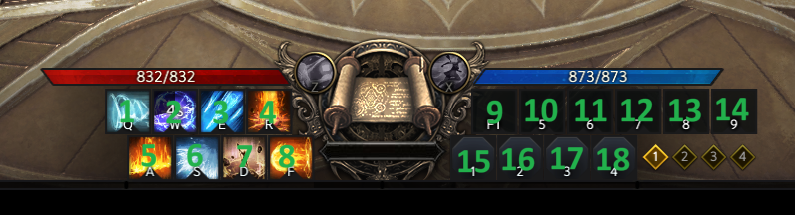
The following new console command has been added:
- -hotbar — Displays data related to your hotbar. 0 means the ability/item is off cooldown (i.e., ready to be used).
This command uses the same base address as HP, so if your HP is not displaying correctly, this command will likely not work.
November 27, 2023
The Lost Ark Speeder has been updated to version 78.
Speeder will now reload your macro file when any changes are made.
The following line has been added to config.txt:
- 78) Macros you would like Speeder to automatically load (or reload). These should reference the “key” you would normally press to activate the macro, and each should be separated by the “|” character. For example, if I wanted to automatically activate my numpad4 and numpad5 macros, I would write 100|101 into this line. Please note that you can activate macros that are normally impossible to activate via keys. For example, you could have a macro assigned to key 999 and write 999 into this line.
November 19, 2023
The Lost Ark Speeder has been updated to version 77.
I've improved the algorithm for "hopping" your character toward its final destination, which should result in a straighter trajectory.
The -t command no longer requires you to click in game as Speeder will automatically press the auto-run key when the game is in focus.
November 5, 2023
The Lost Ark Speeder has been updated to version 74.
The following line has been added to config.txt:
- 77) The virtual key code of the key you’d like to freeze your character’s position. This can be useful for avoiding knockbacks.
The following macro/waymark command has been added:
- “fp+/fp-” — Locks (+) or unlocks (-) your character’s position. Example:
- [113]
keys=fp+|dbg % locked position
endkeys=fp-|dbg % unlocked - Hold F2 to lock position
- [113]
I have adjusted the movement speed hack to work with percentage increases rather than just static. If you write a number with a decimal on line 3, for example, Speeder will assume you want a percentage increase. If there is no decimal, the increase will be static (the way it works now). A value of 1.1 will increase your movement speed by 10%, 1.2 by 20%, and so on.
Movement speed hacking is very dangerous in Lost Ark, so I do not recommend abusing it on an account you care about.
October 19, 2023
The Lost Ark Speeder has been updated to version 72.
-scan has been fixed to work on the CN client. If you would like to test it, use "1" for the region, which will give you the wrong addresses. At this point, after logging in to your character, you can use -scan, and it should find the correct addresses for you.
October 6, 2023
The Lost Ark Speeder has been updated to version 71.
Speeder will no longer attempt to target deceased targets.
October 3, 2023
The Lost Ark Speeder has been updated to version 70.
Mob HP will now be displayed as a decimal from 0 to 1.0, with 1.0 being 100% and 0.5 being 50%. Interestingly, the mob list I am using does not contain an HP value until the mob takes damage, so what I've done is immediately save this initial value as the mob's "max HP" and then divide it by any further changes in HP. It seems to work quite well and should be extremely accurate on bosses, less so on trash.
September 30, 2023
The Lost Ark Speeder has been updated to version 68.
Mob names are now discernable via -allmobs and the new -target command. Consequently, -allmobs now populates the global variable MOB[#]N with the name of each mob in memory. Among other things, this can be used to target or search for specific mobs.
The following new console command has been added:
- -target — If you are currently targeting something in game or have previously targeted something, the following global variables will be populated: TARGETX, TARGETY, TARGETZ, TARGETD (distance), TARGETA (angle), TARGETHP, TARGETN (name), and TARGETID (unique ID number). Appending “o” onto the end of the command, such as -target o, will display all this data in Speeder’s console window (or log.txt). See the “m*” macro/waymark command for example usage.
The following new macro/waymark command has been added:
- “m*[target ID]” — The cursor will be moved in the direction of “target ID.” IDs can be retrieved with the -target command. Example:
- [101]
keys=cc % -target
repeat=0
[100]
keys=m*(VAR % TARGETID)|s50
repeat=1
Press NUMPAD5 while targeting something. Hold down NUMPAD4 to move the cursor in the direction of that target.
- [101]
The distance in line 66 of config.txt will now have a greater effect on cursor movement (i.e., smaller numbers will move the cursor more than before).
I've done some work to find a stable path to player HP. As a result, auto-potion should work fine on the Korean and Global client.
September 29, 2023
The Lost Ark Speeder has been updated to version 67.
The following new macro/waymark command has been added:
- “cnm[number of mobs],[distance]” — If there are “number of mobs” mobs nearby within a max distance of “distance,” the rest of the keys line will process. Example:
- keys=cnm1,200|dbg % there is at least one mob within 200 distance
The following new line has been added to config.txt:
- 76) If 1, Speeder will display the current HP for your current target.
Scanning for a couple of addresses on the Chinese client has been fixed.
September 28, 2023
The Lost Ark Speeder has been updated to version 66.
The Lost Ark Speeder can now iterate through all mobs in memory, which allows for precise targeting, discernment of HP, abilities, and more. I have only implemented targeting at this point, but there is much more to be added. If you would like to get started immediately, consider using the macro I've included in Example_Macro_File.ini.
On top of this, it is now possible to have Speeder scan for new addresses, so you no longer need to wait for me to update them! Large updates may still require a manual update, but in most situations, you can use the new -scan command (and line 74 in config.txt) to find the new addresses.
The following lines have been added to config.txt:
- 74) If this line is not blank, Speeder will scan the game’s memory for the addresses needed for Speeder to work and output them to the file listed here. For example, if I write addresses.txt on this line, the addresses will be outputted to addresses.txt. If this file already exists, Speeder will read the addresses from the file. If these addresses are incorrect, you can use the -scan console command to rescan for the correct addresses. This line basically allows you to use Speeder without having to wait for me to update the addresses on the server. However, some updates may require me to manually update the addresses, but it should work for most updates.
- 75) The number of threads you would like Speeder to use when scanning for addresses. In general, this should be no more than the number of cores in your CPU.
The following console commands have been added:
- -scan — Scans the game’s memory for the addresses Speeder needs to work. In general, you should only use this command if you receive the “Address problem” message. If Speeder has already found the addresses, the scan will likely fail. Line 74 in config.txt must not be blank and must point to the file you would like Speeder to output the addresses to. This command, along with line 74 itself, allows you to update Speeder without having to wait for me to update the addresses on the server.
- -allmobs — Populates the following global variables: MOB[#]X, MOB[#]Y, MOB[#]Z, MOB[#]D (distance), MOB[#]A (angle), and MOB[#]HP, with “#” being a number from 1 to MOBTOTAL. This command allows you to iterate through all mobs currently in memory. Appending “o” onto the end of the command, such as -allmobs o, will display all this data in Speeder’s console window (or log.txt).
The following macro/waymark commands have been added:
- “tcm[distance]” — Moves the mouse cursor toward the closest mob. “Distance” is optional and, if provided, will prevent Speeder from targeting any mob beyond “distance.” Line 66 in config.txt controls how far to move the cursor. Example:
- [100]
keys=!eq % lockedon,1|cc % -mp|store % lockedon,1|dbg % locked on
keys2=tcm|2d|s50
repeat=1
interrupt=0
endkeys=store % lockedon,0|2u|m(VAR % CURSORX),(VAR % CURSORY)|dbg % unlocked - Hold down NUMPAD4, and your cursor will target the closest mob while Speeder holds down right click. Release NUMPAD4, and your cursor will return to its location before the macro was initiated, and right click will be released.
- [100]
- “tcp” — Moves the mouse cursor toward your current or previous target. Line 66 in config.txt controls how far to move the cursor. See the example for “tcm” (you can use the same macro and replace “tcm” with “tcp”).
There are other "utility" commands I've added, such as the (VAR %) command you see above.
As I mentioned, there is much more to be added.
September 14, 2023
The Lost Ark Speeder has been updated to version 65.
It is now possible to activate any of Speeder's console commands from within a macro's "keys" section. This is done with the new "cc %" command:
- “cc % [console command]” — This command can be used to activate any of Speeder’s Console Commands. For example, cc % -mp will display your current mouse position (as if you had typed in the -mp console command). “cc % -record” can be used to easily record coordinates. Please note that you must use a version of the console command that does not require input. For example, cc % -record will not work because it requires you to input distance and wait time. However, cc % -record 9999,30 WILL work because it requires no additional input.
If desired, this command will allow you to change your config file on the fly: keys=cc % -cf newfile.ini
July 16, 2023
The Lost Ark Speeder has been updated to version 60.
Implemented some checks to protect against crashes.
If you are still getting crashes, it probably due to the field of view hack (line 11). I have implemented a temporary fix that will prevent Speeder from scanning memory if the field of view hack is not enabled (i.e., if line 11 is 0). Please set line 11 to 0 if you are still crashing and let me know if the problem persists.
Auto-potion should now work properly.
July 15, 2023
The Lost Ark Speeder has been updated to version 59.
When choosing region 4 (Chinese), the crash when loading Speeder via .dll has been resolved.
July 14, 2023
The Lost Ark Speeder has been updated to version 58.
The Lost Ark Speeder will now work on the Chinese client. Simply use region "4" when logging in.
June 23, 2023
The Lost Ark Speeder has been updated to version 56.
The "lnf" macro command can be used to load a new macro file:
- “lnf % filename.ini” — Speeder will load “filename.ini” as your new macro file once all current macro threads have exited.
Among other things, this can be used to iterate through your macro files for different classes.
June 20, 2023
The Lost Ark Speeder has been updated to version 55.
When using the -t command to teleport, Speeder will wait until you click somewhere in the game window before initiating the teleport. This ensures your position is correctly updated. You also no longer need to set line 58 to 1 for -t to work.
June 13, 2023
The Lost Ark Speeder has been updated to version 54.
The following new waymark/macro command has been added:
- “lm[minX],[maxX],[minY],[maxY]” — Your cursor will be locked in a square, never moving farther left than “minX,” never farther right than “maxX,” never above “minY,” and never below “maxY.” Here is an example of how to use F2 to toggle this command on/off:
- [113]
keys=eq % lockActive,true|store % unlock,true|dbg % unlocking
keys2=!eq % lockActive,true|store % unlock,false|dbg % locking
keys3=eq % unlock,false|lm100,3000,100,1900|store % lockActive,true
keys4=eq % unlock,true|lm|store % lockActive,false
repeat=0
interrupt=0
- [113]
You can copy paste that into your macro file, and make sure line 68 in config.txt points to your macro file.
May 28, 2023
The Lost Ark Speeder has been updated to version 53.
The following new commands can be used in macros and waymarks:
-grid, -grid*, -gridc, -circle, -circle*, -circlec, and -gt
The -grid commands are used to move the cursor in a grid formation to target any nearby mobs/objects. The -circle commands do the same thing but move the cursor in a circle. The -gt command allows you to jump from one waymark index to another.
Please see the Lost Ark Speeder Guide for much more detail on how these commands are used.
May 19, 2023
The Lost Ark Speeder has been updated to version 52.
New line added to config.txt:
73) If 0, Speeder will NOT output text to log.txt when using the .dll version of Speeder.
May 12, 2023
The Lost Ark Speeder has been updated to version 49.
It is now possible to input commands to the .dll Speeder in a manner similar to the console version. This is done by opening the file cmd.txt and typing the command on the first line. Save the file, and the command will activate. Cmd.txt will be located in the same folder as config.txt.
It is now possible to view the output from the .dll by opening log.txt. This file will also be located in the same folder as config.txt. I recommend using notepad++.exe, which has a handy auto-update feature, so you can see when a file is updated in realtime.
May 11, 2023
The Lost Ark Speeder has been updated to version 46.
The issue where the .dll would crash after using the -e command has been resolved.
You can now use line 1 in config.txt to enable the .dll instead of the -e command if you wish. This allows you to use the -hide command before launching the game.
May 11, 2023
The Lost Ark Speeder has been updated to version 45.
Speeder will once again reset settings back to normal when closing.
May 10, 2023
The Lost Ark Speeder has been updated to version 44.
DLL loading has been changed such that you must now type -e to enable Speeder after you have logged into your character. I have also fixed the address problem.
May 9, 2023
The Lost Ark Speeder has been updated to version 41.
I've redone how the injection is performed. You do not need to edit config.txt at all and can simply use the new "-inj" command in Speeder. I've updated the guide with the new steps and created a video. I have to edit the video a bit, but I will post it as soon as I can.
I recommend downloading a new Speeder .zip, extracting it, and copy pasting your login/config/etc. files into the new MoveMe folder. At this point, you are ready to start the injection procedure.
May 8, 2023
The Lost Ark Speeder has been updated to version 39.
It is now possible to inject Speeder into another process. This greatly increases the security of the program because Speeder can effectively hide within the memory of another legitimate process. Many anticheats do not even bother scanning signed applications because, under normal circumstances, there should be no reason to scan them.
If you are interested in taking advantage of this, please see the new [How to Completely Secure Speeder] section of the guide. Although a little lengthy, the process is basically just changing line 73 in config.txt and then choosing the process you want to inject into. Make sure you copy config.txt into the new folder.
May 4, 2023
The Lost Ark Speeder has been updated to version 38.
It is now possible to use Speeder to create macros. Please see Lost Ark Speeder Guide - Speeder Cheats for more details.
New commands have been added to macros/waymarks:
- "gp" to check the current pixel color at given coordinates, with an option for precision.
- "sas" to set your attack speed.
- "sms" to set your movement speed.
- "smts" to set your mount speed.
- "sfv" to set your field of view.
- "store %" and "var %" and "eq %" to set, use, and check variables in macros/waymarks.
- I am planning on adding targeting commands so you can check for nearby targets.
See Lost Ark Speeder Guide - Speeder Cheats for more details on how to use these commands.
"Mouse smoothing" has been added via line 70 in config.txt. This controls how smoothly your cursor moves when using any macro/waymark command that moves the mouse.
Line 72 can be a set to a key to activate the "-cl" console command. If used while -record is active, your current location will be recorded in the final waymark file that appears when you end recording.
March 29, 2023
I've completely revamped how -download works in terms of retrieving an individualized Speeder. From now on, when the server finishes revirtualizing the program, the download link to that version will be sent to this site and dynamically displayed in every post for each game. This means that every post will have a working download link and that this link will change (along with the program) every hour or so. Before, you had to use the -download command to receive a unique version of the program. Now, every version will be unique by default, and you will no longer need to use -download. This not only makes things easier for everyone but also safer.
The dynamic download link can also be found in the guide for each game.
Happy speeding!
March 28, 2023
The Lost Ark Speeder has been updated to version 33.
New setting:
67) If 1 (default), your attack speed will be immediately reset to normal upon release of any key assigned to line 33. If you would prefer a delay, set this line to 0, set line 8 to 1, and set line 9 to whatever delay you want.
The above line basically reverts the previous change made to keybinds. You can now choose whether you want a delay or not (upon releasing a key). For safety, line 67 will be enabled by default.
March 27, 2023
The Lost Ark Speeder has been updated to version 32.
The logic for attack speed keybinds has been changed so that your speed is immediately reset upon releasing an assigned key. This is only relevant for people who have line 8 enabled, so you do not need to update to this version if you are comfortable with your settings.
March 16, 2023
The Lost Ark Speeder has been updated to version 29.
It is now possible to move in Lost Ark using only your keyboard.
Speeder can now automatically aim at your current or previous target.
Waymark movement should be more accurate now with the addition of line 65.
It is now possible to hide the console window.
The following lines have been added to config:
- 62) The virtual key code of the key you want to hide/show the console window.
- 63) The virtual key codes of the keys you want as "lock-on" keys. If any of these keys are held down, Speeder will automatically aim your cursor at your current target until the key is released. Each key should be separated with the "|" character, such as 1|2|3|4.
- 64) The virtual key codes of the keys you want to act as movement keys. This line allows you to move in Lost Ark using the keyboard instead of the mouse (as if you were playing a game with WASD movement). The key codes must be ordered in the following fashion: left, right, up, down, and must be separated with the "|" character. For example, if I wanted to use the WASD keys for movement, I would set:
65|68|87|83
Please see lines 65 & 66 for cursor adjustments. - 65) How far Speeder should move the cursor up (negative number) or down (positive) relative to the center of the screen due to the camera in Lost Ark being slightly offset. 10 seems to work well.
- 66) How far Speeder should move the cursor relative to the center of the screen. This is basically the distance between your character and the cursor. A smaller number is better because, when the movement key is released, your character will stop moving sooner. 25 seems to work well.
January 24, 2023
An issue where 21:9 resolutions were causing the field of view hack to zoom in has been fixed.
January 23, 2023
The Lost Ark Speeder has been updated to version 22.
An issue where if you changed your field of view more than once, Speeder would not update your field of view correctly has been fixed.
January 6, 2023
The Lost Ark Speeder has been updated to version 20.
Teleport to Cursor is no longer affected by line 58 and will always teleport you if enabled. This change requires updating Speeder to version 20.
Mount Speed has been fixed on the Korean client. This does not require updating Speeder.
December 23, 2022
The Lost Ark Speeder has been updated to version 18.
Crashing fix for the Korean client. The occasional spam when adjusting FoV has been fixed as well.
December 22, 2022
The Lost Ark Speeder has been updated to version 15.
Improved code for the new field of view hack to avoid crashes while zoning.
Addresses for the Korean client have been updated.
The field of view changes require updating Speeder to version 15. Otherwise, you can continue using the version you have.
*I highly recommend you use the old FoV version as the new one seems to have crashing issues.*
December 21, 2022
The Lost Ark Speeder has been updated to version 14.
Corrected an address with the previous version. Let me know if it works better/worse. I will include both old and new versions of the FoV hack. The new FoV hack is in version 14.
December 20, 2022
The Lost Ark Speeder has been updated to version 12.
I've completely redone the field of view hack. I believe it should work more consistently than before.
The mount speed hack has been fixed for NA/EU/SA.
November 21, 2022
The Lost Ark Speeder has been updated to version 10.
I've implemented a security protocol into the Lost Ark Speeder that I recently added to the New World Speeder. The Lost Ark Speeder has never been detected, and this will make it even more difficult moving forward.
November 3, 2022
The Lost Ark Speeder has been updated to version 9.
It is now possible to move your character to specific waymarks without teleporting. This works via mouse clicks in the same way you would normally move and is completely safe in terms of movement detection. Along with this, it is now possible to do the following things at individual waymarks: press keys, aim abilities in specific directions, move the mouse cursor to click on things elsewhere on the screen, and wait for a specified amount of time.
Essentially, you can now program simple gathering and combat bots via Speeder. See a video on how to do this here. The readme has been expanded to include information on how to format your waymark files.
The following new settings have been added to config.txt:
58) If 1, your character will run between waymarks instead of teleporting.
Make sure line 26 is set correctly. Window mode does work but may be slightly inaccurate due to the title bar.
I highly recommend using this setting because it is much safer. This affects -tw*, -twrepeat*, & -twrepeat
Speeder will utilize mouse clicks and mouse movement to achieve this, so Lost Ark must be the active window.
59) How close your character should be to the waymark before Speeder stops trying to reach it. 50 seems to work well.
60) A decimal between 0 and 1 that will determine a range Speeder will use for any waymark sleep commands.
For example, if I have this line set to 0.05 and have used "s2000" in one of my waymarks, Speeder will sleep a random time between 1900 and 2100 milliseconds.
2000 * 0.05 = 100, and then this 100 is added and subtracted from the original 2000.
This is to avoid macro detection.
61) How long to wait before assuming there is a problem and stopping -tw*, -twrepeat*, or -twrepeat when line 58 is set to 1.
This is a failsafe so that your mouse does not get locked in place indefinitely. Utilizing line 41 will also avoid this problem.
October 7, 2022
Character size hack should no longer affect ship while it is inactive.
October 4, 2022
Teleporting has been fixed on the Korean client.
It is now possible to adjust the size of your character with line 57 in config:
57) How big you want your character to be. 2.0 = double size.
September 28, 2022
There was a bug with the movement speed hack in the most recent version of Speeder. This has been corrected, but you will need to download the new version (version 2) if you want the movement speed hack to work correctly.
Addresses have been updated on the server, and Speeder is ready to use. If you already own a copy of Speeder (i.e. version 1), you can simply log in and start playing. However, if you do use the movement speed hack, make sure you update to version 2 via -download or with the link here. (Just replace the Speeder executable.)
September 26, 2022
I have implemented a security protocol borrowed from my New World Speeder. Speeder will now receive the current addresses for Lost Ark upon login. This means you will no longer need to update your Speeder every week. You will still need to wait for me to update the addresses on the server, but all you will need to do after that is simply log in, and Speeder will be ready to go. Beyond convenience, the benefit of this is that I can modify the program every week so that, over time, everyone will have a unique copy that cannot be traced to other copies. Although Lost Ark Speeder has never been detected, it can't hurt to have this extra security, and the convenience factor is nice.
September 12, 2022
Movement speed hack was not working unless mount speed was also set. This has been fixed.
September 11, 2022
The criteria for finding HP address have been adjusted so that auto-potion will work with all classes. Speeder will display your max HP in the console window. If it is not correct, use the -hp command.
September 10, 2022
Speeder will now display what it perceives as your max MP (this is used to determine whether the HP offsets are correct or not). If the displayed max MP is incorrect, simply type -hp into the console window. This message will only appear if you have the auto-potion settings set.
August 12, 2022
Teleporting has been fixed for the Korean version.
August 11, 2022
Line 24 (key to hold down to teleport) wasn't working properly. This has been fixed.
August 10, 2022
New camera settings:
54) If 1, and if Line 50 is 1 (or 2), the x axis (left/right) will not be adjusted due to mouse movement.
55) If 1, and if Line 50 is 1 (or 2), the y axis (up/down) will not be adjusted due to mouse movement.
56) A number between 0 and 1 that will determine camera sensitivity when using line 50.
August 7, 2022
You can now move the camera around by holding right or left click. Of course, you will need to use the keyboard for auto-attacks if you choose to do this.
New lines in config:
50) If 1, holding down right click will move the camera as though you were playing an MMO that allows camera movement (FFXIV, WoW, etc.).
If 2, holding down left click will move the camera as though you were playing an MMO that allows camera movement (FFXIV, WoW, etc.).
51) If 1, the x-axis camera movement via line 50 will be inverted.
52) If 1, the y-axis camera movement via line 50 will be inverted.
53) How long to wait before preventing a normal right (or left) click if line 50 is 1 (or 2).
July 30, 2022
Basically, I returned the attack speed hack back to its original functionality now that I was able to solve the crashing issue. Keybinds in particular should work better when it comes to resetting your speed back to your original speed.
July 28, 2022
Someone reported their character freezing during a boss fight. I've changed the addresses for the attack speed hack as a result. Let me know if there are any additional issues. If you are also using the movement speed hack, please disable it and see if the problem persists so that I can narrow down the issue.
July 24, 2022
I've made some adjustments to the attack speed hack that should prevent bosses from freezing and such.
I've also made adjustments to the movement speed hack that will prevent other players & mobs from freezing. Movement speed hacking is still very dangerous, but it will at least work better if you choose to use it.
July 22, 2022
I have changed the way the attack speed hack works. I hope this will alleviate crashing. If you are still experiencing crashes, please try disabling everything except the attack speed hack so that the issue can be narrowed down. Thank you.
July 15, 2022
Config.txt can now contain text on each line as long as there is a space between the setting and the text (e.g. 1.5 Attack Speed). The total number of spaces does not matter. This will allow you to label each setting much more conveniently.
July 4, 2022
This version will hopefully alleviate game crashes.
July 2, 2022
Changes made to the config file should be loaded as normal.
June 30, 2022
The long delay upon first loading the field of view hack should be gone.
June 19, 2022
New setting:
49) The virtual key codes of the keys that will reset the field of view back to normal while held down.
The key codes should be separated with the "|" character: 1|2|3|4|5 etc.
June 10, 2022
The reload function should work regardless of where Speeder is located on your PC.
June 9, 2022
The Field of View hack should work everywhere now.
May 31, 2022
Better detection for when game is closed. Speeder will check every 30 seconds if reload (line 48) is enabled.
May 30, 2022
Lines 47 and 48 in config can be set such that Speeder auto-attaches to a specific client and reloads itself if Lost Ark closes.
May 25, 2022
The Russian version of Lost Ark is now supported.
The Korean and NA/EU/SA versions of Speeder have been consolidated into a single program. You can now pick your region during start-up. If you are only playing on one region, you can use line 46 in config to set the region ahead of time.
If multiple Lost Ark clients are running, Speeder should now display the character associated with each client (if you are logged in), along with the process ID, making it much easier to choose the correct process.
May 16, 2022
An issue where, if safer movement speed was enabled, Speeder would change movement speed while holding items even if line 3 was 0 has been fixed.
May 14, 2022
The same result as the new security feature can be achieved much more quickly simply by opening the config file after logging in, which is what Speeder will do automatically from now on.
May 6, 2022
Line 45 in config.txt can now be used to input your driver's name. With this, the program will no longer require any input from you during start-up.
May 4, 2022
Crashing due to console commands should be fixed.
May 3, 2022
Program has been recompiled and virtualized with new virtual machines. The -download command will work to retrieve the new version as well.
May 2, 2022
New setting: "gradually teleport to cursor." What this does is basically the same as what the normal teleport functions do (-t, -tw, -twrepeat, etc.), partitions the distance between starting point and end point (i.e. where you click the cursor) into small hops so that your movement does not appear suspicious. With this setting enabled, you basically have a pseudo-movement-speed hack. This hack is completely safe from a client-side point of view as your movement speed will not be hacked in any way. However, it is very possible (and probable) that the server can still detect you if you teleport too quickly. Nevertheless, it is the safest form of movement speed hacking that I can come up with, so perhaps it will be useful. Again, I strongly encourage you not to hack your movement speed on your main account and, if you're interested in trying this out, to use this on a spare account.
April 19, 2022
Hacking ship speed seems to be especially dangerous. I have added a new setting, auto-ship speed, which will set your movement speed to ship speed whenever Speeder detects you are on a ship. More importantly, if ship speed is 0, the movement hack will be disabled while on a ship. In config/settings files going forward, this setting will be enabled by default.
March 26, 2022
Interacting with NPCs, objects, etc. should no longer disable movement speed while mounted.
Teleporting while on a mount should now work.
March 21, 2022
If more than one Lost Ark is running, Speeder will ask which you'd like it to attach to.
March 20, 2022
First off, if everything is working for you, you can basically ignore this update.
I have added a new method to load the driver that may work better for some people. The new method, now called "Method 2" (efiguard method is now "Method 3"), has been added to the readme. It is basically the same as Method 1 with one additional step. The .zip now contains a new Loader and the files needed for this new method.
March 18, 2022
New setting added to settings.ini and line 42 of config.txt:
freeze character post-tele=1
# If 1, Speeder will press the auto-run key to prevent your character from moving after teleport to cursor.
Setting this to 0 will revert the teleport to cursor change made in the previous update if you prefer the way it worked before.
March 17, 2022
By utilizing the auto-run key, Speeder will now teleport you directly to where you click and freeze your character there (instead of your character continuing to run post-tele). Along with this, teleportation over longer distances is possible without having to hold down the movement key.
March 16, 2022
New console commands have been added. More in-depth explanations can be found in the readme.
-twrepeat waymarkname, waymarkname2, waymarkname3, etc. — Speeder will read from Waymarks.ini and gradually teleport you back and forth from waymarkname to waymarkname2 to 3, 4, etc. (no limit).
-twrepeat* waymarkfilename.ini — This works the same as -twrepeat except that all you have to do is specify the file name (rather than the individual keys).
-tw*waymarkfilename.ini — Exactly the same as -twrepeat* but does not repeat the loop.
-twresume — Resumes -twrepeat from the next waymark.
-record — Speeder will record waymarks as you move your character in the game.
Teleporting in general has been improved because I realized you can use the auto-run key to ensure your position is updated correctly. By default, Speeder will press the T key as this is the default auto-run key. However, this can be changed in line 40 of config.txt or "this virtual key code enables auto-run" in settings.ini.
Another new setting has been added to pause/resume the waymark teleport functions: line 41 in config.txt or "this virtual key code pauses/resumes -twrepeat" in settings.ini.
March 6, 2022
Teleporting has been fixed so that you no longer teleport into the ground.
New settings have been added:
37) How far to teleport your character up (or down if negative) to prevent character from getting stuck in the ground during teleport to cursor.
38) How far to teleport your character up/down when using the jump keybind (line 39). Negative number = down; positive = up.
39) The virtual key code of the key that will teleport you up/down, utilizing line 38.
You can probably ignore #37. I added it before I figured out what was wrong.
March 1, 2022
It is now possible to use both the general animation speed hack and the keys to activate it at the same time. If you press a key set in line 33 of config.txt or "these virtual key codes enable animation hack" in settings.ini, the general animation speed will be overwritten by the speed set for that particular key. Once the key is released, your animation speed will return to the general speed setting.
It is now possible to set another key to press the "g" key. Because the game doesn't allow you to rebind the interaction key, this will allow you to do just that. Speeder will also return the key to its original function if you begin typing in game.
February 24, 2022
-cf can now be used to change .ini files as well.
February 23, 2022
New console command:
-cf filename.txt - Speeder will use filename.txt as the configuration file.
Animation keybinds for the Korean version should work correctly.
February 23, 2022
Global animation speed (how much to increase animation [attack] speed) will now overwrite keybind animation speeds if it is greater than 0.
Ship/mount speed should no longer require movement speed to be set above 0.
Made some adjustments to how config.txt is read to ensure correct values. Confirmed auto-pot is working & teleport to cursor key.
February 22, 2022
New setting:
anti-afk=0
# The virtual key code of the key you'd like Speeder to press every five minutes if no keyboard or mouse input has occurred.
This setting is line #35 in config.txt. Game needs to be active window.
February 21, 2022
Stealth mode will now work without having to save the config file first.
Teleport to cursor should now work properly.
February 21, 2022
Non-stealth mode still required that driver name be typed into Settings.ini. From now on, if you don't have this set, you can simply input it into the program.
February 21, 2022
I've made some adjustments to my New World hack that will be useful here as well. You now have the option of running the program in "stealth mode." What this does is remove all strings from memory that could be suspicious/problematic (mainly the strings from Settings.ini). The downside is you will have to use config.txt instead of Settings.ini. Config.txt has no indication of what line corresponds to what setting, so you will have to use the readme to understand how to modify the settings. If you do not want to use stealth mode, you can use Settings.ini as normal. The EAC implementation on Lost Ark is not great, so there is probably no reason to use stealth mode, but I figured I'd add it.
Furthermore, Loader will now use Driver.ini instead of Settings.ini to read the driver name. The main benefit of this is that you can divorce the .exe from the driver and Loader (i.e. you can place it anywhere on your PC). You can still use the old Loader if you want.
The readme has been updated with instructions for all this.
Happy speeding!
February 19, 2022
New setting:
these animation speeds correspond to animation keys=0|0|0
# These are the animation speeds Speeder will use for each "these virtual key codes enable animation hack."
# For example, let's say you have the following keys set:
# these virtual key codes enable animation hack=87|65|83
# If you set this setting to:
# these animation speeds correspond to animation keys=1|2|3
# the W key (87) will set your animation speed to +1, the A key (65) to +2, and the S key (83) to +3.
It is also possible to use mouse buttons for animation keybinds now. Furthermore, keybinds will be disabled if Lost Ark is not the foreground window.
February 18, 2022
The reason the new animation hack keybinds didn't work all that well was because Speeder was resetting the animation hack due to "how much to increase animation (attack) speed=0"; now, if you are pressing one of the animation hack keybinds, Speeder will not reset the animation hack. In this way, the keybinds now work 100% of the time to increase your animation speed. I'd actually recommend just using them all the time because it is probably safer (i.e. your speed is only hacked while key is pressed), and it might even work better than "only hack animation speed while attacking=1"
New setting:
safer movement speed hack=0
# Setting this to 1 will alter the way the movement speed hack works and basically just write your speed continuously.
# The downside is that your speed will not be consistent, and you will rubberband a bit.
# The upside is that you will no longer have the monster desync effect that occurs without this setting.
# It is, however, extremely safe from a client-side point of view, and you will only need to worry about server detection.
# Setting "how quickly to check addresses" to a low number will improve the functionality of the hack.
February 17, 2022
Here are some settings that may help with the auto-attack disconnect issue:
these virtual key codes enable animation hack=
# These virtual key codes will enable the animation hack while pressed. This allows you to only use the hack with specific abilities.
# Multiple keys can be included by separating them with the "|" character.
# For example, if you set this to 97|98, both numpad1 and numpad2 will increase your animation speed.
# Please ensure you use the "how much to increase animation (attack) speed with keys" setting and set "how much to increase animation (attack) speed" to 0.
how much to increase animation (attack) speed with keys=0
# Same as "how much to increase animation (attack) speed" but only increases animation speed if "these virtual key codes enable animation hack" key is pressed.
Sometimes the ability activates before the animation speed is changed, resulting in a regular-speed ability. If possible, you can macro the key to enable the hack and then macro the key to activate the ability. In this way, the animation will always be changed in time.
February 17, 2022
From my own testing, I believe the connection error is caused by auto-attacks. Minimizing those or lowering attack speed should resolve the issue. You can try using disable animation key for your auto attacks. I will need to add keybind(s) to enable the animation hack as well so that it can be used effectively in this manner (i.e. disabling for AA and enabling for skills). I will be working on this.
February 15, 2022
I will make this automatic eventually, but for now, we have the following new settings:
how much to increase ship movement speed=0
# If you use "this virtual key code toggles ship speed on/off," this is the amount to add to your base speed.
this virtual key code toggles ship speed on/off=0
# This setting should be set to the virtual key code of the key you want to toggle ship speed on/off.
# You can also use this to have two separate speeds for regular movement.
Basically it's just a toggle between two speeds since ship speed is the same as character speed.
I am looking into gathering and teleport to map.
February 14, 2022
The -tw command has been added, which allows you to teleport to saved sets of coordinates in Waymarks.ini. Instructions are in readme.
Speeder should always find the correct address for teleporting. Let me know if it's still getting hung up.
Command arguments can now be used with Loader.exe. You can create a .bat file with "Loader -lw", double click it, and it will automatically load the driver without having to type anything in. I have also added more verbose language to better explicate error messages.
February 14, 2022
You can now teleport directly to an x, y, z coordinate set using the -t command in the console window. There are instructions in the readme for how to use it.
You can now retrieve your current x, y, z position using the -cl command in the console window.
Two related settings have been added to Settings.ini:
teleport timer=30
# How long to wait (in milliseconds) between each teleport hop.
teleport distance=10
# How far to travel each teleport hop.
A new keybind has been added to allow you to disable the animation hack for specific abilities if desired:
this virtual key code disables animation hack while pressed=0
# This setting should be set to the virtual key code of the key you’d like to disable/enable the animation hack while pressed.
# Using macro software (Autohotkey, Razer, Logitech, etc.), you can disable the animation hack for specific abilities if you wish.
The function to retrieve the address necessary for teleportation was causing a crash occasionally. I have fixed this.
Disabling Speeder via keybind should force Speeder to remain disabled until the key is pressed again or the -e command is used.
February 12, 2022
New settings:
always teleport to cursor=0
# If 1, Speeder will teleport you directly to where you click.
this virtual key teleports you to cursor while held down=0
# This setting should be set to the virtual key code of the key you want to teleport you to the cursor while held down.
# It is functions like "always teleport to cursor" but only teleports if this key is pressed.
movement button=1
# 1 = left click. 2 = right click.
no cooldowns=0
# DOES NOT WORK. This is here for testing only. If you set it to 1, you will no longer have cooldown timers, but you still can't use abilities during cooldown.
I've tried to do some work on auto-pot to fix problems people were having. I am aware of issues with movement speed not working occasionally.
February 12, 2022
I noticed the FoV hack wasn't working occasional while on mount. This has been fixed.
February 11, 2022
When closing Speeder, all hacked values will be reset.
February 11, 2022
The Korean version of the hack will now work with all the camera hacks.
February 11, 2022
New settings:
hp potion threshold=0
# This should be a decimal between 0 and 1. If your HP drops below this decimal (0.5 = 50% HP), Speeder will press "hp potion key"
this virtual key code presses hp potion key=0
# This setting should be set to the virtual key code of your potion key.
disable Speeder completely when addresses cannot be read=1
# If 1, Speeder will return everything to normal while zoning. If this causes crashing, you can disable it by changing it to 0.
Movement speed has been tweaked to work better.
February 11, 2022
Lots of new settings for the camera hacks. You can set the x/y camera movements to the arrow keys on the keyboard to move the camera around. It works pretty well. I've included their virtual key codes. Korean version is coming soon.
max zoom=0
# If greater than 0, your max zoom will be set to this value.
field of view=0
# If greater than 0, your field of view will be set to this value.
this virtual key code moves camera left=0
# This setting should be set to the virtual key code of the key you want to swing the camera left along the x axis. 37 is the left arrow key.
this virtual key code moves camera right=0
# This setting should be set to the virtual key code of the key you want to swing the camera right along the x axis. 39 is the right arrow key.
this virtual key code moves camera up=0
# This setting should be set to the virtual key code of the key you want to swing the camera up along the y axis. 38 is the up arrow key.
this virtual key code moves camera down=0
# This setting should be set to the virtual key code of the key you want to swing the camera down along the y axis. 40 is the down arrow key.
this virtual key code zooms camera in=0
# This setting should be set to the virtual key code of the key you want to zoom the camera in.
this virtual key code zooms camera out=0
# This setting should be set to the virtual key code of the key you want to zoom the camera out.
this virtual key code resets camera=0
# This setting should be set to the virtual key code of the key you want to disable all camera adjustments. Note that typing -d in the console window also works.
how far to move camera per tick=0.5
# How far to move the camera for any of the camera keybinds. (Higher number = camera moves faster.)
February 10, 2022
The below settings should prevent the "forged" message while zoning.
only hack movement speed while moving=1
# For safety, I would recommend setting this to 1, but it may induce crashes.
only hack animation speed while attacking=1
# For safety, I would recommend setting this to 1, but it may induce crashes.
how long to wait till resetting animation=2000
# How many milliseconds to wait until resetting animation hack.
Only tested briefly but didn't experience any crashing, so hopefully these work nicely.
February 10, 2022
New setting:
how much to increase mount movement speed=0
# Your base mount movement speed is around 500, so setting this to 100 would increase your movement by 20%.
# The regular movement speed hack must be enabled for this to work (i.e. it must be greater than 0).
I have also added a new "exit" command that will exit the program gracefully and restore the movement hack addresses back to normal.
February 9, 2022
-download should now provide a link to the correct version.
February 9, 2022
Lost Ark Speeder now works on the Korean client. Use the executable with "KOR" in it.
I have added a new setting to help alleviate crashes some people are experiencing while zoning:
how long to wait before activating hacks=2000
# Some people experience crashes while zoning. This timer can help prevent that by waiting until zoning is complete.
# Default is 2000ms (2 seconds).
February 9, 2022
Speeder should now disable itself when switching characters or at any time when it can't read the addresses.
February 9, 2022
Until I add logout detection, it is a good idea to disable the hack (or close it) when you are switching characters or logging out.