
Below, you can find all the updates to our Diablo IV cheats.
October 11, 2026
The Diablo IV Speeder has been updated to version 230.
The line 39 setting for displaying unique text for specific entities has been changed/improved. By default, whatever text you include on this line is the text that will appear on the radar/ESP regardless of whether the %model% wildcard is used in your radar/ESP settings. Furthermore, this text can itself contain wildcards (such as %hp% and %model%), allowing you to use custom text for every entity type.
The following setting has been added:
- Line 51) The virtual key code of the key you'd like Speeder to use for movement. Default is left click (1). This affects waymark movement as well as any macro commands that move your character.
October 1, 2026
The Diablo IV Speeder has been updated to version 229.
The following macro command has been added:
- "tcoD[distance],[type]" — Exactly the same as 'tco' but instead of targeting the object directly, moves the cursor toward the object based on "distance."
September 21, 2026
The Diablo IV Speeder has been updated to version 228.
Status effect detection has been fixed.
July 12, 2026
The Diablo IV Speeder has been updated to version 227.
The -status console command will now display HP, MP, and potion count. I also added the display of max HP, so it will look like
[current HP]/[max HP]
If this works well, I will add a script command to check HP percentage instead of having to rely on an arbitrary value.
July 8, 2026
The Diablo IV Speeder has been updated to version 226.
The following script command has been added:
- "mpD[percentage]" — Same as "mp" but checks your Dominance value (for Warlock) rather than Wrath.
It is now possible to send scroll up/down keypresses by using '256' and '257' for the virtual key code.
May 7, 2026
The Diablo IV Speeder has been updated to version 222.
The following setting has been added to config.txt:
- Line 50) Controls display text for HP/MP in the console with the following syntax:
[enable HP display]|[enable MP display]
such as 1|1 to enable both or 0|0 to disable both. If this line is blank, both HP & MP will be displayed.
April 28, 2026
The Diablo IV Speeder has been updated to version 220.
Lord of Hatred expansion fixes.
March 12, 2026
The Diablo IV Speeder has been updated to version 219.
Season of Slaughter fixes.
December 12, 2025
The Diablo IV Speeder has been updated to version 218.
New season update.
October 26, 2025
The Diablo IV Speeder has been updated to version 217.
Line 41 in config.txt (assigning colors to specific entities on the ESP/radar) has been fixed for the ESP. The radar was working correctly, but the ESP was not.
I've changed the -cl command to be more readable. I believe people were getting confused by the camera coordinates vs. player coordinates.
The following setting has been added to enlarge/highlight entities via model ID:
- Line 48) A list of model IDs for entities you would like enlarged and highlighted when line 30 is active. Separate each model ID with the "|" character, such as
595801|105849|etc.
October 21, 2025
The Diablo IV Speeder has been updated to version 216.
Potion address will reset when zoning and will resolve after zoning completes.
Some addresses for the zoom hack were missing. This should be fixed.
October 7, 2025
The Diablo IV Speeder has been updated to version 215.
Improved resolution of potion address.
Improved resolution of max zoom addresses so the max zoom hack should work everywhere.
September 23, 2025
The Diablo IV Speeder has been updated to version 213.
Speeder has been updated to work with the new season, Infernal Chaos.
July 15, 2025
The Diablo IV Speeder has been updated to version 210.
The object type 8413872 will now be considered "loot" by default. This is the object type for runes.
The following setting has been added to config.txt:
- Line 47) A list of object types you would like considered as loot. Each object type should be separated with the "|" character, such as
1|2|3|4|5
where 1,2,3,4,5 are different object types to be considered as loot. You can discern object types with the -allobjects command. You may find it useful to categorize chests and other interactable objects as loot so that you can use the "tcl" (target closest loot) command to target them.
I have added a mutex for all console output, so you should no longer see broken lines and jumbled text.
The method for retrieving potion address has been changed slightly.
July 13, 2025
The Diablo IV Speeder has been updated to version 209.
The line 25 zoom hack in config.txt can now be changed as many times as you wish after Speeder loads.
The method for retrieving the address for potions has been improved.
The following line has been added to config to help with targeting objects:
- Line 46) A list of object model IDs you would like considered as loot. Each object model ID should be separated with the "|" character, such as
1|2|3|4|5
where 1,2,3,4,5 are different model IDs to be considered as loot. You can discern object model IDs with the -allobjects command or by using %model% for object text on the ESP (recommended). You may find it useful to categorize chests and other interactable objects as loot so that you can use the "tcl" (target closest loot) command to target them.
The -gpc console command can now contain the x,y coordinates you want to retrieve the pixel color from:
- -gpc [x] [y] — Speeder will display the current pixel color at x,y on your screen and copy it to the clipboard. When determining the x,y coordinates to use, please use -gpc command above and do NOT use -mp. Only the coordinates provided by -gpc will work with this command. Example:
- Use -gpc to get x,y coordinates -> now use -gpc x y with the coordinates you just received.
July 3, 2025
The Diablo IV Speeder has been updated to version 207.
The detection and display of elite mobs has been fixed, along with anything related to mob affixes.
You can now alter the X/Y position of ESP text. This also affects targeting when using commands like "tcm":
- Line 44) Y and X offsets for the ESP & targeting. This number will be added to the screen X/Y coordinates whenever Speeder attempts to target or display something. Basically, turn the ESP on, and if the text is slightly off from where you want the mouse to move, you can use this line to fix it. The syntax is as follows:
[Y offset]|[X offset]
such as
1|-6
which is what I use, and it works well.
June 30, 2025
The Diablo IV Speeder has been updated to version 204.
I've revamped the radar and ESP. Instead of using GDI, which is CPU-based, both will use D2D and DirectWrite, which is GPU-based. You should notice increased performance, and the colors will match this site more accurately.
May 19, 2025
The Diablo IV Speeder has been updated to version 203.
The "wfa" script command has been added:
- "wfa[attack ID],[timeout],[cancel]" — The script will pause until your character performs an attack with an ID matching "attack ID." IDs can be discerned with the -displayaid console command. "Timeout" is the number of milliseconds you would like Speeder to wait until assuming the attack has failed. "Cancel" can be set to 1 if you would like Speeder to ignore the rest of the script commands (on the same line) if "timeout" is reached. Among other things, this command can be used to hold keys down until attacks activate, to set precise timers matching the exact moment an attack fires, etc. Example:
- keys=ct % slot1Timer|49d|wfa36042,5000,0|49u|st % slot1Timer,10000|gt3
- This example will hold down the "1" key until an attack with an ID of 36042 activates, at which point, a 10-second timer will be set, preventing the skill from being used more than once per 10 seconds.
May 3, 2025
The Diablo IV Speeder has been updated to version 201.
Improved reading of hotbar slots (for "ch" command).
Improved reading of camera address for zoom hack.
February 25, 2025
The Diablo IV Speeder has been updated to version 197.
I've adjusted the logic for determining whether a status effect is active or not. Hopefully it will work better.
January 27, 2025
The Diablo IV Speeder has been updated to version 195.
The zoom hack should now be applied to all situations. Once applied, the zoom hack will not be reapplied. If the game resets your max zoom distance for some reason, you can use the new -zoom console command to reapply the hack.
Status effect detection has been completely reworked. It should now work much better than before and find all possible status effects for both mobs and your character.
The console commands -allmobs, -status, -target, etc. will now display all status effects.
November 2, 2024
The Diablo IV Speeder has been updated to version 193.
The address for player statuses such as "knocked down" or "knocked back" has been fixed.
October 30, 2024
The Diablo IV Speeder has been updated to version 192.
You can now use the "dt" command to check game distance as well as screen distance:
- "dt[*][distance]" — If the cursor's distance from the center of the active window is greater than "distance," the rest of the keys will not process. The inverse is possible with "!dt." If you include an asterisk, such as "dt*", the Speeder will check game distance (i.e., the distance the cursor is from your character). Without an asterisk, Speeder will check screen distance (i.e., the number of pixels from the center of the window). Usage example:
- keys=dt160|ch1|49|s300
The "1" key will only be pressed if hotbar slot 1 is active and you are currently targeting a nearby mob.
- keys=dt160|ch1|49|s300
October 28, 2024
The Diablo IV Speeder has been updated to version 191.
Small update to allow for copy-pasting from the console window.
September 20, 2024
The Diablo IV Speeder has been updated to version 187.
Text flickering has been completely eliminated, and the overall display for both the ESP and the radar should look a lot better.
September 19, 2024
The Diablo IV Speeder has been updated to version 186.
Speeder can now display text on every entity in memory, including model ID, HP, and whatever else you want. Speeder can now also perfectly target anything without the use of -calibrate, which has now been removed. The only setting you need to adjust is line 43 in config.txt. This is the field of view value Speeder uses to transform game coordinates to screen coordinates. I've found 29 to work with default zoom and ~51.5 to work with +100% zoom distance. It is very easy to adjust. Just turn the ESP on, and adjust line 43 until the HP values line up with the entities in the game.
Here are all the new settings:
- Line 42) Settings for the ESP overlay. Each setting should be separated with the "|" character, such as 1|2|3|4. Please note that you must use the -esp console command to close (or reopen) the ESP. The order of the settings is:
- Total entities displayed: the max numbers of entities the ESP will display.
- Font size: the size of the ESP text.
- Mob color: the color of text related to mobs.
- Elite color: the color of text related to elite mobs.
- Player color: the color of text related to players.
- Loot color: the color of text related to loot.
- Object color: the color of text related to objects.
- Gather color: the color of text related to gathering objects.
- Player text: the text the ESP should display for players. %hp% can be used to display current HP. %model% can be used to display the player's model.
- Mob text: the text the ESP should display for mobs. %hp% can be used to display current HP. %model% can be used to display the mob's model.
- Loot text: the text the ESP should display for loot. %model% can be used to display the loot object's model.
- Object text: the text the ESP should display for objects. %model% can be used to display the object's model.
- Gather text: the text the ESP should display for gathering objects. %model% can be used to display the gathering object's model.
- Mobs: set to 1 to display mobs.
- Players: set to 1 to display players.
- Loot: set to 1 to display loot.
- Objects: set to 1 to display objects.
- Gather: set to 1 to display gathering objects.
- Refresh rate: how many milliseconds to wait between each ESP update.
- Example:
- 100|15|65000|255|255|65280|0|65280|%hp%|%hp%|!!!|O|!!!|1|1|1|0|1|50
- Line 43) Your field of view. This setting is necessary for targeting and the ESP to work correctly as it is used to transform game coordinates to screen coordinates. If you have not hacked your zoom distance, everything will work fine with the default field of view of 29. If you have hacked your zoom distance, you will want to increase this number until the text lines up with the entities in the game. For example, if you hacked your zoom distance to 2 (100% increase), this line should be set to 51.5. (Doubling your zoom distance does not mean you want to double your field of view.) Your resolution does not matter.
- Line 44) Y offset for targeting. This number will be added to the screen Y coordinate whenever Speeder attempts to target something. If the cursor moves underneath the entity rather than targeting it directly, you should set a negative number on this line.
As Speeder is now directly transforming game coordinates to screen coordinates, the game Y coordinate is now necessary for movement-related commands (e.g., the "mt" command).
September 12, 2024
The Diablo IV Speeder has been updated to version 184.
You can now set "show mobs" to 2 to display only elites/bosses on the radar.
A possible crash when exiting the radar has been fixed.
September 10, 2024
The Diablo IV Speeder has been updated to version 183.
The reading of entity data has been significantly optimized and will use far less CPU.
The following radar setting has been added to config.txt:
- Line 41) A list of model IDs along with associated RGB color values to be displayed on the radar. These colors take precedence over all other radar colors. This line allows you to highlight specific entities with different colors and/or include entities that would not normally appear on the radar (i.e., if you include the model ID for chests, even if you disable object display, chests will still appear on the radar). The syntax is as follows: [Model ID],[Color]|[Model ID 2],[Color 2]. Example:
- 1234,65280|5678,65535
- In this example, the entity with a model ID of "1234" would appear green on the radar, and the entity with a model ID of "5678" would appear teal.
September 9, 2024
The Diablo IV Speeder has been updated to version 182.
It is now possible to create your own GUIs using Speeder. I have created an example here. This is done via new "gui %" script commands:
- "gui % create,[x],[y],[width],[height],[ID],[background],[transparent],[top]" — Creates a GUI window at "x, y" on your screen with a width of "width" and a height of "height." "ID" can be any number and is used to differentiate one GUI from another (i.e., do not use the same ID for multiple GUIs). "ID" also ensures the same GUI is only created once. "Background" is the decimal number for the GUI's background color. You can calculate background colors using this website. "Transparent" can be 0 or 1. If 1, the GUI will be transparent. "Top" can be 0 or 1. If 1, Speeder will place the GUI on top of the Diablo window. Example:
- keys=gui % create,100,100,400,1000,5,0,1,1|dbg % creating a transparent GUI window at 100,100 with a size of 400x1000 and an ID of 5
- "gui % text,[GUI ID],[control ID],[x],[y],[width],[height],[text],[font size],[color]" — Creates a text control on the GUI with an ID matching "GUI ID." Be sure to create a GUI first before using this command. "Control ID" can be any number but should be unique to this control. You will need "control ID" later if you wish to edit the text of the control. "x, y" should be the position of the text on the GUI. For example, 0,0 would be the top left corner of the GUI. "Width" and "height" should be set to the amount of space the text might take up. Usually, "height" should match or be larger than "font size." "Text" is the actual text you want this control to display. "Font size" is how large you want the text to be. "Color" is the decimal value for the text's color. You can calculate colors using this website. Example:
- keys=gui % text,5,1,100,100,200,25,Hello!,25,255
- "gui % button,[GUI ID],[control ID],[x],[y],[width],[height],[text],[font size],[color],[macro]" — Creates a button control on the GUI with an ID matching "GUI ID." Be sure to create the GUI first before using this command. "Control ID" can be any number but should be unique to this control. You will need "control ID" later if you wish to edit this control. "x, y" should be the position of the button on the GUI. For example, 0,0 would be the top left corner of the GUI. "Width" and "height" should be set to the amount of space the button should take up. "Text" is the text you want the button to display. "Font size" is how large you want the text to be. "Color" is the decimal value for the text's color. You can calculate colors using this website. Finally, and most importantly, "macro" is the macro you want the button to activate when it is pressed. For example:
- gui % button,5,1,100,100,100,100,Press Me,15,0,555
- Clicking on this button will activate a macro with [555] as its key. You can activate repeat=2 macros with buttons and toggle them on/off with each button click.
- "gui % edit,text,[GUI ID],[control ID],[text]" — Changes the text of the control with an ID of "control ID" on the GUI with an ID of "GUI ID." The text on the control is changed to "text." See my forum post for an example that continually updates text controls on a GUI to display your current status effects.
Additionally, I've begun to add new data retrieval commands that can be used to retrieve data for your GUIs:
- get % status — The IDs or names of status effects currently affecting you will be placed into the following global variables: STATUS[#], with "#" equal to a number from 1 to the number of status effects currently affecting you. STATUST will contain this total number. To use status effect names rather than IDs, utilize line 40 of config.txt. See my forum post for an example of how this command is used to create a GUI displaying your status effects.
Finally, I've added line 40 to config.txt, which allows you to display the name of status effects rather than their ID:
- 40) A list of status effect IDs with associated strings. Any status effect ID present here will be replaced by the string when the "get % status" script command is used. When creating a GUI, this allows you to display the name of the status effect rather than its ID. The syntax is as follows: 1234:Name|5678:Name. In For example:
- 2097152:IDLE|167341:FLAME SHIELD|786383:DARK SHROUD|794965:STEALTH|1299073:UNSTOPPABLE|380288:SHADOW IMBUE
September 6, 2024
The Diablo IV Speeder has been updated to version 181.
Speeder can now display a radar of all nearby entities, including mobs, loot, players, and objects. Numerous settings/filters are available to control what Speeder displays on the radar. The settings are a bit overwhelming, so I recommend downloading a default config and using that to make your adjustments (see line 38). The default settings work well for me, but you will need to adjust them based on your resolution. Here is the guide text:
- 38) Settings for the radar. Each setting should be separated with the "|" character, such as 1|2|3|4. The order of the settings is:
X position|Y position|Width|Height|ID|Total entities displayed|Font size|Background color|Mob color|Elite mob color|Player color|Loot color|Object color|Gathering object color|Player text|Mob text|Loot text|Object text|Gathering object text|Show mobs|Show players|Show loot|Show objects|Show gathering objects|Transparent|Always on top|Distance multiplier|Refresh rate- The X & Y positions are where you want the radar to appear on your screen with 0|0 being the top left corner.
- Width and Height control how large the radar is.
- ID should be set to any number and simply prevents the creation of multiple radars with the same ID.
- Total entities is the max number of entities the radar should display.
- Font size controls the size of the entity names.
- The color settings should be decimals referring to the RGB (red, blue, green) values you want. You can use this site to calculate the decimals for you.
- Player text should be set to the text you want displayed for players. Mob text should be set to the text you want displayed for mobs and can utilize the following variables: %hp% (displays mob HP), %model% (displays mob model). See the default config.txt if you are confused. Loot text, object text, and gathering object text can all utilize %model% as well. See line 39 below if you would like Speeder to replace model IDs with the entity's name instead.
- Show mobs should be 1 to display mobs. Show players should be 1 to display players. Show loot should be 1 to display loot. Show objects should be 1 to display objects. Show gathering objects should be 1 to display gathering objects.
- Transparent should be 1 to make the radar window transparent.
- Always on top should be 1 to make the radar the topmost window.
- Distance multiplier is the number Speeder will multiply an entity's game distance by when determining where to render its name on the radar. For example, a higher distance multiplier will cause the entity's name to appear farther from the center of the radar.
- Refresh rate is how often (in milliseconds) Speeder should update the radar.
- If you do not wish to use the radar, simply leave this line blank.
- 39) A list of entity model IDs with associated strings. Any model ID present here will be replaced by the string when %model% is used when displaying entities on the radar. The syntax is as follows: Model ID One:Name|Model ID Two:Name. For example:
- 268566:BEAR|1252106:WOLF
I'm planning on creating another setting line for people to input individual model IDs and colors so that you can focus on specific entities. I will also create a command to load radars via macros.
July 21, 2024
The update for both your Speeder and your driver is now complete. You must update both your driver to version 17 and Speeder to version 179. Ignore Launcher when it tells you your driver is out of date. This will be fixed shortly.
To update your driver: Run Launcher.exe -> Click Unload Driver -> Click "Load Driver" button -> Click Download Files -> Click Update Driver Only -> You can now load the new driver with Method One/Two/Three.
To update your Speeder: Run Launcher.exe -> Click Download Files -> Click Update Speeder Only -> Click Run Speeder button at the bottom.
June 27, 2024
The Diablo IV Speeder has been updated to version 178.
By default, all players will now be considered enemies. This allows for targeting command to easily distinguish and correct themselves should they target a friendly player. Friendly players will now be automatically added to a friendly player list when they are targeted at least once. This means that if the "tcp*" command targets a friendly player, the next activation will not target that player. Simply by calling the command multiple times, Speeder can very quickly target the closest enemy player.
The commands "tcp*" and "cnep" will now accurately detect enemy players should enemy player criterion be met.
The "-allplayers" console command can now display both friendly and enemy players:
- -allplayers [type] — Exactly the same as -allmobs but displays all players in memory. "Type" is optional and can be "f" for friendly players or "e" for enemy players. By default, all players are considered enemies until they are targeted at least once, at which point, Speeder can automatically determine whether they are enemies or friendlies. The following global variables are populated: PLA[#]X, PLA[#]Y, PLA[#]Z, PLA[#]D (distance), PLA[#]A (angle), PLA[#]S (status), PLA[#]T (type), PLA[#]ID (unique ID), and PLATOTAL.
The -allplayers, -allmobs, -allobjects, -allcorpses, and -sort console commands will now populate global variables with the ID of the entities, such as PLA[#]ID for players, MOB[#]ID for mobs, and so on. These can be used with the "lt" command to target specific entities.
The following script commands have been added:
- "tcpc[distance]" — Will target the closest player within "distance" from your cursor.
- "tcpc*[distance]" — Will target the closest enemy player within "distance" from your cursor. You must run your cursor over a player at least once before Speeder can determine if they are an enemy or a friendly. You may also consider using the "ign" command.
- "ign[-][distance]" — All players within "distance" of your character will be considered friendly and will be ignored by commands that target or check for enemy players. If a minus sign is included, such as ign-, the friendly list will be cleared, and all players will be considered enemies once more. Example:
- keys=ign5|tcp*10|dbg % only players beyond 5 distance and under 10 will be potential targets
June 14, 2024
The Diablo IV Speeder has been updated to version 176.
You can now use -sort to sort all entities, and I've added more useful global variables for model ID, status, and entity type. The guide text has been updated as follows:
- -sort [type] [sort method] [distance] — Sorts all entities, mobs, objects, corpses, or players depending on "type." Use "e" for all entities, "m" for mobs, "p" for players, "o" for objects, and "c" for corpses. Possible sort methods are "d" for distance, "nm" for number of nearby mobs, "lhp" for lowest HP, and "hhp" for highest HP. "Distance" is only used for "nm" sorting method and refers to how far you want to check for nearby mobs. Entities will be sorted via the same global variables used for -allentities, -allmobs, -allcorpses, -allplayers, and -allobjects. For example, if you sort using distance, the entity closest to you will be at ENT2D, MOB1D, OBJ1D, PLA1D, or COR1D distance from you. Note the "2" in "ENT2D." This is because when sorting all entities by distance, the first entity is always your own character. Usage examples:
- Locate the mob with the most mobs near it:
keys=cc % -sort m nm 25|dbg % the mob with the most mobs near it is at (VAR % MOB1X), (VAR % MOB1Y), (VAR % MOB1Z) - Locate the closest player:
keys=cc % -sort p d|dbg % the player closest to me is (VAR % PLA1D) distance away - Display the HP for all mobs in memory from highest to lowest:
keys=store % iter,0|store % iter2,1|cc % -sort m hhp
keys2=cmp(VAR % iter),(VAR % MOBTOTAL)|dbg % mob(VAR % iter2): (VAR % MOB(VAR % iter2)HP)
keys3=add % iter,1|add % iter2,1
keys4=cmp(VAR % iter),(VAR % MOBTOTAL)|gt2 - Display the model ID of the closest entity:
keys=cc % -sort e d|dbg % Closest Entity is at (VAR % ENT2X), (VAR % ENT2Y), (VAR % ENT2Z) with a model ID of (VAR % ENT2MD)
- Locate the mob with the most mobs near it:
June 7, 2024
The Diablo IV Speeder has been updated to version 175.
The cap for reading status effects has been increased from 10 to 20.
The -allmobs console command will now include a global variable for model ID: MOB[#]MD.
June 5, 2024
The Diablo IV Speeder has been updated to version 174.
An issue where ignored mobs could send the cursor offscreen has been resolved.
June 5, 2024
The Diablo IV Speeder has been updated to version 173.
An issue where cursor distance instead of character distance was being used to calculate the closest object has been fixed. This affects any command related to targeting objects, gathering items, or loot.
The -status console command will now display remaining stacks.
June 4, 2024
The Diablo IV Speeder has been updated to version 172.
Only status effects with stacks between 1 (default) and 20 will be considered by Speeder. This should eliminate incorrect status IDs. I've also changed the logic for iterating through status effects to better ensure none are missed.
June 3, 2024
The Diablo IV Speeder has been updated to version 171.
For most objects, it is now possible to distinguish between interactable and non-interactable objects. In general, this involves adding an asterisk to already-extant commands. The following commands are affected:
- "tcmd[*][distance],[model ID]" — Will target the closest entity with a model ID matching "model ID" so long as it is closer than "distance" to your character. If you include an asterisk, such as tcmd*, only entities that are currently interactable will be considered. This is useful for distinguishing between open and closed doors, for example. You may include multiple model IDs by separating them with a comma. Model IDs can be discerned with -allentities, -target, and various console commands. This works for all entity types. Example:
- keys=!pot9|tcmd994703|1|dbg % clicking on potion because I have fewer than 9
- "cnmd[*][*][number],[model ID],[distance]" — If there are "number" of entities with model IDs matching "model ID" within "distance" of your character, the rest of the keys line will process. The inverse is possible with "!cnmd." If you include a single asterisk, such as cnmd*, the distance will be calculated from your cursor instead of your character. If you include two asterisks, such as cnmd**, only currently interactable entities will be considered. This is useful for distinguishing between open and closed doors, for example. Multiple model IDs can be included so long as the first parameter is always "number" and the last is always "distance." Model IDs can be discerned with -allentities, -target, and various console commands. This command is quite powerful as it allows you to zero in on any entity in the game. Example:
- keys=cnmd3,439907,100|dbg % I have at least 3 skeleton warriors summoned
- "cnot[*][*][number],[object type],[distance]" — Checks for nearby objects matching "object type" within "distance" of your character. If you include a single asterisk, such as cnot*, the distance will be calculated from your cursor position instead of your character. If you include two asterisks, such as cnot**, only interactable objects will be considered. This is useful for distinguishing between open and closed doors, for example. If the number of matching objects is greater than or equal to "number," the rest of the keys will process. Object types can be discerned with the -target, -closeo, or -allobjects commands. Multiple types can be included by separating each with a comma. The first parameter should always be "number," and the final should always be "distance." Example:
- cnot1,1122875,9|dbg % gathering object nearby!
- "tco[*][distance]" — Will target the closest object (gathering points, chests, destructible objects, loot, etc.) within "distance." Use the -mp console command (with something targeted) to get an idea of how far entities are in the game world. If you include an asterisk, such as tco*, only currently interactable objects will be considered. This is useful for distinguishing between open and closed doors, for example.
- "tco[*][distance],[type]" — Will target the closest object (gathering points, chests, destructible objects, loot, etc.) within "distance" that has a type of "type." Multiple types can be used by separating them with a comma. Types can be discerned via the -target, -allobjects, or -closeo commands. If you include an asterisk, such as tco*, only currently interactable entities will be considered. This is useful for distinguishing between open and closed doors, for example.
The following line has been added to config.txt:
- 36) If 0, Speeder will no longer display status effects in the console window.
May 29, 2024
The Diablo IV Speeder has been updated to version 170.
The "sta" script command can now detect the stacks remaining of a particular status effect:
- "sta[status effect ID],[stacks]" — If you are currently affected by any status effect matching "status effect ID," and the number of stacks remaining is greater than or equal to "stacks," the rest of the keys will process. The inverse is possible with "!sta." Active status effects will be displayed in Speeder's console window. The number outside the parentheses is the ID. The number inside is the stack number. For status effects without stacks, you can ignore the "stacks" parameter or set it to 0. Some status effects are listed here. Usage example:
- keys=sta380288,2|dbg % shadow imbuement active with 2 stacks remaining
keys2=!sta380288|dbg % shadow imbuement not active!
- keys=sta380288,2|dbg % shadow imbuement active with 2 stacks remaining
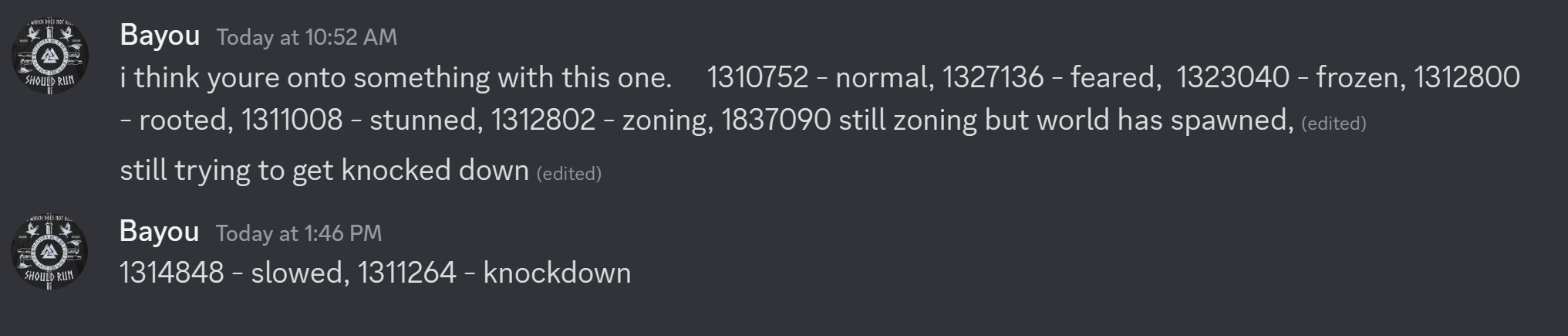
Along with this, Speeder will now display the stacks remaining in the console window whenever you receive a status effect or the stack number changes.
May 27, 2024
The Diablo IV Speeder has been updated to version 169.
The following console command has been added:
- -allloot — Displays data for all loot on the ground, including rarity, which is useful for script commands such as "cnl" (check nearby loot) and "tcl" (target closest loot).
The following script commands have been added:
- "tcl[distance],[rarity]" — Will target the closest loot object within "distance" so long as the rarity of the object is greater than or equal to "rarity." 0 is the lowest rarity and refers to grey/white loot, 1 refers to blue, 3 refers to yellow, and so on. Rarity numbers can be discerned with the -allloot console command. The "rarity" parameter can be omitted, in which case Speeder will target the closest loot object regardless of its rarity. This can be used to create a simple auto-loot macro:
- [113]
keys=tcl10,3|1|dbg % clicking on yellow rarity item or higher|s100|gt1
keys2=s10
repeat=0
interrupt=0 - Press F2, and Speeder will auto-target and click on all yellow rarity or higher loot objects within 10 distance.
- [113]
- "cnl[number],[distance],[rarity]" — If there are "number" of loot objects within "distance" whose rarity is greater than or equal to "rarity," the rest of the keys line will process. The inverse is possible with "!cnl." Rarity numbers can be discerned with the -allloot console command. 0 is the lowest rarity and refers to grey/white loot, 1 refers to blue, 3 refers to yellow, and so on. The "rarity" parameter can be omitted, in which case Speeder will check for any loot. Example:
- cnl1,20,1|dbg % blue rarity or higher loot within 20 distance!
- "tcm*[cursor distance],[mob type]" — This command is similar to "tcm," but instead of directly targeting the mob, the cursor is only moved toward it. This can be helpful for determining the direction of a nearby but offscreen elite mob. "Cursor distance" is how far away from the center of the window you'd like the cursor to move. A distance of around 3 should work fine. "Mob type" refers to the type of mob you are interested in locating, and you can include as many as you need by separating them with commas. Example:
- keys=tcm*3,1,2,3,4,5|dbg % moving cursor 3 distance toward any non-trash mob
May 24, 2024
The Diablo IV Speeder has been updated to version 168.
An issue where 200+ entities in memory could cause Speeder to fail to read an entity has been resolved.
May 19, 2024
The Diablo IV Speeder has been updated to version 165.
The "lt" (lock target) command will now work for any entity in the game.
Likewise, the -target command will now work for any entity in the game. As well, a new global variable TARGETMD will be populated, which contains your target's model ID.
May 18, 2024
The Diablo IV Speeder has been updated to version 164.
I added an HP check to ensure Speeder only considers entities with HP > 0 as potential targets.
The following lines have been added to config.txt:
- 34) A list of mob models you would like Speeder to ignore, separated by the "|" character. All models listed here will no longer be considered "mobs" and will be ignored by any command involving mobs, such as "tcm," "cnm," etc.
- 35) A list of object models you would like Speeder to ignore, separated by the "|" character. All models listed here will no longer be considered "objects" (or "loot") and will be ignored by any command involving objects or loot, such as "tcl," "cno," etc.
May 18, 2024
The Diablo IV Speeder has been updated to version 163.
It is now possible to utilize model IDs in macro/waymark commands. This allows you to target or check for specific mobs, objects, loot, minions, etc. The following macro/waymark commands have been added:
- "md[model ID]" — If you are targeting an entity whose model ID matches "model ID," the rest of the keys line will process. Model IDs can be discerned with -allentities, -target, and various console commands. This works for any entity type. The inverse is possible with "!md." Example:
- keys=md409830|1|dbg % clicking on gold
- "cnmd[*][number],[model ID],[distance]" — If there are "number" of entities with model IDs matching "model ID" within "distance" of your character, the rest of the keys line will process. The inverse is possible with "!cnmd." If you include an asterisk, the distance will be calculated from your cursor instead of your character. Multiple model IDs can be included so long as the first parameter is always "number" and the last is always "distance." Model IDs can be discerned with -allentities, -target, and various console commands. This command is quite powerful as it allows you to zero in on any entity in the game. Example:
- keys=cnmd3,439907,100|dbg % I have at least 3 skeleton warriors summoned
- "tcmd[distance],[model ID]" — Will target the closest entity with a model ID matching "model ID." You may include multiple model IDs by separating them with a comma. Model IDs can be discerned with -allentities, -target, and various console commands. This works for all entity types. Example:
- keys=!pot9|tcmd994703|1|dbg % clicking on potion because I have fewer than 9
I have updated loot detection to ignore potions by default since you can now use the new model commands to retrieve potions if needed.
Corpse detection will now use the model ID for corpses. I am not 100% sure this ID will work in all cases, however, so if it does not work, let me know and, if possible, provide the model ID for the corpse that isn't working so I can add it to the program.
May 11, 2024
The Diablo IV Speeder has been updated to version 161.
An issue where dead mobs were considered for the "tmp" (target mob pack) command has been fixed.
The following loot command has been added:
- "tcl*[distance]" — Same as "tcl" but ignores gold and potions.
May 3, 2024
The Diablo IV Speeder has been updated to version 159.
An issue where Speeder could move the mouse erroneously if there were no matching targets has been fixed.
April 15, 2024
The Diablo IV Speeder has been updated to version 158.
The following console command has been added:
- -reindex filename.ini — All waymark indices in "filename.ini" will be reordered in the order the waymarks physically appear in the file. The reindexed file will be called "Filename Reindexed.ini"; it will not overwrite your current file. This command is meant to be used with waymark files that have numbers for indices (i.e., waymark files meant for -twrepeat* and -tw*), but it is possible to use it with any waymark file.
- For example, let's say you have waymarks listed from [0] to [10] and you want to delete waymark [5]. Normally, you would have to renumber all the waymarks following [5]. However, if you use -reindex, all indices after 5 will be automatically decreased by 1. You can delete as many waymarks as you want as long as the remaining waymarks appear in the order you ultimately want them to activate.
- Conversely, if you wanted to add a new waymark [5], simply create a new waymark [5] before the old waymark [5] so that the old waymark comes after the new one. Use -reindex, and the old waymark [5] will become [6], and all subsequent waymarks will be increased by 1. Again, you can add as many waymarks as you want as long as the remaining waymarks appear in the order you ultimately want them to activate.
April 1, 2024
The Diablo IV Speeder has been updated to version 157.
I've improved the logic for detecting status effects applied to the player so that none should be missed.
The following macro/waymark command has been added to assist with inventory management:
- "ci[item ID]" — If you are targeting an item in your inventory, the rest of the keys line will process. "Item ID" is optional and allows you to specify a specific ID to look for. IDs can be discerned by placing your cursor over the inventory item and using the -target command. The game must be the active window, so you can either make a macro or use the following console command: -cmd s3000|cc % -target.
The following console command has been added:
- -cmd [macro/waymark commands] — Speeder will activate "macro/waymark commands" as if you had pressed a macro key with them present. This is a great way to test commands to make sure they are working correctly. You could also use this command to set variables manually. Example:
- -cmd store % testvar,1|eq % testvar,1|dbg % this message should appear in the console
March 13, 2024
The Diablo IV Speeder has been updated to version 156.
Addresses have been updated for the recent patch. A Speeder update to version 156 is required.
The following macro/waymark command has been added:
- "eva*" — If the Evasion ability is currently off-cooldown (i.e., ready to use), the rest of the keys line will process. The inverse is possible with "!eva*." Example:
- keys=cnm1,3|hp0.5|eva*|32|dbg % using Evasion because my HP is low
March 7, 2024
The Diablo IV Speeder has been updated to version 155.
The "-calibrate" command will now stop if the game loses focus. This allows you to cancel it simply by alt-tabbing.
I have changed the offset for reading the camera's coordinates. Let me know if this causes any issues for anyone.
March 5, 2024
The Diablo IV Speeder has been updated to version 154.
The -calibrate command will now take into account the ratio between the width and height of your resolution when determining the distance between each circle. Essentially, the cursor will travel farther the closer to 90 and 270 degrees you get, improving cursor accuracy along the X axis. In fact, -calibrate 5 50 8 seemed to perfectly target a mob even from a distance of 15. I recommend calibrating in a flat area in the game so that the translation from cursor coordinates to screen coordinates is as accurate as possible.
February 27, 2024
The Diablo IV Speeder has been updated to version 153.
The "chp" command will now always return false if you are not targeting a mob.
February 26, 2024
The Diablo IV Speeder has been updated to version 152.
The logic for determining the address for your own player should work better than before. This should mitigate issues with commands like cnm and improve the reading of potions, dodge charges, combo points, and some other things.
I have noticed that some buffs cause the offsets for potion count and dodge charges to stop working. However, if Speeder was running before the buff was used, the address will still work, so keep that in mind (i.e., relog if potions are not displaying correctly in the console and run Speeder before using any buffs).
February 25, 2024
The Diablo IV Speeder has been updated to version 151.
Upon loading, Speeder will retrieve the ID of your character and will use this ID to determine the entity that corresponds to your character until you exit out of Speeder. This will prevent situations where your character is not the first entity in the player array. Normally, it is, but I have a sense that this is not always the case. This should resolve issues related to reading player data, such as HP.
I have improved the logic for determining the address for potions. Some classes were not working correctly. You can always see your current potion count in Speeder's console window, so you will know whether it is working or not.
February 19, 2024
Addresses for reading item data have been fixed. As with hotbar slots, the addresses tend to stop working after 3 relogs, so if you do need to relog 3 times, just close and re-open the game.
February 2, 2024
The Diablo IV Speeder has been updated to version 150.
Addresses have been updated for the recent patch. A Speeder update to version 150 is required. You can find the latest version of Speeder by clicking the Download Files button in Launcher. Your Launcher must be version 27+ for this button to appear. I am currently uploading new Speeders for everyone as I write this, so if you do not yet have version 150, just wait a few minutes.
Sorry for the delay. A lot of the offsets changed, but I believe everything should be working.
January 24, 2024
The Diablo IV Speeder has been updated to version 148.
Addresses have been updated for the new season. Unlike normal address updates, this does require a Speeder update to version 148. I still need to do more work on the hotbar slots. The addresses don't seem to work well after logging out. However, I should be able to get this done later tonight. Camera hacks, entity data (mob/object location), and ESP are all working.
You can find the latest version of Speeder in your MEGA folder, which can be accessed by clicking the "MEGA Folder" button in Launcher.
December 15, 2023
The Diablo IV Speeder has been updated to version 146.
The following line has been added to config.txt:
- 33) A list of entity types that Speeder will highlight and enlarge in the game. This should correspond to the “type4” type when you use the -allentities command. Separate each entity type with the “|” character. For example, to highlight/enlarge most targetable “white” objects (i.e., objects that are normally highlighted in white), you would set this line to 269558331|8192.
December 10, 2023
The Diablo IV Speeder has been updated to version 145.
It is now possible to target only loot/gathering objects (instead of all objects). This allows for some new, useful macros, such as an auto-looter and a macro that points toward the nearest gathering point.
The following new macro/waymark commands have been added:
- “tcl[distance]” — Will target the closest loot object within “distance.” This can be used to create a simple auto-loot macro:
- [113]
keys=tcl10|1|s100|gt1
keys2=s10
repeat=0
interrupt=0 - Press F2, and Speeder will auto-target and click on all loot objects within 10 distance.
- [113]
- “tcg[distance]” — Will target the closest gathering object within “distance.” See “-closeo g” command to move the cursor in the direction of the nearest gathering object (even if it isn’t on the screen).
- “cnl[number],[distance]” — If there are “number” of loot objects within “distance, the rest of the keys line will process. Example:
- cnl1,20|dbg % loot nearby!
- “cng[number],[distance]” — If there are “number” of gathering objects within “distance, the rest of the keys line will process. Example:
- cng1,20|dbg % gather object nearby!
The following console command has been adjusted:
- -closeo [g or l]— Exactly the same as -closem but displays the closest object (chests, destructible objects, gathering points, loot, etc.). If “g” or “l” (lowercase L) is appended to the end of the command, Speeder will find the closest gathering object (if “g”) or the closest loot object (if “l”). The following variables are populated: COBJX, COBJY, COBJZ, COBJD (distance), COBJA (angle), COBJT (type), COBJS (status). Among other things, this command can be used to direct your character toward the nearest loot/gathering object:
- [113]
keys=cc % -closeo g|!eq % COBJD,9999|m*(VAR % COBJA),5
repeat=0 - Press F2, and if there is a gathering object in memory, Speeder will move your cursor in the direction of that object.
- [113]
November 28, 2023
The Diablo IV Speeder has been updated to version 143.
I've changed the code for reading status effects, which may work better than before.
November 27, 2023
The Diablo IV Speeder has been updated to version 142.
Speeder will now check to ensure potential targets have HP greater than 0.
November 20, 2023
The Diablo IV Speeder has been updated to version 141.
The following line has been added to config.txt:
- 32) A list of mob affixes that will indicate, to Speeder, which mobs Speeder should highlight in the game. Separate each affix with the “|” character.
November 19, 2023
The Diablo IV Speeder has been updated to version 140.
The following line has been added to config.txt:
- 31) A list of mob types that Speeder will highlight in the game. This is essentially an ESP function as it will allow you to see mobs through walls. Each mob type should be separated with the “|” character, such as 0|1|2|3|4|5.
The following new macro/waymark command has been added:
- “eva[evasion charge]” — If the number of evasion charges currently available is greater than or equal to “evasion charge,” the rest of the keys will process. The inverse is possible with “!eva.” Please note this command will not work if you only have a single evasion charge (i.e., if your boots do not provide additional charges). Example:
- keys=eva2|dbg % I have at least 2 evasion charges remaining
November 14, 2023
The Diablo IV Speeder has been updated to version 139.
The following macro/waymark command has been added:
- “bar[percentage]” — If you have a barrier active, and it has less than “percentage” remaining, the rest of the keys will process. “Percentage” should be written as a decimal, with 0.5 equal to 50%. The inverse is possible with “!bar.” Example:
- keys=!bar0.29|dbg % my barrier has at least 30% remaining
November 3, 2023
The Diablo IV Speeder has been updated to version 138.
It is now possible to increase the size of loot and gathering objects. This is done by altering three new lines added to config.txt:
- 28) If greater than 0, Speeder will display the number loot items within this distance. ~10 is about the distance of the screen. However, if you are using the zoom hack, you may want a longer distance. If line 30 is greater than 0, Speeder will also increase the size of any loot item within this distance.
- 29) If greater than 0, Speeder will display the number gathering objects within this distance. ~10 is about the distance of the screen. However, if you are using the zoom hack, you may want a longer distance. If line 30 is greater than 0, Speeder will also increase the size of any gathering objects within this distance.
- 30) If greater than 0, Speeder will increase the size of all loot and gathering objects within the distances set on lines 28 (loot) and 29 (gather objects). “1” is about a 100% increase, “2” 200%, and so on.
If a particular gather/loot object is not working, use -target on it and send me the "type."
November 1, 2023
The Diablo IV Speeder has been updated to version 137.
An issue where player coordinates were not being read correctly has been fixed.
October 29, 2023
The Diablo IV Speeder has been updated to version 136.
It is now possible to calibrate Speeder to the exact resolution and zoom distance you are using with a single command: -calibrate. This command will measure the distance between the center of the window and your character, as well as the angle and distance differences between your screen and the game. The command only needs to be used once as all data will be saved to a file, which will then be automatically loaded by Speeder. If you do change your resolution or zoom distance, you will need to re-calibrate.
The following console command has been added:
- -calibrate [precision] [distance] [circles] — Calibrates Speeder so that targeting commands (“tcm,” “tco,” “m*,” etc.) can accurately aim your cursor at the intended entity. It works by moving your cursor around in a circle and measuring the difference between screen distance and game distance. “Precision” is how many degrees between each measurement. I recommend 5-10. “Distance” is how far away from the center of the window you want each measurement to be. I recommend 50-100, but this will vary based on your resolution. “Circles” is how many circles you would like Speeder to measure. I recommend using the number of circles needed to reach near the edge of the game window without going over. You absolutely do not want to measure beyond the game window, or the calibration will not work. For example, if I use -calibrate 5 50 8, Speeder will move my cursor in 5 degree increments around the center of the game window. At each increment, Speeder will move the cursor 50 pixels toward the edge of the game window 8 times (because I have set 8 circles) for a total of 400 distance.
- I recommend starting with -calibrate 5 50 8. If the cursor moves too far (i.e., outside the game window), try -calibrate 5 25 8. If the cursor does not move near the edge of the game window, try -calibrate 5 75 8. Basically, you only need to adjust “distance,” although you have the option of making the targeting extremely precise if you want (i.e., using a precision under 5).
- Calibration can take 2-5 minutes depending on the settings you’ve chosen. Do not touch the mouse!
- This setting requires that line 27 in config.txt points to a file where your calibration data can be stored. Once you have calibrated successfully, you never need to do it again unless you change your camera distance or resolution.
- Calibration will not start until Diablo is the active window.
The following line has been added to config.txt:
- 27) The name of your calibration file to be used with the -calibrate console command. This can be anything you want.
Because the -calibrate command now handles distance calculation, lines 10 and 20 have been deprecated and are no longer necessary.
October 24, 2023
The Diablo IV Speeder has been updated to version 135.
The detection of status effects on enemy mobs has been improved. You should now see two values, status and status2, when using the -target command. Either can be used to detect various status effects. From what I have tested just today, you can use "2" for a vulnerable mob and "4" for a cursed mob.
October 21, 2023
The Diablo IV Speeder has been updated to version 132.
The -rescan command has been updated to work with Season 2. If you are experiencing "Address problem," type -rescan into Speeder, and Speeder should find the addresses for you.
October 21, 2023
The Diablo IV Speeder has been updated to version 131.
Added a check to ensure that the correct value is changed for the max zoom hack. This is mainly to prevent crashing.
The following new line has been added to config.txt:
- 26) Amount of fog to remove. 20 will basically remove all fog.
October 20, 2023
The Diablo IV Speeder has been updated to version 130.
The Max Zoom Hack should apply in all areas/situations. Let me know if it is not working somewhere.
October 20, 2023
The Diablo IV Speeder has been updated to version 129.
Mob detection should be back to normal, including detection of mob types (normal, elite, boss, etc.), skeletons, and corpses.
Object detection has been improved, specifically with regard to the "type" of object. Most objects that you can actually click on are "1," whereas potions are "4."
The -dump command can now dump specific entity IDs:
- -dump [filename] [data type] [entity type] — If "entity type" is not supplied, the currently targeted entity will have its data dumped to "filename." "Data type" can be "f," "i," or "b." If "i," the data will be outputted as integers; if "f," the data will be outputted as float values; if "b" the data will be outputted as bytes. "Entity type" can be "m" (closest mob), "o" (closest object), or the exact ID of the entity you want to dump. This allows you to help me out in trying to distinguish entities from one another. Usage example:
- -dump dump.txt i
- Currently targeted entity will be dumped to dump.txt. Data will be outputted as integers.
- -dump dump.txt f o
- Closest object will be dumped to dump.txt. Data will be outputted as floats.
- -dump dump.txt i
October 19, 2023
The Diablo IV Speeder has been updated to version 128.
The zoom hack will now work in all areas, and fog will be automatically removed.
October 18, 2023
The Diablo IV Speeder has been updated to version 127.
Sorry for the delay. A lot of the data for entities was changed, so it was a lot of work finding everything. You'll notice the numbers have changed for some of the data, such as mob type and player status, so you may need to adjust your macros.
I've added a really nice zoom hack to Speeder that does not modify the game client in any way (basically the same way the field of view hack works). Consequently, the following line has been added to config.txt:
- 25) Max zoom distance. 2 = 100% increase; 3 = 200% increase; and so on. Does not currently work in non-combat zones but should work everywhere else.
October 10, 2023
The Diablo IV Speeder has been updated to version 126.
I believe I've found a more reliable way to categorize entities as objects such that object targeting should now work much better. If there are still missing objects, please use the new -allentities command and send me the type1 and type2 numbers. The easiest way to use the command is to stand near the object and then use it. The entity with the shortest distance to your character is the one you want.
The following new macro/waymark command has been added:
- -allentities — Displays basic data for all entities in memory. The data for type1 and type2 are the most important to me as I use them to distinguish entities from one another. If you notice an entity that does not show up with -allmobs/-allobjects/-allplayers (when it should), please send me the type1 and type2 data, and I will fix it.
October 8, 2023
The Diablo IV Speeder has been updated to version 125.
Functions can now be defined in both your macro and your waymark files (files designed for -tw* and -twrepeat* only). Functions defined in your waymark file will work in your macro file and vice versa.
September 26, 2023
The Diablo IV Speeder has been updated to version 124.
An issue where adding a function to a macro file could prevent certain macros from being read correctly has been fixed.
September 22, 2023
The Diablo IV Speeder has been updated to version 122.
It is now possible to activate Windows' console commands from any macro/waymark. This is done via the new "cmd %" command:
- “cmd % [command line command]” — Speeder will activate “command line command” as if you had typed the command into the Windows console (i.e., cmd.exe). Example:
- [113]
keys=cmd % “C:\Program Files\VideoLAN\VLC\vlc” –qt-start-minimized –play-and-exit C:\soundfile.mp3
repeat=0
interrupt=0 - Press F2, and Speeder will play the sound file soundfile.mp3 in the background (i.e., Diablo will not lose focus). You must have VLC installed for this particular command to work.
- [113]
September 20, 2023
The Diablo IV Speeder has been updated to version 120.
The following new macro/waymark command has been added:
- “cnep[number],[distance]” & “cnep*[number],[distance]” — Exactly the same as all the “cnm” commands but checks enemy players instead of mobs.
September 18, 2023
The Diablo IV Speeder has been updated to version 119.
The "gt" command should now work correctly when used inside of a function called from a waymark.
September 8, 2023
The Diablo IV Speeder has been updated to version 115.
Target closest enemy player (tcp*) should now work correctly. Additionally, the -target console command should now display data for enemy players. Finally, the "cp" command (check player target) should now recognize both enemy and allied players. To check specifically for enemy players, you can use keys=cm|cp|dbg % targeting enemy player.
While I was fixing player targeting, I noticed some badly coded sections for "tcm," "tco," and "tcc" that would prevent Speeder from efficiently updating the coordinates for these entities. These have been fixed as well.
September 6, 2023
The Diablo IV Speeder has been updated to version 113.
The "tcp*" (target closest enemy player) should now correctly recognize when an enemy is targeted.
The "-target" console command should now output data related to enemy players.
The "-status" console command will now populate the global variable "STATUST," which contains the total number of active status effects.
September 3, 2023
The Diablo IV Speeder has been updated to version 112.
It is now possible to detect status effects that do not appear on the HUD, such as some forms of stun, frozen, fear, etc. These status effects will appear in the exact same manner as all other status effects and can be discerned with the "-status" command or just by looking at Speeder's log. A "normal" status has an ID of 1310752, so to check whether you are afflicted by some sort of movement debuff, you can do
keys=!sta1310752|dbg % bad things might be happening
The following new macro/waymark command has been added:
- “cnp[number],[distance]” & “cnp*[number],[distance]” — Exactly the same as all the “cnm” (check nearby mob) commands but checks players instead of mobs.
August 31, 2023
The Diablo IV Speeder has been updated to version 111.
It is now possible to call functions from within your macros or waymarks. This is mainly a QoL feature that alleviates the need to type the same code over and over again, although it can be particularly useful for waymarks because it allows you to have multiple "keys" commands for a single waymark.
Please see the new [Functions] section of the guide for more detail and usage examples.
August 25, 2023
The Diablo IV Speeder has been updated to version 110.
It is now possible to check the ID of your current attack with the "aid" command:
- “aid[attack ID]” — If the ID of your current attack is equal to “attack ID,” the rest of the keys line will process. IDs can be discerned with the -displayaid console command.
This can be used to create checks in macros so that if a specific attack is currently firing, other commands may or may not activate.
Although not possible currently, this data should theoretically be usable to create triggers to avoid mob attacks as well.
August 22, 2023
The Diablo IV Speeder has been updated to version 107.
I believe I have found a much better address for mob status effects. Status effects such as stun are now discernible.
August 18, 2023
The Diablo IV Speeder has been updated to version 106.
The following new console command has been added:
- -dumps [filename] — All currently active status effects (on you) will be dumped to "filename."
Some status effects have the same ID with slightly different effects. You can use this to distinguish them from each other.
August 14, 2023
The Diablo IV Speeder has been updated to version 105.
It is now possible to target and click on nearby loot. You can also distinguish between different objects (e.g., search for nearby health potions). The following new macro/waymark commands have been added:
- “cno[number],[distance]” & “cno*[number],[distance]” & “cno*[number],[distance],[x],[z]” — Exactly the same as all the “cnm” (check nearby mob) commands but checks objects instead of mobs.
- “cnot[number],[object type],[distance]” — Checks for nearby objects matching “object type” and within “distance.” If the number of matching objects is greater than or equal to “number,” the rest of the keys will process. Object types can be discerned with the -target, -closeo, or -allobjects commands. 1-3+ is a non-loot item; 4294967294 is a loot item; and 4294967293 is a health potion. Multiple types can be included by separating each with a comma. The first parameter should always be “number,” and the final should always be “distance.” Example:
- cnot1,4294967294,9|dbg % some loot nearby!
- “tco[distance],[type]” — Will target the closest object (gathering points, chests, destructible objects, loot, etc.) within “distance” that has a type of “type.” Multiple types can be used by separating them with a comma. Types can be discerned via the -target, -allobjects, or -closeo commands. 1-3+ is a non-loot object, like a gathering point, chest, door, destructible object, etc. 4294967294 is a generic loot item, and 4294967293 is a health potion. Example:
- keys=cnot1,4294967294,8|tco8,4294967294|1|s1000|dbg % clicking nearest loot|gt1
- The above example will repeat until no more loot is within 8 distance.
- “cot[type]” — If you are targeting an object, and the object is of type “type,” the rest of the keys will process. Types can be discerned with -target, -closeo, or -allobjects commands. 1-3+ is a non-loot object, and 4294967294 is a loot object.
The -dump command can now dump the nearest mob/object. This is helpful for objects like health potions, which cannot be targeted.
The new -dumpu command can be used to dump the entirety of mob/object/unknown1/unknown2 sections.
August 13, 2023
The Diablo IV Speeder has been updated to version 104.
It is now possible to check the status of a mob, including vulnerability, poisoned status, and probably many more. It does not work with all statuses, such as stun. I believe it only works with status effects that change the appearance of the mob.
The following macro/waymark command has been added:
- “cms[status]” — If you are targeting a mob and the mob’s status matches “status,” the rest of the keys will process. Use the -target console command to retrieve different statuses. Example:
- keys=cms15|dbg % mob is vulnerable!
-target, -allmobs, -allobjects, -allcorpses, -allplayers, etc. now have variables for STATUS and will display the status in the console window.
August 7, 2023
The Diablo IV Speeder has been updated to version 102.
If any hotbar slot's address is no longer valid, Speeder will automatically rescan for all hotbar slots.
August 4, 2023
The Diablo IV Speeder has been updated to version 100.
The "cmt" (check mob type) command can now contain multiple types, such as cmt1,2,3,4. If your current target matches any of the listed types, the rest of the keys will process.
August 2, 2023
The Diablo IV Speeder has been updated to version 99.
The following new command has been added:
- “tmp[distance from player],[distance from mob],[mob number],[target mob]” — Will target the mob pack with the greatest concentration of mobs within “distance from player.” “Mob number” is the minimum number of mobs to check for near each mob, and “distance from mob” is how far to check from each mob. “Target mob” should be 1 if you want Speeder to directly target the mob with the greatest number of nearby mobs or 0 if you want Speeder to target the center point among the greatest concentration of mobs. Usage example:
- keys=tmp9,3,5,0|dbg % targeting center point in a cluster of 5 mobs that are all within 3 distance of each other and no farther than 9 distance from player
August 1, 2023
The Diablo IV Speeder has been updated to version 98.
The following new console command has been added:
- -item — Information related to the currently selected item in the game will be displayed and stored in the following global variables: INAME (item name), ITYPE (item type), IDMG (item damage), IDMGD (item damage relative to your currently equipped weapon [negative or positive number]), IARM (item armor), IARMD (item armor relative to your currently equipped armor [negative or positive number]), IPOW (item power). Among other things, this command can be used to quickly iterate through your inventory to salvage items:
- [variables]
xinc=43
yinc=63
invstartx=1040
invstarty=608
[114]
keys=store % iter,0|store % invx,(VAR % invstartx)|store % invy,(VAR % invstarty)
keys2=m(VAR % invx),(VAR % invy)|s100|cc % -item|cmp(VAR % IPOW),200|!str % ITYPE,Gem|!eq % ,(VAR % INAME)|dbg % (VAR % INAME) is garbage!|32
keys3=!eq % iter,10|!eq % iter,20|gt5
keys4=add % invy,(VAR % yinc)|store % invx,(VAR % invstartx)|gt6
keys5=add % invx,(VAR % xinc)
keys6=add % iter,1|eq % iter,32|gt8
keys7=s10|gt2
keys8=s10|dbg % done!
repeat=0
interrupt=0 - Press F3, and any item below 200 item power will be marked for salvage (i.e., the spacebar will be pressed). Gems will be skipped. You will need to adjust the “xinc,” “yinc,” “invstartx,” and “invstarty” to match the location of your inventory slots. “xinc” should be the difference between horizontal slots, and “yinc” should be the difference between vertical slots. “invstartx” and “invstarty” should point to the upper-left slot of your inventory (i.e., the first slot).
- [variables]
The following waymark/macro command has been added:
- “str % [variable name],[text]” — If the string “text” is stored anywhere in the variable “variable name,” the rest of the keys will process. This is a way to check for partial text within a string rather than relying on an exact match. Usage example:
- keys=cc % -item|str % ITYPE,Gem|dbg % I am currently targeting a gem
Some additional tips for using the above commands. A blank inventory slot will have a blank name, so you can use "!eq % ,(VAR % INAME)" to check for this. The full name of an item includes the color code, which can be used to determine the rarity of the item. This can be done with the new "str %" command. The item type also includes the rarity. Speeder will not read the same inventory slot's data twice, so do not use -item twice on the same slot.
July 27, 2023
The Diablo IV Speeder has been updated to version 95.
The reading of entities (mobs, objects, players, etc.) is now handled in its own thread and cannot be bottlenecked by anything else in the program. In accordance with this change, the following line has been added to config.txt:
- 24) How often (in milliseconds) Speeder should read all entities in memory. The default is 100, which works well. If you need more precision, you can reduce this to a minimum of 10.
Two new areas of memory can now be dumped with the -dump command, and the -dump command has been improved so that it can dump all mob/object data (rather than just your current target).
- -dump [filename] [data type] [entity type] — If “entity type” is not supplied, the currently targeted entity will have its data dumped to “filename.” “Data type” can be “f” or “i.” If “i,” the data will be outputted as integers; if “f,” the data will be outputted as float values. “Entity type” can be “mo” (all mobs, objects, corpses), “pl” (all players), “u1” (unknown type 1), or “u2” (unknown type 2). If “entity type” is supplied, all entities matching this type will be dumped. This allows you to help me out in trying to distinguish entities from one another. Usage example:
- -dump dump.txt i
- Currently targeted entity will be dumped to dump.txt. Data will be outputted as integers.
- -dump dump.txt f u1
- All unknown type 1 entities will be dumped to dump.txt. Data will be outputted as floats.
- -dump dump.txt i
My sense is u1 or u2 is loot items, and the other may be NPCs or something like that.
July 24, 2023
The Diablo IV Speeder has been updated to version 93.
Macros set to automatically load via line 23 will now automatically reload when the macro file is altered.
July 22, 2023
The Diablo IV Speeder has been updated to version 92.
In my quest to find working imbuement offsets, I ended up finding all or most status effects, which is even better. As a result, I have removed the -imb and "imb" commands and replaced them with following:
- -status — The status effect IDs for any active status effects will be displayed. The global variable(s) “STATUS[#]” will be populated, with STATUS1 being the first status effect, STATUS2 being the second, and so on. This command can be used in conjunction with the “sta” macro/waymark command to check for specific status effects and react accordingly.
The following macro/waymark command has been added:
- “sta[status effect ID]” — If you are currently affected by any status effect matching “status effect ID,” the rest of the keys will process. The inverse is possible with “!sta.” Use the -status console command to retrieve status effect IDs. Usage example:
- keys=sta380288|dbg % shadow imbuement active!
keys2=!sta380288|dbg % shadow imbuement not active!
- keys=sta380288|dbg % shadow imbuement active!
I am not sure if this address also has debuffs, but it seems to have most—if not all—buffs, including buffs from skills that you can't even see on the UI.
Macros will now reload automatically when the file has been modified.
July 20, 2023
The Diablo IV Speeder has been updated to version 89.
The "imb" command for imbuements has been fixed, and you can now also specify the type of imbuement (if you want):
- “imb[type]” — If an imbuement is currently active, the rest of the keys will process. The inverse is possible with “!imb.” “Type” is optional and allows you to specify a specific imbuement to check for. Use the -imb console command to retrieve imbuement IDs.
- keys=!imb|51|dbg % using imbuement skill
Along with this, the -imb console command has been added:
- -imb — The ID for your current imbuement will be displayed, and the global variable IMB will be populated with this ID.
The address for HP should no longer act up while mounted.
July 19, 2023
The "cnmt" command can now include multiple mob types:
- “cnmt[number],[mob type],[distance]” — Very similar to the “cnm” command above but only counts mobs of “mob type.” Some mob types are listed here, and you can discern mob types yourself via the -target console command. You may include multiple mob types, such as “keys=cnmt1,4,5,3|dbg % there is an elite or boss nearby.” Please note that the first number is always the number of mobs to check for, and the last number is always distance.
- As with the other commands, “cnmt*” can be used to check mobs near the cursor.
It is now possible to have Speeder automatically load macros via line 23 in config.txt:
- 23) Macros you would like Speeder to automatically load (or reload). These should reference the “key” you would normally press to activate the macro, and each should be separated by the “|” character. For example, if I wanted to automatically activate my numpad4 and numpad5 macros, I would write 100|101 into this line. Please note that you can activate macros that are normally impossible to activate via keys. For example, you could have a macro assigned to key 999 and write 999 into this line. If you do this, you must use the -toggle console command to disable the macro (since you can’t press the key).
A new console command has been added:
- -toggle [key] — Mainly meant to be used when auto-loading macros via line 23 in config.txt, this will toggle the macro assigned to “key” off or on. For example, if I wanted to disable my macro assigned to numpad4, I would type -toggle 100.
A new logical "or" command has been added:
- “or % [command1]’|[command2]’|etc.” — This is your basic “or” statement, which will check “command1,” “command2,” and so on until one is true. As soon as one of the commands is true, the rest will not be checked. Each “command” should be separated by an escaped version of the normal delimiter: ‘|. Essentially, this allows you to perform multiple checks in a single keys line. Usage example:
- keys=or % cm’|co|1|dbg % left clicking object or mob
July 19, 2023
The Diablo IV Speeder has been updated to version 88.
Addresses have been updated for the season one patch. I am working on fixing some rogue commands, such as imbuement, and potion number (auto-potion is still working). Everything else should be working.
I have added some new commands I will go over in a new post.
July 17, 2023
The Diablo IV Speeder has been updated to version 84.
The following new commands have been added:
- “is[inner sight percent]” — If the inner sight gauge is greater than or equal to “inner sight percent,” the rest of the keys will process. The inverse is possible with “!is.” Usage example:
- keys=is1.0|dbg % gauge is full!
- “imb” — If an imbuement is currently active, the rest of the keys will process. The inverse is possible with “!imb.”
- keys=!imb|51|dbg % using imbuement skill
The "tcm" command can now contain multiple mob types:
- “tcm[distance],[mob type]” — Will target the closest mob within “distance” that has a type of “mob type.” Multiple mob types can be used by separating them with a comma. Mob types can be discerned with the -target console command. Some mob types are listed here. Usage example:
- keys=tcm9,4,5|dbg % auto-targeting boss or elite within 9 distance
July 16, 2023
The Diablo IV Speeder has been updated to version 82.
It is now possible to specify mob type for the "tcm" command:
- “tcm[distance],[mob type]” — Will target the closest mob within “distance” that has a type of “mob type.” Mob types can be discerned with the -target console command. Some mob types are listed here. Usage example:
- keys=tcm9,4|dbg % auto-targeting boss
July 12, 2023
The Diablo IV Speeder has been updated to version 80.
A lot of issues with addresses should now be resolved. In particular, addresses related to "cmb" command, "ch" command (and -slots and/or anything related to the hotbar), and "cnm*" (and associated) command should now work without needing to relog. If you start Speeder after playing for a bit, you may still need to relog initially, but after this, you should be all set.
Height will be taken into account when determining distance from mobs. However, it will only be taken into account if it is greater than the two-dimensional distance (i.e., flat distance) between your character and the mob. This is to avoid situations where you might be directly above a mob, which could incorrectly trigger commands like "cnm*."
The following new command has been added:
- “cnmt[number],[mob type],[distance]” — Very similar to the “cnm” command but only counts mobs of “mob type.” Some mob types are listed here, and you can discern mob types yourself via the -target console command.
- As with the other commands, “cnmt*” can be used to check mobs near the cursor.
July 8, 2023
The Diablo IV Speeder has been updated to version 75.
The following new command has been added:
- “skl[skeletons]” — If “skeletons” is less than or equal to the number of skeletons currently summoned, the rest of the keys will process. The inverse is possible with “!skl.” Usage example:
- keys=cc|skl7|cnm*1,3|50|dbg % corpse explosion
keys2=cc|!skl7|49|dbg % raise skeleton
- keys=cc|skl7|cnm*1,3|50|dbg % corpse explosion
Using "gp" should no longer be needed on Necromancer. All types of skeletons seem to be added to the same address, so to check for 4 warriors and 3 mages, you would use "skl7." You can basically replace any "gp" commands in your macros with skl[max number of skeletons here].
It is now possible to use "(VAR %)" inside of the "var %" command. For example:
- [variables]
iter=1
test1var=1|s1000|1
[113]
keys=var % test(VAR % iter)var
repeat=0
interrupt=0
In this example, pressing F2 will press left click twice (i.e., 1|s1000|1).
July 6, 2023
The Diablo IV Speeder has been updated to version 74.
The following macro/waymark command has been added:
- "cmb[combo points]" — If the number of combo points you currently have exceeds or is equal to "combo points," the rest of the keys will process. Usage example:
- keys=cm|cmb3|mp0.25|2|dbg % pressing right click with 3 combo points
The address for determining potion count has been improved.
July 4, 2023
The Diablo IV Speeder has been updated to version 73.
The following new commands have been added:
- “ce” — If you are targeting an elite, the rest of the keys will process. The inverse is possible with “!ce.”
- “cmt[type]” — If you are targeting a mob and the mob is of type “type,” the rest of the keys will process. The inverse is possible with “!cmt.” Mob types can be discerned via the -target, -closem, or -allmobs console commands.
The auto-potion feature in the config file has been improved to always use a potion if there is an address problem. Also, you can now force Speeder to always use a potion by adding a "|1" to the end of the line, such as 0.75|81|500|1.
The -dump command has been improved to read the entirety of the target's data. You can also now output the data as float values rather than just integers. This is done by appending "f" to the command, such as -dump filename.txt f.
July 3, 2023
The Diablo IV Speeder has been updated to version 69.
The accuracy of targeting commands has been improved.
The following new commands have been added:
- "cne[number],[distance]" & "cne*[number],[distance]" & "cne*[number],[distance],[x],[z]" — Exactly the same as all the "cnm" commands but checks for elite mobs instead of regular mobs.
The above command is an easier way of detecting nearby elite mobs and reacting appropriately.
July 1, 2023
The Diablo IV Speeder has been updated to version 65.
The "cmp" command will now convert numbers to decimals if either number contains a period. This allows for commands like cmp0,0.1|dbg % 0 is less than 0.1.
The value 688 has been added as an indicator for a hotbar slot being ready when using the "ch" command. Basically, this allows for abilities with buffs to work correctly.
I have added some additional security features to the program, which is why the file size has increased, and optimized the program some more.
June 30, 2023
The Diablo IV Speeder has been updated to version 63.
Again thanks to Trip, it is now possible to detect the type of mob being targeted or in memory. -allmobs will now include the global variable MOB[#]T, and -target will now include TARGETMT. The possible values discovered by Trip can be found here. Usage example:
- keys=store % iter,0|store % iter2,1|cc % -allmobs
keys2=cmp(VAR % iter),(VAR % MOBTOTAL)|eq % (VAR % MOB(VAR % iter2)T),4|dbg % omg it's a boss
keys3=add % iter,1|add % iter2,1
keys4=cmp(VAR % iter),(VAR % MOBTOTAL)|gt2
June 29, 2023
The Diablo IV Speeder has been updated to version 59.
I've located the issue affecting the slow-down of macros, and they are now faster than before. To test this, I implemented a new "time %" command to see exactly how many milliseconds it took for the macro to iterate once:
- [117]
keys=store % iter,0|store % iter2,1|cc % -allmobs|time % beginT
keys2=!cmp(VAR % iter),(VAR % MOBTOTAL)|gt5
keys3=!eq % MOB(VAR % iter2)A1,4294967295|dbg % (VAR % MOB(VAR % iter2)ID) with affix (VAR % MOB(VAR % iter2)A1) at (VAR % MOB(VAR % iter2)D)|gt5
keys4=add % iter,1|add % iter2,1|gt2
keys5=time % endT|dbg % (VAR % beginT) & (VAR % endT)|sub % endT,(VAR % beginT)|dbg % time: (VAR % endT)
repeat=0
interrupt=0
endkeys=dbg % elite search off
Basically, "time" stores the current time in the supplied variable, so you just use it twice, once at the beginning and once at the end, and then subtract them. The above macro outputs 0 delay for me. You may occasionally see a 15-16ms delay if the first "time" occurs right at the end of the current clock cycle, but that is essentially the same as 0 delay. To put it another way, "time" is accurate to within 15-16ms, so anything around that or below is fine.
June 28, 2023
The Diablo IV Speeder has been updated to version 58.
The offsets used for "ch" and "-slots" commands should work almost perfectly. There may be an issue with slot 5 in rare cases. Even so, the addresses for the slots are now found individually, so if there does happen to be a problem with a particular slot, it won't prevent the other slots from working.
I've made some changes to the program in an effort to fix crashing and improve efficiency.
EDIT: Forgot to mention: I added TARGETA1–A4 global variables to the -target command for retrieving the affixes of your current target.
June 26, 2023
The Diablo IV Speeder has been updated to version 55.
With thanks to Trip on Discord, it is now possible to detect elite mobs (and display their affixes if desired). This is accomplished by using the new global variables MOB[#]A1–A4 populated by the -allmobs command. Here is an example macro to detect any nearby elite mobs:
- [120]
keys=store % iter,0|store % iter2,1|cc % -allmobs
keys2=!cmp(VAR % iter),(VAR % MOBTOTAL)|gt5
keys3=!eq % MOB(VAR % iter2)A1,4294967295|dbg % elite nearby with affix (VAR % MOB(VAR % iter2)A1)|s2000|gt5
keys4=add % iter,1|add % iter2,1|gt2
keys5=s1000
repeat=2
interrupt=0
It is possible to display what the affix is by setting a global variable that utilizes the affix ID
[variables]
affix674104=Shadow Enchanted
Then, in your macro, you can refer to this affix with
dbg % elite has (VAR % affix(VAR % MOB(VAR % iter2)A1))
I have made some adjustments to alleviate crashing. If it still occurs, please try to narrow down what causes it for you. Thank you!
June 26, 2023
The Diablo IV Speeder has been updated to version 52.
The following new waymark/macro command has been added:
- “tcp*[distance]” — Will target the closest enemy player within “distance.” You must run your cursor over the enemy player at least once before this command will work.
This is temporary workaround until enemy players can be naturally distinguished from teammates.
It is now possible to sort mobs and players by their HP value. This is done via "lhp" for lowest HP and "hhp" for highest HP. Usage example:
- Display the HP for all mobs in memory from highest to lowest:
keys=store % iter,0|store % iter2,1|cc % -sort m hhp
keys2=cmp(VAR % iter),(VAR % MOBTOTAL)|dbg % mob(VAR % iter2): (VAR % MOB(VAR % iter2)HP)
keys3=add % iter,1|add % iter2,1
keys4=cmp(VAR % iter),(VAR % MOBTOTAL)|gt2
The above macro is also a good example of how you can quickly iterate through all entities.
I have added the following new command to assist me in discerning different types of mobs/players:
- -dump [filename] — The currently targeted entity will have its data dumped to “filename.” This allows you to help me out in trying to distinguish entities from one another. For example, you could use this on a few elites and send me the file, and I can try to find discrepancies between them and regular mobs. (If you’re feeling particularly enterprising/generous, you could dump some normal mobs and compare them yourself.)
June 25, 2023
The Diablo IV Speeder has been updated to version 47.
CPU usage has been drastically reduced.
Improved the "lt" (lock target) command so that it doesn't try to move cursor offscreen. The following template macro seems to work well for me:
- [98]
keys=!eq % lockon,true|cc % -target|store % lockon,true
keys2=eq % lockon,true|chp0.01,(VAR % TARGETID)|store % lockon,false
keys3=!eq % TARGETD,0|eq % lockon,true|lt(VAR % TARGETID)|!cm|!co|gt11
keys4=ct % presskey|cm|ch1|49|st % presskey,300|gt11
keys5=ct % presskey|cm|ch2|50|st % presskey,300|gt11
keys6=ct % presskey|cm|ch3|51|st % presskey,300|gt11
keys7=ct % presskey|cm|ch4|52|st % presskey,300|gt11
keys8=ct % presskey|cm|mp0.5|2|st % presskey,300|gt11
keys9=ct % presskey|cm|1|st % presskey,300|gt11
keys10=ct % presskey|co|1|st % presskey,300
keys11=s100
repeat=1
endkeys=store % lockon,false
Hold down NUMPAD2, and Speeder will lock to your current target. The lock will be removed if the target dies. At this point, if you target a new mob/player, Speeder will lock to that target.
-slots and "ch" should work better. Speeder will update the addresses for hotbar slots if it detects they are no longer working.
June 24, 2023
The Diablo IV Speeder has been updated to version 44.
The following new console commands have been added:
- -allplayers — Exactly the same as -allmobs but displays all players in memory. The following global variables are populated: PLA[#]X, PLA[#]Y, PLA[#]Z, PLA[#]D (distance), PLA[#]A (angle), and PLATOTAL. The first player is always your own character.
- -sort [type] [sort method] [distance] — Sorts mobs, objects, corpses, or players depending on “type.” Use “m” for mobs, “p” for players, “o” for objects, and “c” for corpses. Possible sort methods are “d” for distance and “nm” for number of nearby mobs. “Distance” is only used for “nm” sorting method and refers to how far you want to check for nearby mobs. Entities will be sorted via the same global variables used for -allmobs, -allcorpses, -allplayers, and -allobjects. For example, if you sort using distance, the entity closest to you will be at MOB1D, OBJ1D, PLA1D, or COR1D distance from you. Usage examples:
- keys=cc % -sort m nm 25|dbg % the mob with the most number of mobs near it is at (VAR % MOB1X), (VAR % MOB1Y), (VAR % MOB1Z)
- keys=cc % -sort p d|dbg % the player closest to me is (VAR % PLAD) distance away
The following new waymark/macro commands have been added:
- “tcp[distance]” — Will target the closest player within “distance.”
- “tcc[distancefromyou],[distancefromcorpse]” — Will target the closest corpse within “distancefromyou” with the highest number of mobs near it. Will only consider mobs that are within “distancefromcorpse” distance of the corpse.
- “caw” — If Diablo is the active window, the rest of the keys will process. The inverse is possible with “!caw.” This can be used to toggle macros off if Diablo loses focus:
- [97]
keys=!cm|!co|1d
keys2=s100|!caw|to
repeat=2
endkeys=1u|dbg % run off
- [97]
- “to” — The macro will be toggled off.
An issue where clicking on certain objects could trigger "cm" has been fixed.
June 23, 2023
The Diablo IV Speeder has been updated to version 41.
It is now possible to lock your cursor to your current target. This can be achieved via two new commands, one a console command, and the other a macro/waymark command:
- -target — Data related to your current target with be outputted to the Speeder console window. The following global variables will be populated: TARGETX, TARGETY, TARGETZ, TARGETD (distance from character to target), TARGETA (angle from character to target), TARGETT (type of target), and TARGETID (target’s unique ID). This can be used to create a lock-on macro so that you will never lose your target:
- [113]
keys=!eq % lockon,true|cc % -target|store % lockon,true
keys2=lt(VAR % TARGETID)
keys3=s100
repeat=1
interrupt=0
endkeys=store % lockon,false
While F2 is held down (and you are initially targeting something), the cursor will automatically follow your current target.
- [113]
- “lt[ID]” — Will lock the cursor to the mob/object with the ID “ID.” An entity’s ID can be retrieved with the -target console command:
An issue where using the goto command ("gt") in multiple macros at once could cause problems has been fixed.
New offsets have been added to determine the correct number of potions.
I have found the entity list for players and will be adding the ability to auto-target players soon.
June 21, 2023
The Diablo IV Speeder has been updated to version 38.
The following new corpse features have been added:
- -allcorpses — Exactly the same as -allmobs but displays all corpses in memory. The following global variables are populated: COR[#]X, COR[#]Y, COR[#]Z, COR[#]D (distance), COR[#]A (angle), and CORTOTAL.
- -closec — Exactly the same as -closem but displays the closest corpse. The following variables are populated: CCORX, CCORY, CCORZ, CCORD (distance), CCORA (angle).
- “cnc[number],[distance]” & “cnc*[number],[distance]” & “cnc*[number],[distance],[x],[z]” — Exactly the same as all the “cnm” (check nearby mobs) commands but checks for nearby corpses instead of mobs.
- “tcc[distance]” — Will target the closest corpse within “distance.”
Mob targeting has been improved such that when a mob's HP reaches 0, it will no longer be targeted.
The "chid" command has been improved, and it is now possible to use the (VAR %) command within another (VAR %) command:
- “chid[ability]” — Same as the above command but checks ALL slots for “ability.” If the ability is found, the rest of the keys will process. The global variable CHID will contain the slot the ability is assigned to. You can have Speeder automatically press the key for this slot by assigning your slot keys to global variables:
- [variables]
slot1key=49
slot2key=50
[118]
keys=chid1059157|(VAR % slot(VAR % CHID)key)
repeat=0
interrupt=0
This macro is a little complicated to understand, but basically if ability “1059157” is in slot 1, CHID will become 1, which then results in the variable “slot1key,” which has been assigned the key “49” in the [variables] section. If “1059157” were in slot 2, the variable would become “slot2key,” which has been assigned the key “50.”
- [variables]
June 20, 2023
The Diablo IV Speeder has been updated to version 36.
The -slots console command has been expanded to include the current cooldown values for each hotbar slot:
- -slots — The ability IDs for slot 1-6 in your hotbar will be displayed, as well as the current cooldown value. The first number displayed is the ability ID; the second number is the cooldown value. The following global variables are populated: SLOT[#]ID (ability ID for that slot), with “[#]” standing for the slot number, and SLOT[#]C (cooldown value for that slot). For example, SLOT1ID would be the ID of the ability in the first slot. Here is an example of how you can use this command to activate your cooldowns when they are ready:
- [115]
keys=cc % -slots
keys2=eq % SLOT1C,48|dbg % slot 1 is ready to be used!
keys3=eq % SLOT2C,48|dbg % slot 2 is ready to be used!
keys4=eq % SLOT3C,48|dbg % slot 3 is ready to be used!
keys5=eq % SLOT4C,48|dbg % slot 4 is ready to be used!
repeat=0
interrupt=0
Please note that “48” may not be the correct number (though it usually is). See Speeder’s console output to determine the correct number.
- [115]
As you can see, you can now use -slots in lieu of "ch" for checking cooldown timers (if you want).
"ch[slot]" has also been improved and should work in all situations now. Again, if it is still not working, you can use the -slots command in the manner above or check for pixels using "gp."
The "chid" command can now be used without inputting a slot number: chid[ability]. If you do this, Speeder will check all slots for "ability" and continue processing the keys if the ability is found.
June 20, 2023
The Diablo IV Speeder has been updated to version 35.
Speeder will now automatically calculate line 20 in config.txt for you if it is set to 0 (default). This is done by retrieving the resolution of the game window and multiplying it by a constant. If the resolution is incorrect for some reason, it can be manually inputted in line 22. At this point, you should not have to adjust any settings for "tcm," "tco," and "m*" commands to work.
The "m*" command now utilizes game distance instead of screen distance, which allows for cool macros like:
- [118]
keys=cc % -closem|m*(VAR % CMOBA),(VAR % CMOBD)
repeat=0
interrupt=0
Press F7 to target the closest mob in memory.
I didn't mention it before, but the scaling for the -gpc command is also calculated automatically now, so you do not need to adjust line 4. This is done automatically if line 4 is set to 1 (default) or 0.
June 20, 2023
The Diablo IV Speeder has been updated to version 34.
Two new commands in the "cnm" (check nearby mobs) family have been added:
- “cnm*[number],[distance]” — If “number” of mobs are within “distance” of your cursor’s location in the game world, the rest of the keys will process. Among other things, this can be used to activate corpse explosion only when a mob is near the corpse. Usage example:
- keys=cc|cnm*1,5|50
The “2” key will only be pressed if 1 mob is within 5 distance of the currently targeted corpse.
- keys=cc|cnm*1,5|50
- “cnm*[number],[distance],[x],[z]” — Exactly the same as “cnm*” above but distance is compared with x,z (“y” can be ignored) instead of your cursor’s current position in the game world.
The accuracy of targeting commands "tcm" and "tco" has been greatly improved. You still need to adjust line 20 to correctly convert game distance to cursor distance, but this can be done more easily now with the -mp command. The -mp command will display both screen distance and game distance. All you have to do is divide screen distance by game distance to get the multiplier you should use. I will work on making this automatic.
(As I'm writing this, I realize that I need to correct the "m*" command as well, which I will do ASAP.)
Line 22 has been added to config.txt. This should NOT need to be adjusted as I have set up Speeder to automatically calculate the resolution of your game window, but if, for some reason, Speeder calculates the resolution incorrectly, you can manually input it here. The resolution of the game window is needed to calculate cursor movement.
Global variables have been added to the -mp and -gpc commands. The global variable ZONING will be set to true while zoning.
The -calibrate command has been added to assist you in determining the best value to use for line 10 in config.txt:
- -calibrate — After using this command, make Diablo the active window. After three seconds, Speeder will move your cursor to the center of the window, taking into account line 10 in config.txt, and display the distance in the game world between where your cursor is and where your character is. Ideally, you want this distance to be as close to 0 as possible. Continue adjusting line 10 until the number is as low as possible.
June 19, 2023
The Diablo IV Speeder has been updated to version 32.
The "tcm" (target closest mob) has been fixed and will do a better job of targeting, especially at close range.
A new command has been added to move your cursor given a specific angle and distance:
- “m*[angle],[distance]” — Relative to the center of the window, the mouse cursor will be moved in the direction of “angle” and at a distance of “distance.” For example, to move to the cursor 100 pixels to the right, you would use m*90,100. “Angle” should be in degrees with 0 being north, 90 being east, 180 being south, and 270 being west. Usage example:
- [113]
keys=cc % -closem|m*(VAR % CMOBA),100
repeat=0
Press F2, and your cursor will be moved in the direction of the closest mob.
- [113]
New commands have been added for multiplying (mul % [variable],[value]) and dividing (div % [variable],[value]) variables. One important note for these commands is that including a period (.) will transform the global variable into a float data type instead of an integer. Floats are basically decimals and should be used for things like angles, coordinates, distances, etc. Integers are whole numbers only and do not contain decimals.
June 19, 2023
The Diablo IV Speeder has been updated to version 30.
It is now possible to insert dynamic values into any keys string in any location using the new (VAR % [variable]) command:
- “(VAR % [variable name])” — Everything in the parentheses will be replaced by the value stored in “variable name.” This command can be used anywhere in a keys command and is extremely versatile. See -allmobs, -cl, -slots console commands for examples of how to use this command. Concept example:
- keys=store % testvar1,-1
keys2=store % testvar2,0
keys3=cmp(VAR % testvar1),(VAR % testvar2)|dbg % testvar1 is less than testvar2
- keys=store % testvar1,-1
It is now possible to toggle Speeder's console output on/off with the -output command.
It is now possible to have Speeder output all mobs in memory, saving them into global variables that can then be used in macros/waymarks:
- -allmobs — Speeder will display all mobs in memory and populate the global variables MOB[#]X, MOB[#]Y, MOB[#]Z, MOB[#]D (distance), MOB[#]A (angle), and MOBTOTAL, with “[#]” standing for 1, 2, 3, etc. For example, the first mob in memory would have its location stored as MOB1X, MOB1Y, MOB1Z; its distance stored as MOB1D; and its angle (relative to your character) as MOB1A. Usage example:
- [120]
keys=cc % -allmobs|s100
keys2=dbg % there are (VAR % MOBTOTAL) mobs in memory
keys3=!cmp(VAR % MOBTOTAL),0|dbg % first mob’s distance is (VAR % MOB1D)
repeat=0
interrupt=0
- [120]
The same can be done with -allobjects for objects.
It is now possible to have Speeder output the closest mob to the console and save its data to global variables:
- -closem — Displays the mob closest to you and populates the following variables: CMOBX, CMOBY, CMOBZ, CMOBD (distance), CMOBA (angle). Usage example:
- [118]
keys=cc % -closem|s100
keys2=cmp(VAR % CMOBD),5|dbg % closest mob is within 5 distance
repeat=0
interrupt=0
- [118]
The same can be done with -closeo for objects.
It is now possible to retrieve the ability IDs currently assigned to the hotbar:
- -slots — The ability IDs for slot 1-6 in your hotbar will be displayed. The following global variables are populated: SLOT[#]ID, with “[#]” standing for the slot number. For example, SLOT1ID would be the ID of the ability in the first slot. Usage example:
- [115]
keys=cc % -slots|s10|dbg % my slot 1 ability: (VAR % SLOT1ID)
repeat=0
interrupt=0
Press F4 to activate.
- [115]
It is now possible to check for specific ability IDs and perform commands if they match:
- “chid[slot],[ability]” — If the ID of the ability in slot “slot” matches “ability,” the rest of the keys will process. Among other things, this can be used to quickly swap macro files depending on your equipped abilities. Use the -slots console command to retrieve ability IDs. Usage example:
- [117]
keys=chid5,309320|lnf % druid.ini
repeat=0
interrupt=0
Press F6 to activate.
- [117]
It is now possible to switch macro files with the "lnf % filename.ini" command (see above for example):
- “lnf % filename.ini” — Speeder will load “filename.ini” as your new macro file once all current macro threads have exited.
It is now possible to compare two values:
- “cmp[value1],[value2]” — If “value1” is less than “value2,” the rest of the keys will process. The opposite (i.e., greater than) is possible with “!cmp.” Among other things, this command is useful for checking distances and angles. Usage example:
- [118]
keys=cc % -closem
keys2=cmp(VAR % CMOBD),5|dbg % closest mob is within 5 distance
repeat=0
interrupt=0
Press F7 to activate.
- [118]
It is now possible to add/subtract variable values with "add % [variable],[value]" and "sub % [variable],[value]." The result of the operation is placed into "variable." For example, add % testvar,1 will add 1 to the value in testvar.
The -cl console command will now populate global variables:
- -cl — Speeder will display your current location in x, z. Will also add the displayed text to the clipboard for easy copy-and-paste. (You can ignore the y coordinate as your height is irrelevant for movement in Diablo.) If you are targeting an object or mob, Speeder will also display the distance to that target. The global variables PLAYERX, PLAYERY, PLAYERZ, and TARGETD will be updated to reflect the data outputted by -cl. Usage example:
- [119]
keys=cc % -cl|s100
keys2=dbg % my location is (VAR % PLAYERX), (VAR % PLAYERY), (VAR % PLAYERZ)
keys3=dbg % my current target is (VAR % TARGETD) distance away
repeat=0
interrupt=0
Press F8 to activate.
- [119]
June 18, 2023
The Diablo IV Speeder has been updated to version 29.
It is now possible to check for the number of nearby mobs using the new "cnm" command:
- “cnm[number],[distance]” — If “number” of mobs are within “distance” distance, the rest of the keys will process. This can be used to activate AoE abilities when you are surrounded by a specific number of enemies. Usage example:
- keys=cnm5,3|ch1|49|s300
The “1” key will only be pressed if there are 5 mobs within a distance of 3 and slot 1 is off-cooldown.
- keys=cnm5,3|ch1|49|s300
It is now possible to target the closest mob or object. I consider these commands to be in BETA as they not 100% accurate in terms of cursor placement right now.
- “tcm[distance]” — Will target the closest mob within “distance.” Use the -cl command (with something targeted) to get an idea of how far entities are in the game world. You must adjust line 20 in config.txt to correctly translate game distance to cursor distance. Line 20 set to 60 works pretty well at 4k resolution.
- “tco[distance]” — Will target the closest object (gathering points, chests, destructible objects, etc.) within “distance.” Use the -cl command (with something targeted) to get an idea of how far entities are in the game world. You must adjust line 20 in config.txt to correctly translate game distance to cursor distance. Line 20 set to 60 works pretty well at 4k resolution.
Is now possible to activate commands based on whether an ability is unable to be used (i.e., you are under a crowd-control effect):
- “ch*[slot]” — If the ability equipped to hotbar slot “slot” is unavailable to be used (e.g., you are afflicted by some debuff preventing usage), the rest of the keys will process. This can be used to automatically use recovery abilities. Usage example:
- keys=ch*1|49|dbg % using recovery ability
Speeder will only press the “1” key if slot 1 is unavailable to be used.
- keys=ch*1|49|dbg % using recovery ability
"ch5" and "ch6" for slots 5 and 6 should now work. Along with this, the "ch" commands should work better in general.
June 15, 2023
The Diablo IV Speeder has been updated to version 28.
The following command can be used in macros/waymarks:
"cp" — If you are not targeting a player, the rest of the keys will not process. The inverse is possible with "!cp." Please see the "cm" command for an example of how this command can be used.
This command works for targeting players in PvE content. You will need to use "cm" to target players in PvP content, though combining the two as "cm|cp|dbg % targeting enemy player" may work to distinguish enemy players from mobs in PvP.
June 13, 2023
The Diablo IV Speeder has been updated to version 26.
I believe I have found stable offsets for current potion quantity, so Speeder will no longer attempt to use potions if you do not have any left. I would recommend making a backup of your current version in case this does not work for you. I have also added a new "pot" command that could be useful for using potions depending on how many you have left:
- “pot[potion number]” — If you have “potion number” number of potions or greater, the rest of the keys will process. Among other things, this can be used to activate your first potion sooner so you do not waste potion drops:
- [113]
keys=hp0.8|pot4|81|s300
keys2=hp0.5|81|s300
keys3=s100
repeat=2
If you have 4 potions and your HP drops below 80%, Speeder will use a potion. Otherwise, Speeder will not use a potion unless your HP drops below 50%.
- [113]
I have reordered the priority for MP offsets, which may help if you are having issues with the "mp" command.
June 12, 2023
The Diablo IV Speeder has been updated to version 25.
Logic for finding correct MP address has been improved.
It is now possible to write your driver name on line 19 in config.txt to avoid having to type it in every time Speeder loads.
June 10, 2023
The Diablo IV Speeder has been updated to version 22.
It is now possible to have Speeder rescan for addresses. This will allow Speeder to work even after the game is updated. Major updates will still need to be updated manually (probably), but it should work fine with small updates. Rescanning is accomplished by typing -rescan into Speeder and pressing enter. You can also set line 18 in config.txt to 1. This will automatically scan for addresses when Speeder first loads. The scan should be very fast as it only needs to scan the executable and not the entirety of the game's memory.
The "ch" command (checking cooldowns) should now work correctly.
June 9, 2023
The Diablo IV Speeder has been updated to version 21.
Repeating macros will now persist after zoning (you will no longer need to press the key again).
You will now see your current HP in the Speeder window. I noticed that if you have max life buffs, the percentage changes. For example, if you have a 6% max life buff, your "full life" percent becomes 1.06 instead of 1.0.
June 8, 2023
The Diablo IV Speeder has been updated to version 20.
“kd[key]” — If “key” is currently pressed, the rest of the keys section will process. The inverse is possible with “!kd.” As always, “key” should be the virtual key code of the key. This command may be preferable to creating a multi-key macro. Please see the new Example_Macro_File.ini for an example of how you can use the command to emulate WASD movement in Diablo.
The "gt" command can now be used in macros to jump from one "keys" section to another. For example:
[87]
keys=eq % wkey,true|gt3
keys2=eq % move,true|gt7
keys3=store % move,true|store % wkey,true
keys4=!kd68|!kd65|c0|1d
keys5=kd68|c-0.78|1d
keys6=kd65|c0.78|1d
keys7=s10
repeat=1
endkeys=eq % wkey,true|1u|store % move,false|store % wkey,false
The above example will move you NW, N, and NE depending on whether you are pressing A+W, W, or W+D. Again, please see the new Example_Macro_File.ini for a more complete example.
I have improved mob detection to fix situations where highlighting item labels triggers "cm."
June 7, 2023
The Diablo IV Speeder has been updated to version 18.
The "ch" command for checking cooldowns should now work correctly. Here is a helpful Necromancer macro I made:
Alternate Necromancer Macro (F6) to explode corpses if all skeles are summoned.
Note that you must use the -gpc command to find the correct pixels for your monitor.
Be sure to adjust line 4 depending on the scaling you are using. 250% scaling = 2.5 on line 4.
[117]
keys=store % clickmob,false|store % clickobj,false|store % clicked,false|store % ability,false|store % skeleactive,false
keys2=cm|store % clickmob,true
keys3=co|store % clickobj,true
keys4=gp2792,1995,6189918,5|store % skeleactive,true
keys5=eq % clickmob,true|mp0.16|store % ability,true|2|s300
keys6=eq % clickmob,true|eq % ability,false|store % clicked,true|1|s300
keys7=eq % clickobj,true|eq % ability,false|eq % clicked,false|1|s100
keys8=eq % clicked,false|cc|eq % skeleactive,false|49|dbg % raising dead|s300
keys9=eq % clicked,false|cc|eq % skeleactive,true|50|dbg % corpse explosion|s300
keys10=s20
repeat=2
endkeys=dbg % AA off
June 6, 2023
The Diablo IV Speeder has been updated to version 17.
New macro/waymark command:
- "dt[distance]" — If the cursor's distance from the center of the active window is greater than "distance," the rest of the keys will not process. The inverse is possible with "!dt." This is meant to be used with abilities that target the area around your character. Usage example:
- keys=dt160|ch1|49|s300
The "1" key will only be pressed if hotbar slot 1 is active and you are currently targeting a nearby mob.
- keys=dt160|ch1|49|s300
To assist with the new command, the "-mp" console command will now display the distance of the cursor from the center of the active window. I recommend assigning this command to a key:
- [115]
keys=cc % -mp
repeat=0
Press F4 to activate.
A bug affecting the "cm" command has been fixed.
June 5, 2023
The Diablo IV Speeder has been updated to version 15.
New macro commands:
"ch[slot]" — If the ability equipped to hotbar slot "slot" is not ready, the rest of the keys will not process. The inverse is possible with "!ch." This command can be used to use your cooldowns as soon as they are ready. Usage example:
- [113]
keys=store % cooldownused,false
keys2=ch1|49|dbg % pressing slot 1|store % cooldownused,true
keys3=eq % cooldownused,false|ch2|50|dbg % pressing slot 2|store % cooldownused,true
keys4=eq % cooldownused,false|ch3|51|dbg % pressing slot 3|store % cooldownused,true
repeat=0
Press F2, and one of your cooldowns in slots 1-3 will be activated with a priority of 1, 2, 3.
A bug where targeting the item name of certain items (particularly gold) was triggering the "cm" command has been fixed.
June 5, 2023
The Diablo IV Speeder has been updated to version 14.
New macro commands:
- “mp[percentage]” — If your current MP (i.e., Spirit, Fury, etc.) is greater than “percentage,” the rest of the keys will process. The inverse is possible with “!mp.” Here is an example of how you can automate your right-click attack when your MP is greater than 50%:
- [113]
keys=store % attacked,false
keys2=cm|mp0.5|store % attacked,true|2|s300
keys3=eq % attacked,false|cm|1|s300
keys4=s20
repeat=2
- [113]
- “cc” — If you are not targeting a corpse, the rest of the keys will not process. The inverse is possible with “!cc.” This command is particular useful for Necromancer as you can automate corpse abilities:
- [113]
keys=cc|49|s333
keys2=s10
repeat=2
Press F2, and as soon as a corpse is targeted, Speeder will press the “1” key.
- [113]
June 4, 2023
The Diablo IV Speeder has been updated to version 13.
I've implemented a temporary measure to find the correct offsets for the Animation Delay Hack. It works well enough but still may fail after zoning a few times. Relogging should fix it.
Here are a couple of super lazy macros I made for myself:
[113]
keys=store % click,false
keys2=cm|store % click,true
keys3=co|store % click,true
keys4=eq % click,true|1|s300
keys5=s20
repeat=2
endkeys=dbg % AA off
[82]
keys=store % target,false
keys2=cm|store % target,true
keys3=co|store % target,true
keys4=eq % target,false|1d
keys5=s100
repeat=2
endkeys=1u|dbg % AR off
Press F2 for auto-click on all mobs/objects. R becomes your auto-run key, which will stop if you are targeting something and then resume afterward. Basically you can just run around without having to click on anything. I'm working on MP & cooldown detection for creating additional macro commands.
June 4, 2023
The Diablo IV Speeder has been updated to version 8.
I found offsets for the Animation Delay Hack that seem consistent. Tested after relogging & restarting PC. This means that Speeder no longer needs to scan the game and the hack will work immediately.
June 3, 2023
The Diablo IV Speeder has been updated to version 7.
Line 15 in config.txt can now be used to set your animation delay. A value of 0.6 seems to remove all delay. This does not allow you to auto-attack faster, despite how it looks, but it may be helpful with using cooldowns. The address for this setting is particularly hard to find, so Speeder will need to scan the game's memory. Speeder's scanning speed can be adjusted in line 14. See the guide for more details.
Line 13 can be used to remove all fog. It only works while stationary right now.
The new "sad[animation delay]" command can be used in macros to set different animation delays for different abilities.
The Diablo IV Speeder Guide has been expanded to include these new settings, as well as others that I forgot to add earlier.
June 2, 2023
The first version of the Diablo IV Speeder is now available. I will be posting a video shortly that has all the current features. As I mentioned, the game is mostly server-checked, so Speeder will function mostly as a botting/macro tool. That said, I am pretty happy with what can be done so far.